
AdminLTE 4 Migration Guide: Upgrading from v3 to v4
Introduction
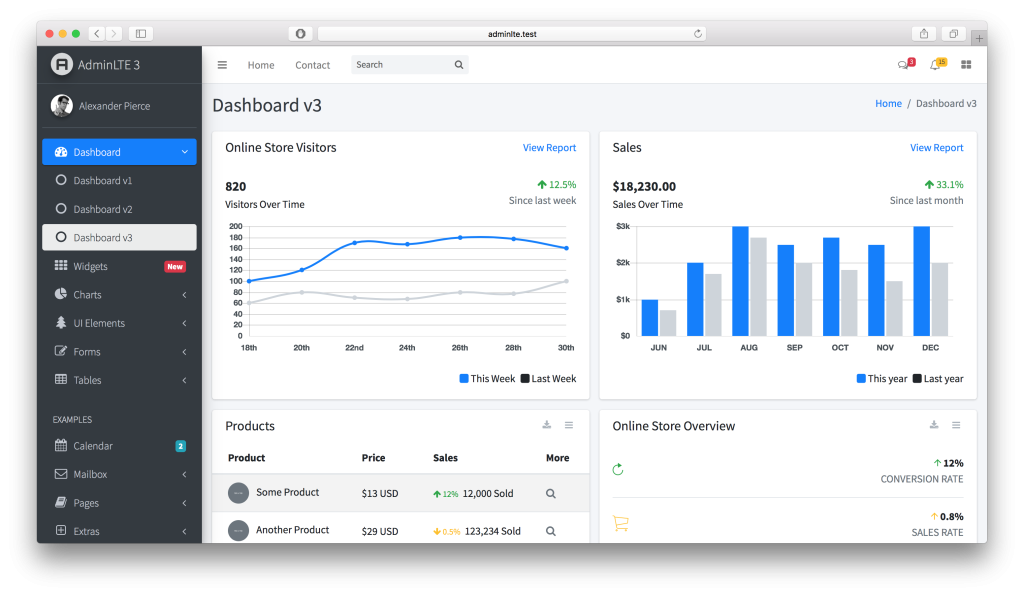
AdminLTE 4 has reached Release Candidate 7 as of March 2026, and it represents the most significant overhaul in the project’s history. Built on Bootstrap 5.3.8, written in TypeScript, and completely free of jQuery, v4 is a ground-up rewrite — not an incremental update you can ease into over a weekend.
The maintainers themselves have confirmed there is no gradual migration path. You cannot swap out the CSS file and call it done. The layout classes have changed, the data attributes are different, the plugin system has been rebuilt, and the JavaScript architecture has moved from jQuery plugins to native ES modules. If your admin panel runs on AdminLTE 3, upgrading means touching nearly every template file.
That said, the process is systematic. Once you understand what changed and in what order to tackle it, the migration becomes a series of well-defined search-and-replace operations followed by targeted refactoring. This AdminLTE 4 migration guide walks through the entire process step by step, from auditing your current setup to enabling the new dark mode system.
AdminLTE v3 to v4 is a full rewrite, not an incremental upgrade. The maintainers recommend starting fresh with v4 scaffolding rather than attempting an in-place migration.
What Changed in AdminLTE v4
Before diving into the migration steps, here is a high-level summary of what v4 brings to the table:
- Bootstrap 5.3.8 — The underlying CSS framework jumped from Bootstrap 4 to 5, which itself introduced breaking changes to utility classes, data attributes, JavaScript APIs, and dropped jQuery as a dependency.
- jQuery removed — AdminLTE 3 relied heavily on jQuery for its plugin system. In v4, all JavaScript is written in TypeScript and compiled to native ES modules. There is zero jQuery anywhere in the codebase.
- TypeScript source — The plugin system has been rewritten in TypeScript with proper type definitions, making it easier to extend and debug.
- Built-in dark mode — Leveraging Bootstrap 5.3’s
data-bs-themeattribute, AdminLTE 4 supports light, dark, and auto (system-preference) themes out of the box. - RTL support — Right-to-left layouts now work natively through Bootstrap 5’s logical properties.
- Accessibility module — A new built-in module adds font size controls and a high-contrast toggle for end users.
- Simplified plugin architecture — Several plugins were removed in favor of native Bootstrap 5 components. The remaining plugins use a consistent initialization pattern with
data-lte-*attributes. - New layout class naming — Every major layout element has been renamed from
.main-*to.app-*, reflecting a cleaner component-based naming convention.
Before You Start
Rushing into a find-and-replace across your templates is a recipe for a broken dashboard. Take these preparatory steps first.
Before writing any code, review your project for the following:
- Which AdminLTE JavaScript plugins you currently use (see removed/kept lists below)
- Any custom SCSS variable overrides referencing AdminLTE 3 variable names
- All
data-widgetanddata-toggleattributes across every template and partial - Third-party jQuery plugins (DataTables, Select2, daterangepicker, etc.)
- Custom JavaScript that depends on jQuery syntax or AdminLTE 3’s jQuery plugin API
- Layout templates using
.main-*class names,.wrapper, orelevation-*utilities
Back Up Your Project
This should go without saying, but create a full backup or work on a dedicated Git branch. The migration will touch layout files, stylesheets, JavaScript, and potentially your build configuration. You want a clean rollback point.
Audit Your Plugin Usage
AdminLTE 3 shipped with a dozen JavaScript plugins. Several have been removed in v4 because Bootstrap 5 now handles the same functionality natively, or because the feature was rarely used. Before you start migrating, inventory which plugins your project actually uses.
Removed Plugins
The following AdminLTE plugins no longer exist in v4. If your project uses any of them, you will need to replace them with Bootstrap 5 equivalents or third-party libraries:
- CardRefresh — Removed. Implement with a custom fetch call and a loading spinner if needed.
- ControlSidebar — Removed. Use Bootstrap 5’s native Offcanvas component instead.
- Dropdown — Removed. Bootstrap 5 Dropdowns handle this natively.
- ExpandableTable — Removed entirely.
- IFrame — The tabbed iframe layout mode has been removed.
- NavbarSearch — Removed. Build a custom search component.
- SidebarSearch — Removed. Build a custom search component.
- Toasts — Removed. Use Bootstrap 5’s native Toast component.
- TodoList — Removed entirely.
Kept Plugins
These plugins have been rewritten in TypeScript but retain similar functionality:
- Layout — Handles the fixed navbar, fixed sidebar, and fixed footer behavior.
- PushMenu — Controls sidebar open/close toggling.
- Treeview — Manages expandable sidebar menu items.
- CardWidget — Collapse and maximize cards.
- DirectChat — Toggle the contacts pane in the chat widget.
- FullScreen — Toggle fullscreen mode for the browser window.
New: Accessibility Module
AdminLTE 4 introduces a built-in accessibility module that gives end users controls for font size adjustment and a high-contrast toggle. If your project has custom accessibility features, you may be able to replace them with this module.
Step 1 — Update the HTML Layout Structure
The most visible change in AdminLTE 4 is the complete renaming of layout classes. Every major structural element has moved from the .main-* convention to .app-*. This is not optional — the new CSS will not style anything using the old class names.
Class Name Mapping
| AdminLTE 3 Class | AdminLTE 4 Class | Notes |
|---|---|---|
.wrapper | .app-wrapper | Outermost container |
.main-header | .app-header | Top navbar |
.main-sidebar | .app-sidebar | Sidebar container |
.sidebar | .sidebar-wrapper | Inner sidebar scroll area |
.brand-link | .sidebar-brand | Logo/brand area in sidebar |
.nav-sidebar | .sidebar-menu | Sidebar navigation list |
.content-wrapper | .app-main | Requires inner .app-content div |
.main-footer | .app-footer | Footer bar |
AdminLTE 3 Layout (Before)
<body class="hold-transition sidebar-mini">
  <div class="wrapper">

    <!-- Navbar -->
    <nav class="main-header navbar navbar-expand navbar-white navbar-light">
      <ul class="navbar-nav">
        <li class="nav-item">
          <a class="nav-link" data-widget="pushmenu" href="#">
            <i class="fas fa-bars"></i>
          </a>
        </li>
      </ul>
    </nav>

    <!-- Sidebar -->
    <aside class="main-sidebar sidebar-dark-primary elevation-4">
      <a href="/" class="brand-link">
        <span class="brand-text font-weight-light">AdminLTE 3</span>
      </a>
      <div class="sidebar">
        <nav class="mt-2">
          <ul class="nav nav-pills nav-sidebar flex-column" data-widget="treeview">
            <li class="nav-item">
              <a href="/dashboard" class="nav-link active">
                <i class="nav-icon fas fa-tachometer-alt"></i>
                <p>Dashboard</p>
              </a>
            </li>
          </ul>
        </nav>
      </div>
    </aside>

    <!-- Content -->
    <div class="content-wrapper">
      <div class="content-header">
        <div class="container-fluid">
          <h1 class="m-0">Dashboard</h1>
        </div>
      </div>
      <section class="content">
        <div class="container-fluid">
          <!-- Page content here -->
        </div>
      </section>
    </div>

    <footer class="main-footer">
      <strong>AdminLTE 3</strong>
    </footer>

  </div>
</body>
AdminLTE 4 Layout (After)
<body class="layout-fixed sidebar-expand-lg">
  <div class="app-wrapper">

    <!-- Navbar -->
    <nav class="app-header navbar navbar-expand-lg navbar-light">
      <div class="container-fluid">
        <ul class="navbar-nav">
          <li class="nav-item">
            <a class="nav-link" data-lte-toggle="sidebar" href="#" role="button">
              <i class="bi bi-list"></i>
            </a>
          </li>
        </ul>
      </div>
    </nav>

    <!-- Sidebar -->
    <aside class="app-sidebar bg-body-secondary shadow" data-bs-theme="dark">
      <div class="sidebar-brand">
        <a href="/" class="brand-link">
          <span class="brand-text fw-light">AdminLTE 4</span>
        </a>
      </div>
      <div class="sidebar-wrapper">
        <nav class="mt-2">
          <ul class="sidebar-menu" data-lte-toggle="treeview" role="menu">
            <li class="nav-item">
              <a href="/dashboard" class="nav-link active">
                <i class="nav-icon bi bi-speedometer"></i>
                <p>Dashboard</p>
              </a>
            </li>
          </ul>
        </nav>
      </div>
    </aside>

    <!-- Content -->
    <main class="app-main">
      <div class="app-content-header">
        <div class="container-fluid">
          <h3 class="mb-0">Dashboard</h3>
        </div>
      </div>
      <div class="app-content">
        <div class="container-fluid">
          <!-- Page content here -->
        </div>
      </div>
    </main>

    <footer class="app-footer">
      <strong>AdminLTE 4</strong>
    </footer>

  </div>
</body>
Notice several additional changes beyond class names: the content wrapper is now a <main> element with a separate .app-content inner div, the sidebar brand is wrapped in its own .sidebar-brand div, font-weight-light has become the Bootstrap 5 utility fw-light, and elevation-4 has been replaced with the standard Bootstrap shadow class.
Step 2 — Fix Bootstrap 5 Classes
Since AdminLTE 4 is built on Bootstrap 5, every Bootstrap 4 class and attribute in your templates needs updating. This is the most tedious part of the migration but also the most mechanical — it is almost entirely search-and-replace.
Data Attribute Changes
| Bootstrap 4 | Bootstrap 5 |
|---|---|
data-toggle | data-bs-toggle |
data-target | data-bs-target |
data-dismiss | data-bs-dismiss |
data-ride | data-bs-ride |
data-slide | data-bs-slide |
data-slide-to | data-bs-slide-to |
data-parent | data-bs-parent |
data-content | data-bs-content |
Utility Class Changes
| Bootstrap 4 | Bootstrap 5 | Notes |
|---|---|---|
ml-* | ms-* | Margin-left → margin-start |
mr-* | me-* | Margin-right → margin-end |
pl-* | ps-* | Padding-left → padding-start |
pr-* | pe-* | Padding-right → padding-end |
float-left | float-start | |
float-right | float-end | |
text-left | text-start | |
text-right | text-end | |
font-weight-bold | fw-bold | |
font-weight-light | fw-light | |
font-italic | fst-italic |
Component Class Changes
| Bootstrap 4 | Bootstrap 5 | Notes |
|---|---|---|
.form-group | Removed | Use mb-3 on wrapper divs instead |
.form-row | Removed | Use .row .g-3 instead |
.form-inline | Removed | Use grid or flex utilities |
.badge-primary | .bg-primary .rounded-pill | Badges no longer have contextual classes |
.badge-danger | .bg-danger .rounded-pill | Same pattern for all colors |
.close | .btn-close | No more × entity needed |
.sr-only | .visually-hidden | |
.media | Removed | Use .d-flex with utility classes |
.no-gutters | .g-0 | |
.custom-control | .form-check | Custom checkboxes/radios merged into standard forms |
.custom-select | .form-select | |
.input-group-append | Removed | Place buttons/spans directly in .input-group |
Step 3 — Update AdminLTE Data Attributes
Beyond the Bootstrap data attribute prefix change, AdminLTE 4 has its own set of attribute renames. The old data-widget pattern has been replaced with data-lte-toggle.
| AdminLTE 3 | AdminLTE 4 |
|---|---|
data-widget="pushmenu" | data-lte-toggle="sidebar" |
data-widget="treeview" | data-lte-toggle="treeview" |
data-widget="card-widget" | data-lte-toggle="card-widget" |
data-widget="fullscreen" | data-lte-toggle="fullscreen" |
data-widget="chat-pane-toggle" | data-lte-toggle="chat-pane" |
Sidebar Dark Theme
In AdminLTE 3, you controlled the sidebar color scheme with utility classes like sidebar-dark-primary or sidebar-light-primary. In v4, dark mode is handled through Bootstrap 5.3’s theme system:
<!-- AdminLTE 3 -->
<aside class="main-sidebar sidebar-dark-primary elevation-4">

<!-- AdminLTE 4 -->
<aside class="app-sidebar bg-body-secondary shadow" data-bs-theme="dark">
The data-bs-theme="dark" attribute tells Bootstrap to apply dark color tokens to the sidebar and all its children. This is more powerful than the old approach because it inherits properly — dropdowns, badges, and text inside the sidebar will all pick up the dark theme automatically.
Step 4 — Remove jQuery
AdminLTE 3 required jQuery, and many developers wrote custom dashboard logic using jQuery syntax. AdminLTE 4 does not include or depend on jQuery at all. If your project has custom JavaScript, you need to convert it to vanilla JS or keep jQuery as a separate dependency (not recommended for new projects).
Remove the Script Tag
Find and remove the jQuery script inclusion from your layout. In AdminLTE 3 this was typically:
<!-- Remove this -->
<script src="plugins/jquery/jquery.min.js"></script>
Replace Document Ready
// AdminLTE 3 (jQuery)
$(document).ready(function() {
  initDashboard();
});

// AdminLTE 4 (Vanilla JS)
document.addEventListener('DOMContentLoaded', function() {
  initDashboard();
});
If your scripts are loaded at the bottom of the body (which they should be), you can often skip the ready wrapper entirely and call your initialization functions directly.
Replace Modal Calls
// AdminLTE 3 (jQuery)
$('#myModal').modal('show');
$('#myModal').modal('hide');

// AdminLTE 4 (Bootstrap 5 native)
const myModal = new bootstrap.Modal(document.getElementById('myModal'));
myModal.show();
myModal.hide();

// Or for an already-initialized modal:
const existingModal = bootstrap.Modal.getInstance(document.getElementById('myModal'));
existingModal.hide();
Replace AJAX Calls
// AdminLTE 3 (jQuery)
$.ajax({
  url: '/api/stats',
  method: 'GET',
  dataType: 'json',
  success: function(data) {
    updateChart(data);
  },
  error: function(xhr, status, error) {
    console.error('Failed to load stats:', error);
  }
});

// AdminLTE 4 (Fetch API)
fetch('/api/stats')
  .then(response => {
    if (!response.ok) throw new Error('Failed to load stats');
    return response.json();
  })
  .then(data => updateChart(data))
  .catch(error => console.error(error));
Replace DOM Manipulation
// AdminLTE 3 (jQuery)
$('.info-box').addClass('bg-info');
$('.sidebar-toggle').on('click', function() {
  $('body').toggleClass('sidebar-collapse');
});
const userName = $('#user-name').text();

// AdminLTE 4 (Vanilla JS)
document.querySelectorAll('.info-box').forEach(el => el.classList.add('bg-info'));
document.querySelector('.sidebar-toggle')?.addEventListener('click', function() {
  document.body.classList.toggle('sidebar-collapse');
});
const userName = document.getElementById('user-name')?.textContent;
If your project has extensive jQuery usage, consider migrating incrementally: keep jQuery temporarily while you convert file by file, then remove it once everything is ported. Just be aware that AdminLTE 4’s own JavaScript will not interact with jQuery in any way.
Step 5 — Update SCSS Variables
If you compiled AdminLTE’s SCSS with custom variable overrides, the variable naming convention has changed entirely. All AdminLTE-specific variables now use a $lte- prefix to avoid collisions with Bootstrap’s own variables.
Key Variable Renames
| AdminLTE 3 | AdminLTE 4 |
|---|---|
$sidebar-width | $lte-sidebar-width |
$sidebar-padding-x | $lte-sidebar-padding-x |
$sidebar-padding-y | $lte-sidebar-padding-y |
$sidebar-custom-height | $lte-sidebar-height |
$main-header-height | $lte-header-height |
$main-footer-height | $lte-footer-height |
$nav-link-padding | $lte-sidebar-menu-link-padding |
Removed SCSS Partials
If you imported specific AdminLTE partials in your custom SCSS, check whether they still exist. The following partials have been removed in v4:
_brand.scss_elevation.scss— Bootstrap 5shadow-*utilities replace this_control-sidebar.scss— Use Bootstrap Offcanvas_preloader.scss_social-widgets.scss_users-list.scss_text.scss_animation-effects.scss_colors.scss_close.scss_forms.scss_modals.scss_navs.scss_carousel.scss- The entire
plugins/directory
New SCSS Partials
These partials have been added in v4:
_accessibility.scss— Styles for the accessibility module_compact-mode.scss— Compact sidebar layout variant_variables-dark.scss— Dark mode variable overrides_app-wrapper.scss— Replaces the old wrapper styles_app-main.scss— Main content area styles_app-content.scss— Content container styles_app-header.scss— Header/navbar styles_app-sidebar.scss— Sidebar styles_app-footer.scss— Footer styles
If you have a custom SCSS build, update your import statements to reference the new filenames. The safest approach is to import AdminLTE’s main entry point and then add your overrides, rather than cherry-picking individual partials.
Step 6 — Enable Dark Mode
One of the most requested features in AdminLTE 4 is built-in dark mode. Thanks to Bootstrap 5.3’s color mode system, this is straightforward to implement.
Manual Toggle
Set the theme on the <html> element:
<!-- Light mode (default) -->
<html lang="en" data-bs-theme="light">

<!-- Dark mode -->
<html lang="en" data-bs-theme="dark">
Auto-Detection with User Override
This pattern detects the user’s system preference and allows them to override it. It stores the preference in localStorage:
function initThemeToggle() {
  const themeToggle = document.getElementById('theme-toggle');
  if (!themeToggle) return;

  // Check for saved preference, fall back to system preference
  const savedTheme = localStorage.getItem('theme');
  const systemPrefersDark = window.matchMedia('(prefers-color-scheme: dark)').matches;
  const currentTheme = savedTheme || (systemPrefersDark ? 'dark' : 'light');

  document.documentElement.setAttribute('data-bs-theme', currentTheme);

  themeToggle.addEventListener('click', function() {
    const newTheme = document.documentElement.getAttribute('data-bs-theme') === 'dark'
      ? 'light'
      : 'dark';
    document.documentElement.setAttribute('data-bs-theme', newTheme);
    localStorage.setItem('theme', newTheme);
  });

  // Listen for system preference changes
  window.matchMedia('(prefers-color-scheme: dark)').addEventListener('change', function(e) {
    if (!localStorage.getItem('theme')) {
      document.documentElement.setAttribute('data-bs-theme', e.matches ? 'dark' : 'light');
    }
  });
}

initThemeToggle();
You can then add a simple toggle button in your navbar:
<li class="nav-item">
  <a class="nav-link" id="theme-toggle" href="#" role="button">
    <i class="bi bi-moon-stars-fill"></i>
  </a>
</li>
Because the dark mode is applied at the CSS custom property level, every Bootstrap component and AdminLTE element adapts automatically. You do not need separate dark stylesheets.
Common Pitfalls
After migrating dozens of AdminLTE dashboards, these are the issues that catch people most often:
.app-content wrapper. In v3, .content-wrapper was a single element. In v4, .app-main requires an inner .app-content div. Without it, padding and layout calculations break silently — the page looks almost right but spacing is off. Always verify this wrapper is present in every page template.
- Missing
.app-contentwrapper. In v3,.content-wrapperwas a single element. In v4,.app-mainrequires an inner.app-contentdiv. Without it, padding and layout calculations break silently — the page looks almost right but spacing is off. - Old
data-widgetattributes left behind. If you search-and-replacedata-toggletodata-bs-togglebut forget the AdminLTE-specificdata-widgetattributes, the sidebar toggle and treeview menus will stop working with no console errors. AdminLTE 4 simply does not look fordata-widgetat all. - Font Awesome vs. Bootstrap Icons. AdminLTE 3 examples used Font Awesome. AdminLTE 4 examples use Bootstrap Icons (
bi bi-*). The framework does not require either — use whichever icon library you prefer. Just be aware that copy-pasting from v4 examples will include Bootstrap Icons classes. - The
elevation-*classes are gone. AdminLTE 3 had custom elevation utility classes (elevation-1throughelevation-5) for box shadows. These do not exist in v4. Use Bootstrap 5’sshadow-sm,shadow, andshadow-lginstead. - jQuery plugins for datatables, date pickers, and charts. If you used AdminLTE 3’s bundled jQuery plugins (DataTables, Select2, daterangepicker, etc.), you need to source and configure these independently in v4. AdminLTE 4 does not bundle third-party jQuery plugins. Look for vanilla JS alternatives or include jQuery as a separate dependency for those specific plugins.
- The
sidebar-collapsebody class still works but behaves differently. In v4, the PushMenu plugin manages sidebar state. If you have custom JavaScript that togglessidebar-collapsedirectly on the body, it may conflict with the new plugin. Use thedata-lte-toggle="sidebar"trigger instead. - CSS specificity conflicts with custom themes. If you built a custom color theme by overriding AdminLTE 3’s SCSS variables, the old variable names will be silently ignored in v4. Your compiled CSS will fall back to defaults, and the dashboard will look like stock AdminLTE 4. Rename your variable overrides to use the
$lte-prefix. - Missing container-fluid in the navbar. AdminLTE 4’s header expects a
.container-fluidwrapper inside.app-header. The v3 layout did not always require this. Without it, navbar items may not align correctly.
Conclusion
Migrating from AdminLTE 3 to AdminLTE 4 is not a quick find-and-replace job, but it is a structured one. The key steps are: update layout classes from .main-* to .app-*, fix all Bootstrap 4-to-5 class and attribute changes, replace data-widget with data-lte-toggle, remove jQuery from your custom code, update SCSS variable names to use the $lte- prefix, and enable the new dark mode system.
The payoff is significant. AdminLTE 4 is lighter, faster, and more accessible than its predecessor. The dark mode support alone eliminates a common feature request, and the TypeScript foundation makes the codebase easier to maintain and extend.
For the complete source code and documentation, visit the AdminLTE GitHub repository. The official AdminLTE 4 documentation covers every component and plugin in detail. If you are starting a brand-new project rather than migrating, consider using the v4 starter template directly — it will save you from having to unlearn the v3 patterns covered in this guide.
Looking for a production-ready admin dashboard built on AdminLTE 4? Check out our premium templates that come pre-configured with dark mode, advanced charts, and role-based access control out of the box.
You Might Also Like

Comments (No Comments)