
AdminLTE 4 Data Tables: Tabulator, DataTables 3 Without jQuery, and Plain Bootstrap Tables

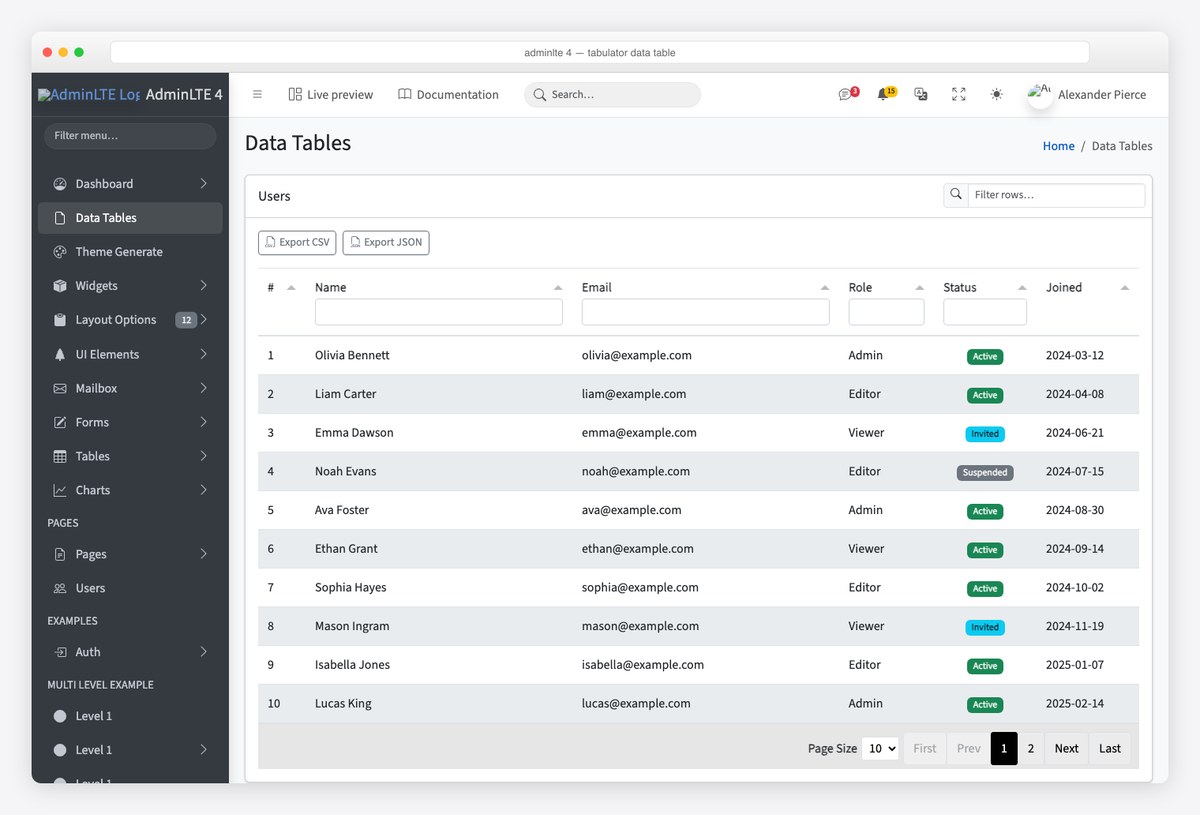
AdminLTE 3 shipped DataTables.net on top of jQuery; AdminLTE 4 ships neither. The v4 template dropped jQuery entirely, and its Data Tables demo page now runs on Tabulator, a vanilla-JavaScript grid with a Bootstrap 5 theme. That leaves three honest options for tables in an AdminLTE 4 project: Tabulator as the template does it, DataTables 3 — which no longer requires jQuery — for teams migrating from v3, or a plain Bootstrap table when the data is small enough not to need sorting and paging. This guide sets up all three inside a v4 card, with a global filter, header filters, export and dark mode, and every screenshot comes from a real page built on the starter template.
Which table library fits?
| Option | jQuery | Best for | Bootstrap 5 styling |
|---|---|---|---|
| Tabulator (what v4’s demo uses) | No | New v4 projects; header filters, editing, tree rows, virtual DOM for big data | Own theme file (tabulator_bootstrap5.css) |
| DataTables 3 | No (from v3; v2 needed it) | Teams porting v3 pages that already use the DataTables API and extensions | Official Bootstrap 5 integration package |
| Plain Bootstrap table | No | Short lists, settings pages, anything under a screenful | Native .table classes |
All three are MIT-licensed. The deciding question is whether you need the DataTables extension ecosystem (Buttons, Responsive, Editor) or are starting fresh — in which case following the template’s own choice keeps you closest to what AdminLTE’s future demo pages and framework wrappers use.
Option 1: Tabulator, the way the v4 demo does it
Add Tabulator’s Bootstrap 5 theme to the head and its script after AdminLTE’s. The table mounts into an empty div, not a table element — Tabulator renders its own DOM:
<!-- head -->
<link rel="stylesheet" href="https://cdn.jsdelivr.net/npm/[email protected]/dist/css/tabulator_bootstrap5.min.css">

<!-- after adminlte.min.js -->
<script src="https://cdn.jsdelivr.net/npm/[email protected]/dist/js/tabulator.min.js"></script>
<div class="card">
<div class="card-header">
<h3 class="card-title">Users</h3>
<div class="card-tools">
<div class="input-group input-group-sm" style="width: 16rem">
<span class="input-group-text"><i class="bi bi-search"></i></span>
<input id="table-filter" type="search" class="form-control" placeholder="Filter rows…" aria-label="Filter rows">
</div>
</div>
</div>
<div class="card-body">
<div class="d-flex gap-2 mb-3">
<button id="export-csv" type="button" class="btn btn-sm btn-outline-secondary"><i class="bi bi-filetype-csv me-1"></i>Export CSV</button>
<button id="export-json" type="button" class="btn btn-sm btn-outline-secondary"><i class="bi bi-filetype-json me-1"></i>Export JSON</button>
</div>
<div id="users-table"></div>
</div>
</div>The initialisation is the demo page’s, with a status column rendered as a Bootstrap badge through a formatter, a list-type header filter on Role and Status, and pagination:
const statusBadge = (cell) => {
  const map = { Active: 'success', Invited: 'info', Suspended: 'secondary' };
  return '<span class="badge text-bg-' + (map[cell.getValue()] || 'secondary') + '">' + cell.getValue() + '</span>';
};

document.addEventListener('DOMContentLoaded', () => {
  const data = [
    { id: 1, name: 'Olivia Bennett', email: '[email protected]', role: 'Admin',  status: 'Active',  joined: '2024-03-12' },
    { id: 2, name: 'Liam Carter',    email: '[email protected]',   role: 'Editor', status: 'Active',  joined: '2024-04-08' },
    // …
  ];

  const table = new Tabulator('#users-table', {
    data,
    layout: 'fitColumns',
    pagination: true,
    paginationSize: 10,
    paginationSizeSelector: [10, 25, 50],
    movableColumns: true,
    columns: [
      { title: '#', field: 'id', width: 60 },
      { title: 'Name', field: 'name', headerFilter: 'input' },
      { title: 'Email', field: 'email', headerFilter: 'input' },
      { title: 'Role', field: 'role', width: 120, headerFilter: 'list',
        headerFilterParams: { values: ['', 'Admin', 'Editor', 'Viewer'] } },
      { title: 'Status', field: 'status', width: 130, hozAlign: 'center', formatter: statusBadge,
        headerFilter: 'list', headerFilterParams: { values: ['', 'Active', 'Invited', 'Suspended'] } },
      { title: 'Joined', field: 'joined', width: 130, sorter: 'string' },
    ],
  });

  // Global filter box in the card header: match name OR email
  document.getElementById('table-filter').addEventListener('input', (e) => {
    const v = e.target.value;
    v ? table.setFilter([[{ field: 'name', type: 'like', value: v }, { field: 'email', type: 'like', value: v }]])
      : table.clearFilter();
  });

  // Export buttons
  document.getElementById('export-csv').addEventListener('click', () => table.download('csv', 'users.csv'));
  document.getElementById('export-json').addEventListener('click', () => table.download('json', 'users.json'));
});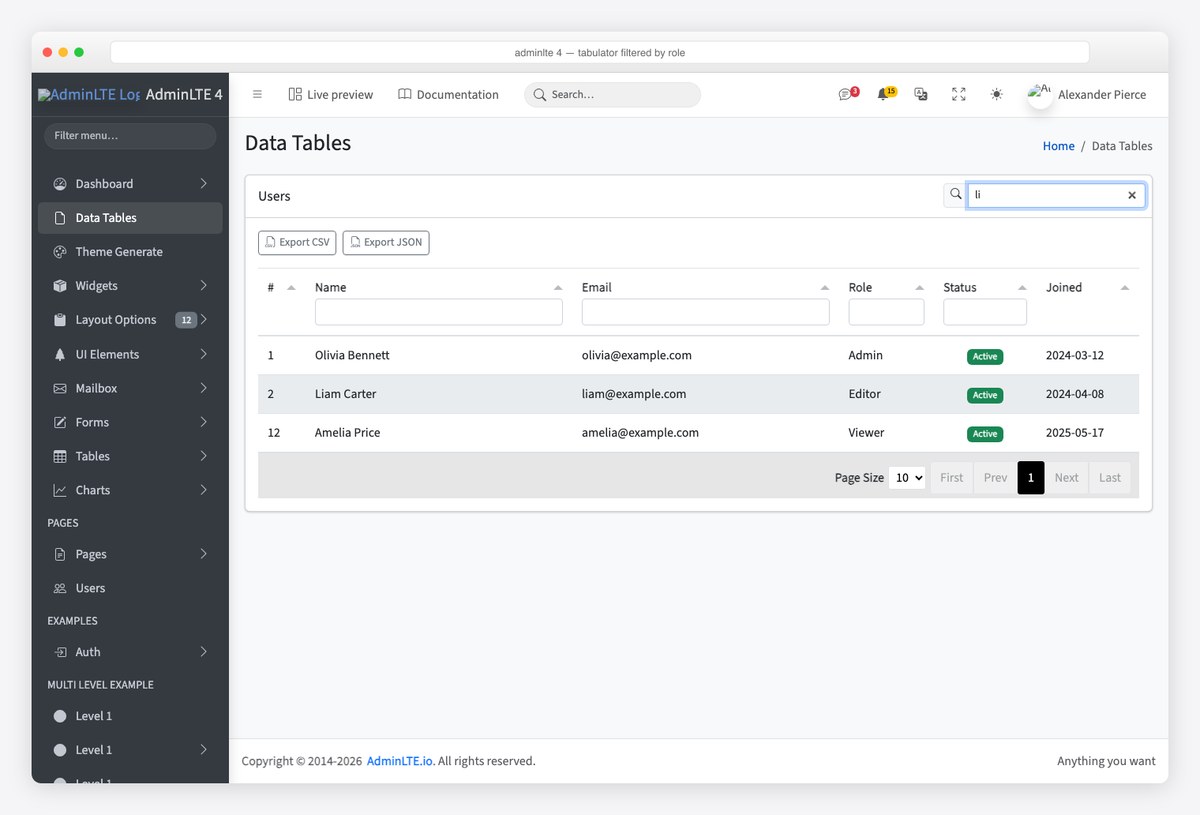
Two things the screenshots show that are easy to miss in the docs: header filters live in a second header row and combine with the global box, and layout: 'fitColumns' is what makes the grid fill the card on every viewport instead of scrolling horizontally. For server data, replace data with ajaxURL: '/api/users' and add paginationMode: 'remote' to let the server page and sort.
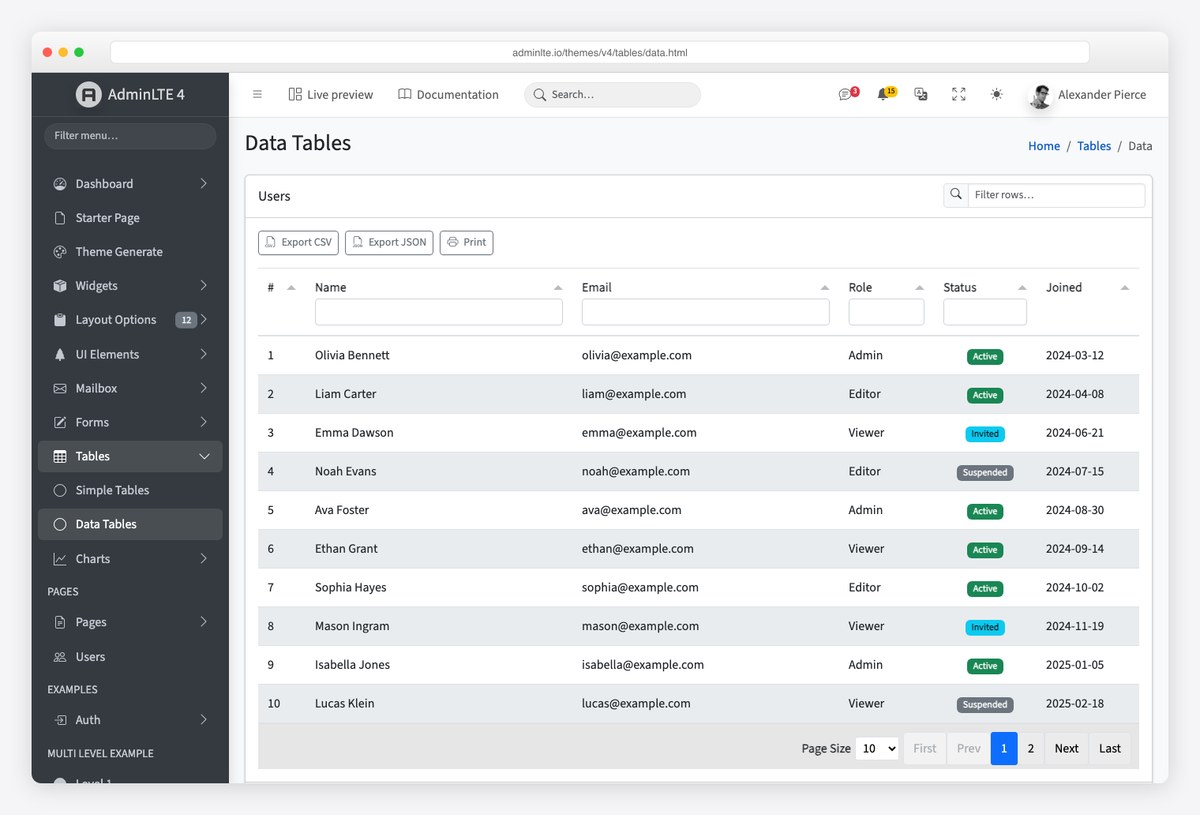
The v4 Data Tables page is this exact setup plus a print button — read its source when you want the template’s version rather than ours.
Option 2: DataTables 3 without jQuery
DataTables 2 still listed jQuery as a dependency; DataTables 3 removed it, so it now runs in an AdminLTE 4 page with nothing else loaded. Use the core package plus the Bootstrap 5 integration, which swaps the default styling for .table, .pagination and .form-control classes:
<!-- head -->
<link rel="stylesheet" href="https://cdn.jsdelivr.net/npm/[email protected]/css/dataTables.bootstrap5.min.css">

<!-- after adminlte.min.js: core first, then the Bootstrap 5 integration -->
<script src="https://cdn.jsdelivr.net/npm/[email protected]/js/dataTables.min.js"></script>
<script src="https://cdn.jsdelivr.net/npm/[email protected]/js/dataTables.bootstrap5.min.js"></script>
Unlike Tabulator, DataTables enhances a real table element, which is the migration advantage: your v3 markup keeps working. The Bootstrap table classes stay on the element:
<div class="card">
  <div class="card-header">
    <h3 class="card-title">Users</h3>
  </div>
  <div class="card-body">
    <table id="users" class="table table-striped table-hover align-middle w-100">
      <thead>
        <tr><th>#</th><th>Name</th><th>Email</th><th>Role</th><th>Status</th><th>Joined</th></tr>
      </thead>
      <tbody>
        <tr><td>1</td><td>Olivia Bennett</td><td>[email protected]</td><td>Admin</td><td><span class="badge text-bg-success">Active</span></td><td>2024-03-12</td></tr>
        <!-- … -->
      </tbody>
    </table>
  </div>
</div>
document.addEventListener('DOMContentLoaded', () => {
new DataTable('#users', {
pageLength: 10,
lengthMenu: [10, 25, 50],
order: [[5, 'desc']], // newest first
columnDefs: [{ targets: 0, width: '3rem' }],
// where the controls go: length menu top-left, search top-right, info + paging below
layout: { topStart: 'pageLength', topEnd: 'search', bottomStart: 'info', bottomEnd: 'paging' },
});
});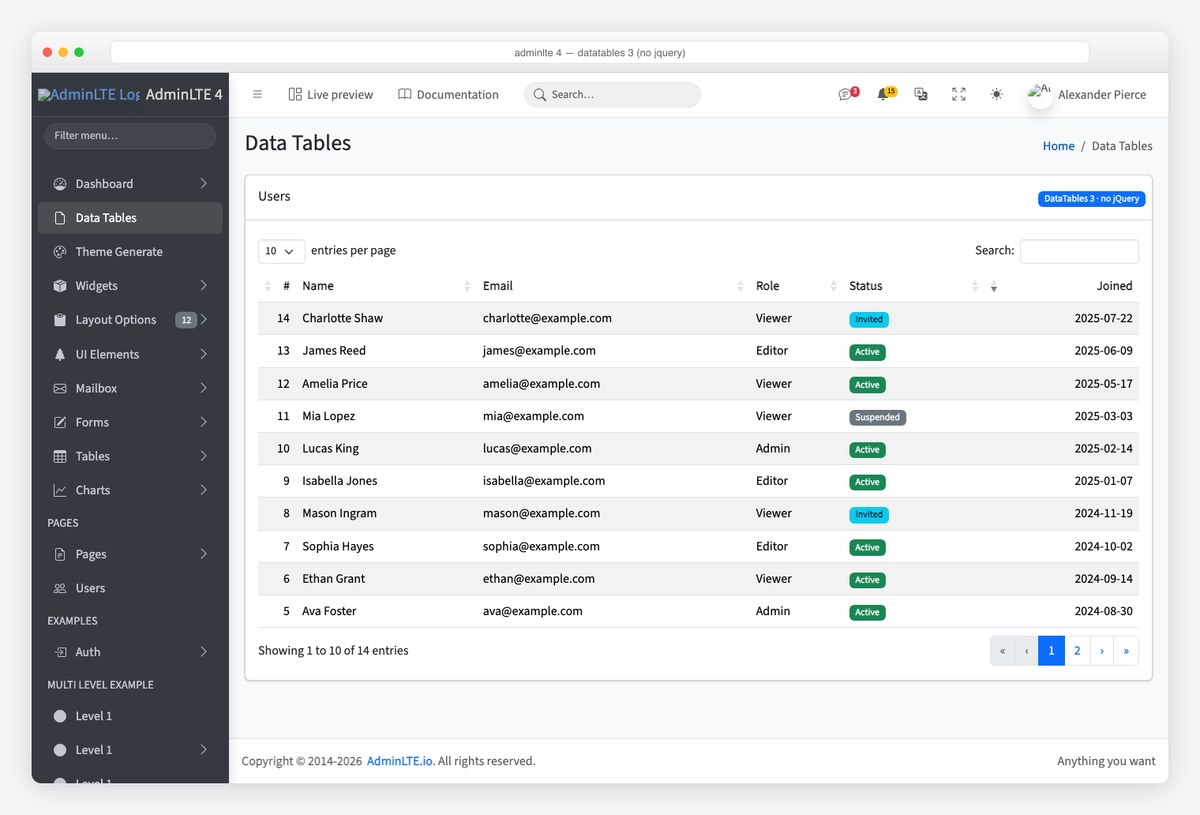
The new DataTable('#users', …) constructor replaces the old $('#users').DataTable() call; the options object is the same one you know, and the layout option replaces the old dom string for placing the search box and pager. Server-side processing is unchanged: ajax: '/api/users' with serverSide: true.
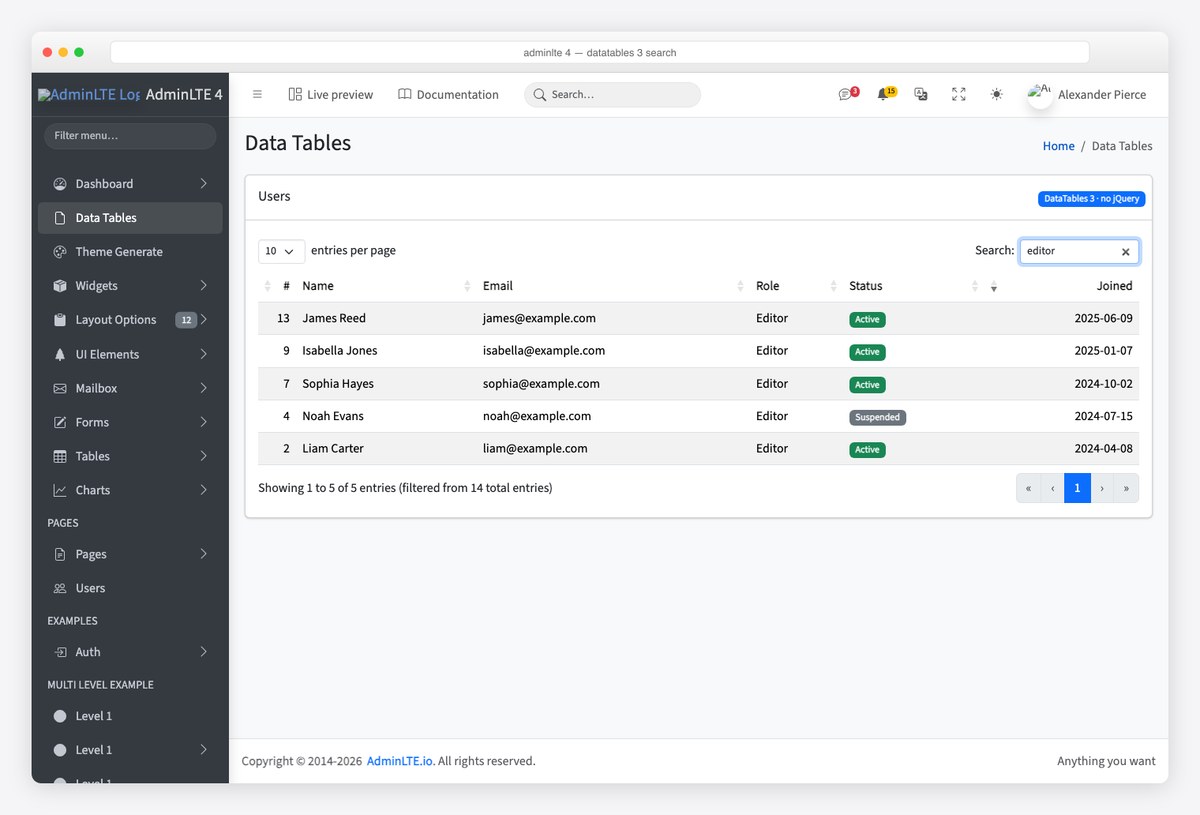
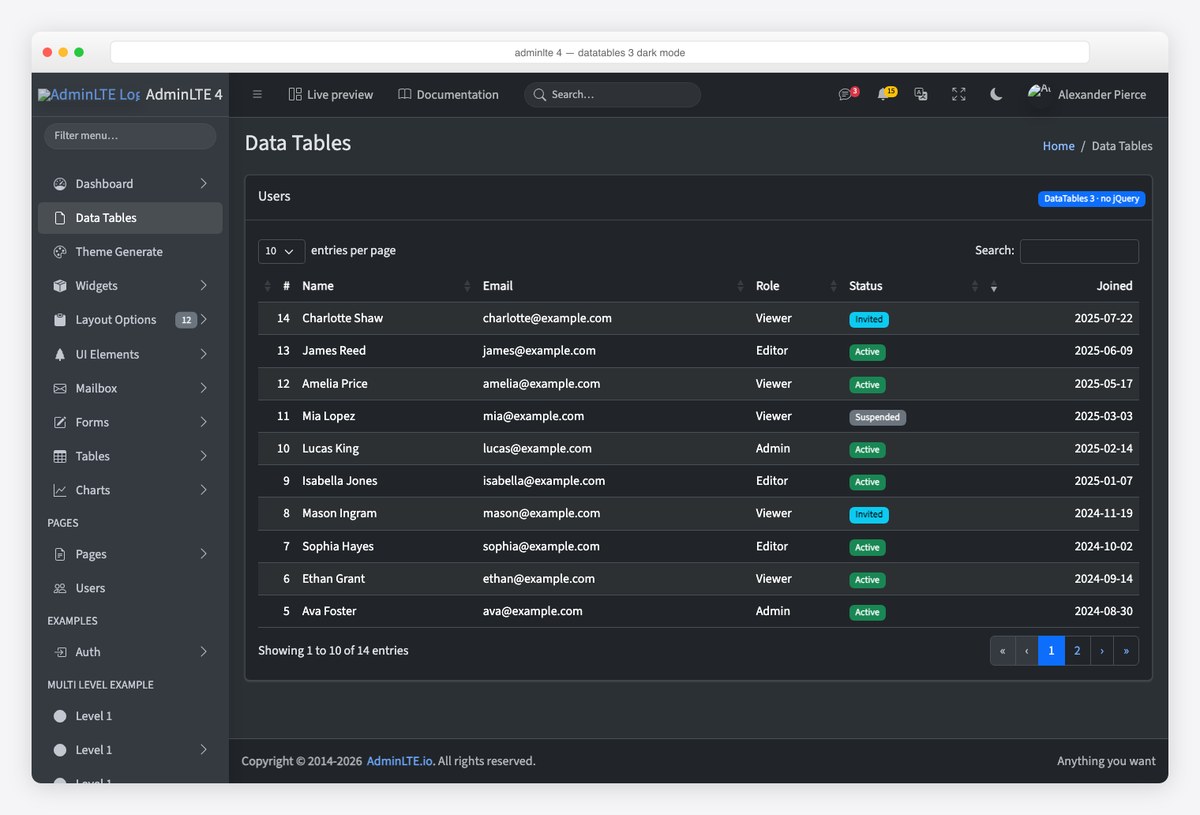
Dark mode needs no extra CSS. The Bootstrap 5 integration styles everything with Bootstrap variables, so data-bs-theme="dark" on the root element carries through the table, the search input and the pager:
Option 3: a plain Bootstrap table
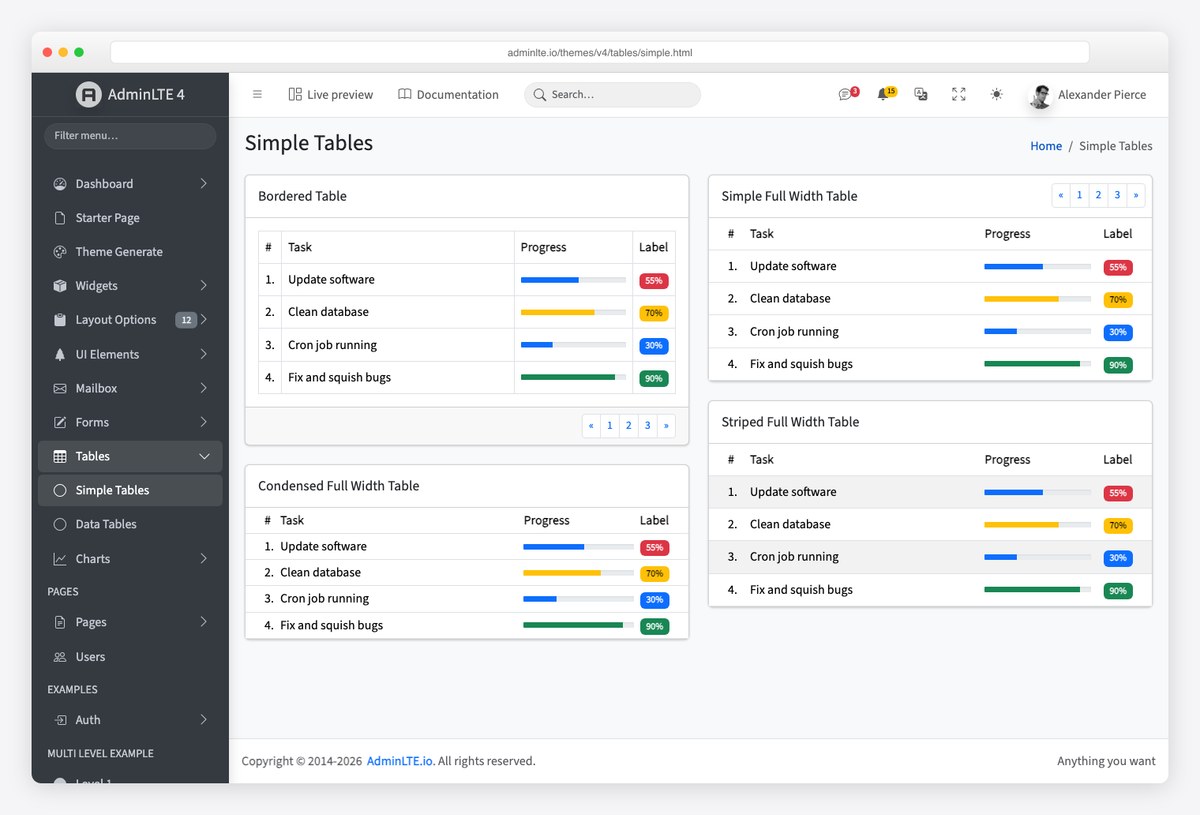
Most admin tables are short. A settings page, a list of ten API keys, the last five logins — none of them need a library, and a plain table is faster, prints cleanly and has no JavaScript to break. AdminLTE 4’s Simple Tables page shows the useful combinations:
<div class="card">
  <div class="card-header"><h3 class="card-title">Recent logins</h3></div>
  <div class="card-body p-0">
    <div class="table-responsive">
      <table class="table table-striped table-hover align-middle mb-0">
        <thead>
          <tr><th>User</th><th>IP</th><th>When</th><th class="text-end">Status</th></tr>
        </thead>
        <tbody>
          <tr><td>Olivia Bennett</td><td>203.0.113.7</td><td>2 minutes ago</td><td class="text-end"><span class="badge text-bg-success">OK</span></td></tr>
        </tbody>
      </table>
    </div>
  </div>
</div>.card-body.p-0lets the table run edge to edge inside the card, which is how the demo pages do it..table-responsivescrolls horizontally on small screens instead of breaking the layout..table-smcondenses rows when density matters more than touch targets.- Sorting a short table client-side is a ten-line function on the header click — you do not need a grid for it.
Choosing between them
Start with a plain table and reach for a library the moment you need paging, sorting across more than a screenful, or filtering. From there: Tabulator if the project is new and you want the template’s own path (and features like inline editing and tree rows later); DataTables 3 if you are migrating v3 pages or rely on its extensions. Do not load both — they solve the same problem, and the second one is dead weight in every page.
Frequently asked questions
Does AdminLTE 4 include DataTables?
No. AdminLTE 4 bundles no table plugin. Its Data Tables demo page uses Tabulator, a jQuery-free grid loaded from a CDN, and the template’s own CSS only styles plain Bootstrap tables. You add the library you want.
Can I use DataTables with AdminLTE 4 without jQuery?
Yes, with DataTables 3 or later: its package no longer depends on jQuery, and you initialise it with new DataTable(‘#id’, options). Pair it with the datatables.net-bs5 integration for Bootstrap 5 styling. DataTables 2 and earlier still need jQuery loaded first.
Why does the v4 demo use Tabulator instead of DataTables?
AdminLTE 4 removed jQuery from the template, and Tabulator is vanilla JavaScript that ships a Bootstrap 5 theme and covers filtering, sorting, paging, editing and export without extensions. DataTables only dropped its jQuery requirement in version 3, so it is now a valid alternative.
How do I add a search box to an AdminLTE 4 table?
With Tabulator, listen to an input and call table.setFilter() with the fields to match (the demo filters name and email together). With DataTables, the built-in search box is placed by the layout option (topEnd: ‘search’); with a plain table, filter the rows yourself by toggling a hidden class on each tr.
How do I load table data from an API?
Tabulator: set ajaxURL to your endpoint and, for large sets, paginationMode: ‘remote’ so the server pages and sorts. DataTables: set ajax to the endpoint and serverSide: true for the same behaviour. Both send the page, sort and search parameters for you.
Do the tables work in dark mode?
DataTables’ Bootstrap 5 integration and plain Bootstrap tables follow data-bs-theme automatically. Tabulator’s Bootstrap 5 theme handles most of it, but check your custom formatters — a hard-coded background colour in a cell will not switch.
Related reading: the AdminLTE 4 install guide for the page these cards sit in, AdminLTE 4 modals for the edit dialog behind a row’s button, and — if your stack is React — the shadcn/ui data table templates roundup for the TanStack Table route.

You Might Also Like


