
How to Use AdminLTE with Django (Official Guide, 2026)

There is now an official AdminLTE 4 package for Django — adminlte-django, MIT-licensed, maintained by Colorlib alongside the React, Vue, Angular, Laravel and ASP.NET builds. It gives you the AdminLTE layout as Django templates and django-components, a sidebar defined as a Python dict, themed auth pages, and hooks into Django’s own forms, tables, messages, pagination and i18n.
This guide covers the three ways to put AdminLTE in front of a Django project, when each is the right call, and what the official package does not do — including one thing about the “themed Django admin” that is easy to misread.
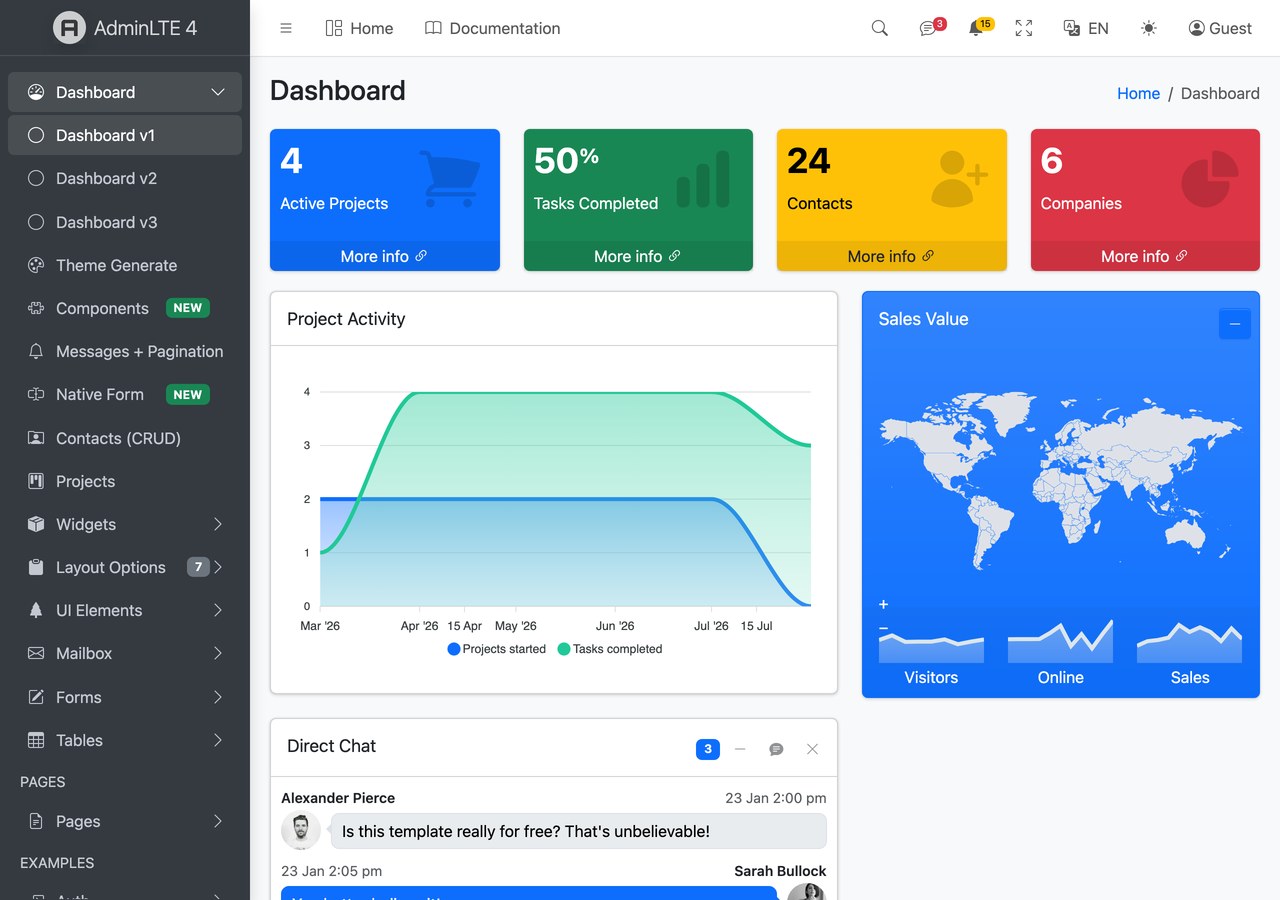
Everything below is the current shipped API, checked against the package and the live demo at the time of writing.
Three ways to use AdminLTE with Django
- The official
adminlte-djangopackage — pip install, configure a dict, extend a base template. Recommended for almost everyone. - Manual integration — drop the AdminLTE dist files into
static/and write the layout yourself. Right when you need one specific page or are retrofitting an existing template tree. - Skip AdminLTE — use a Django-native admin theme or a modern JS dashboard instead. Right more often than tutorials admit; see the last section.
Path 1 (recommended): the official adminlte-django package
The package is published on PyPI as adminlte-django and imported as django_adminlte4. It requires Python 3.12+ and Django 6.0+, which is the main thing to check before you start — it will not install on an older stack.
Step 1 — install
pip install adminlte-djangoThat pulls in django-components and django-vite. Node 18+ is needed only if you want the Vite asset pipeline; see step 3 for the no-Node route.
Step 2 — settings
This is the longest part of the setup and the one place people get stuck, because django-components requires an explicit template loaders list, which in turn means APP_DIRS must be False. Copying this block wholesale is safer than assembling it from memory.
INSTALLED_APPS = [
    "django_components",
    # ... django.contrib.* ...
    "django_vite",
    "django_adminlte4",
]

MIDDLEWARE = [
    # ...
    "django_components.middleware.ComponentDependencyMiddleware",
]

COMPONENTS = {"dirs": [], "app_dirs": ["components"], "autodiscover": True}

TEMPLATES = [{
    "BACKEND": "django.template.backends.django.DjangoTemplates",
    "DIRS": [],
    # IMPORTANT: APP_DIRS must be False because we provide an explicit `loaders` list.
    "APP_DIRS": False,
    "OPTIONS": {
        "context_processors": [
            "django.template.context_processors.request",
            "django.contrib.auth.context_processors.auth",
            "django_adminlte4.context_processors.adminlte",
        ],
        "loaders": [(
            "django.template.loaders.cached.Loader",
            [
                "django.template.loaders.filesystem.Loader",
                "django.template.loaders.app_directories.Loader",
                "django_components.template_loader.Loader",
            ],
        )],
        "builtins": ["django_components.templatetags.component_tags"],
    },
}]

STATICFILES_FINDERS = [
    "django.contrib.staticfiles.finders.FileSystemFinder",
    "django.contrib.staticfiles.finders.AppDirectoriesFinder",
    "django_components.finders.ComponentsFileSystemFinder",
]

DJANGO_VITE = {"default": {"dev_mode": DEBUG, "manifest_path": BASE_DIR / "assets" / "dist" / "manifest.json"}}
The adminlte context processor is what makes the sidebar, topbar and config available to every template. Miss it and you get a page that renders but has no navigation.
Step 3 — front-end assets (or skip Node entirely)
The default mode uses Vite, which gives you HMR in development and a hashed production build:
python manage.py adminlte_install   # copies assets/app.js, assets/app.scss, vite.config.js stubs
npm install                          # installs admin-lte, bootstrap, overlayscrollbars, ...
npm run dev                          # dev server with HMR (DEBUG=True)
# production: npm run build && python manage.py collectstatic
If you do not want Node in your Django project at all, you do not need it. The package ships a pre-compiled bundle in static/adminlte/dist/, and one setting switches to it:
ADMINLTE = {"assets_mode": "static"} # default "vite"In static mode django-vite is never imported and collectstatic is the whole build. That is the mode to choose for an internal tool, a Docker image you want to keep small, or any team that would rather not add a JS toolchain to a Python deployment. You give up HMR and the optional plugin set, which for most back-office projects is not a real loss.
Step 4 — define the sidebar as data
The menu is a Python list in settings rather than markup, which is the single biggest practical difference from hand-rolling AdminLTE. Permissions are part of the data structure, so a menu item disappears for users who cannot use it:
ADMINLTE = {
    "title": "My Dashboard",
    "logo": "<b>My</b>App",
    "sidebar_theme": "dark",          # dark | light
    "menu": [
        {"text": "Dashboard", "url": "/", "icon": "bi bi-speedometer"},
        {"header": "CONTENT"},
        {"text": "Posts", "icon": "bi bi-file-post", "submenu": [
            {"text": "All posts", "route": "posts:index", "icon": "bi bi-circle"},
            {"text": "New post", "route": "posts:create", "icon": "bi bi-circle", "can": "blog.add_post"},
        ]},
    ],
}
Item keys are header, text, route (a named URL) or url (raw), icon, icon_color, label and label_color for a badge, active for URL patterns, target, can for a permission or callable, and submenu. Use route rather than url wherever you can — it survives URL restructuring, which raw paths do not.
The can key is the one worth designing around. Hiding a nav item the user would only get a 403 from is a real usability gain, and doing it declaratively in the menu definition beats scattering {% if perms.x %} through a template.
Step 5 — build pages
Pages extend adminlte/page.html and fill blocks. Components are called with {% component %} tags:
{% extends "adminlte/page.html" %}
{% block page_title %}Dashboard{% endblock %}
{% block breadcrumb %}
    <li class="breadcrumb-item active">Dashboard</li>
{% endblock %}
{% block content %}
    {% component "adminlte_card" title="Sales" theme="primary" outline=True collapsible=True %}
        Card body…
        {% fill "footer" %}Updated 5 min ago{% endfill %}
    {% endcomponent %}
{% endblock %}
Breadcrumbs fall back to an automatic Home → … trail derived from request.path if you do not set the block, which is a sensible default for a CRUD app with predictable URLs.
What you get beyond the layout
The layout is the least interesting part. The integration points with Django’s own machinery are what make this different from pasting a Bootstrap theme into static/:
- Forms. Bind a Django form field to a component and validation feedback is wired automatically:
{% component "adminlte_input" field=form.email type="email" %}{% endcomponent %}. For whole-form rendering, the[crispy]extra works with the stockbootstrap5pack — AdminLTE 4 is Bootstrap 5, so no custom template pack is needed. - Tables and filters. The
[tables]extra addsdjango-tables2anddjango-filter; settingDJANGO_TABLES2_TEMPLATE = "django_tables2/adminlte.html"wraps any table in an AdminLTE card with sortable headers and query-string-preserving pagination in the footer. - Messages. Django’s messages framework renders as dismissible AdminLTE alerts with icons, and
errormaps todangerautomatically — noMESSAGE_TAGSconfig. - Auth. Themed
registration/templates ship for Django’s built-in auth views, so login, logout and the full password change and reset flow work once you addpath("", include("django.contrib.auth.urls")). There is a[allauth]extra that overrides django-allauth’s layouts and elements if you use that instead. - i18n. Templates use
{% translate %}throughout and a compiled Spanish catalogue ships in the wheel.
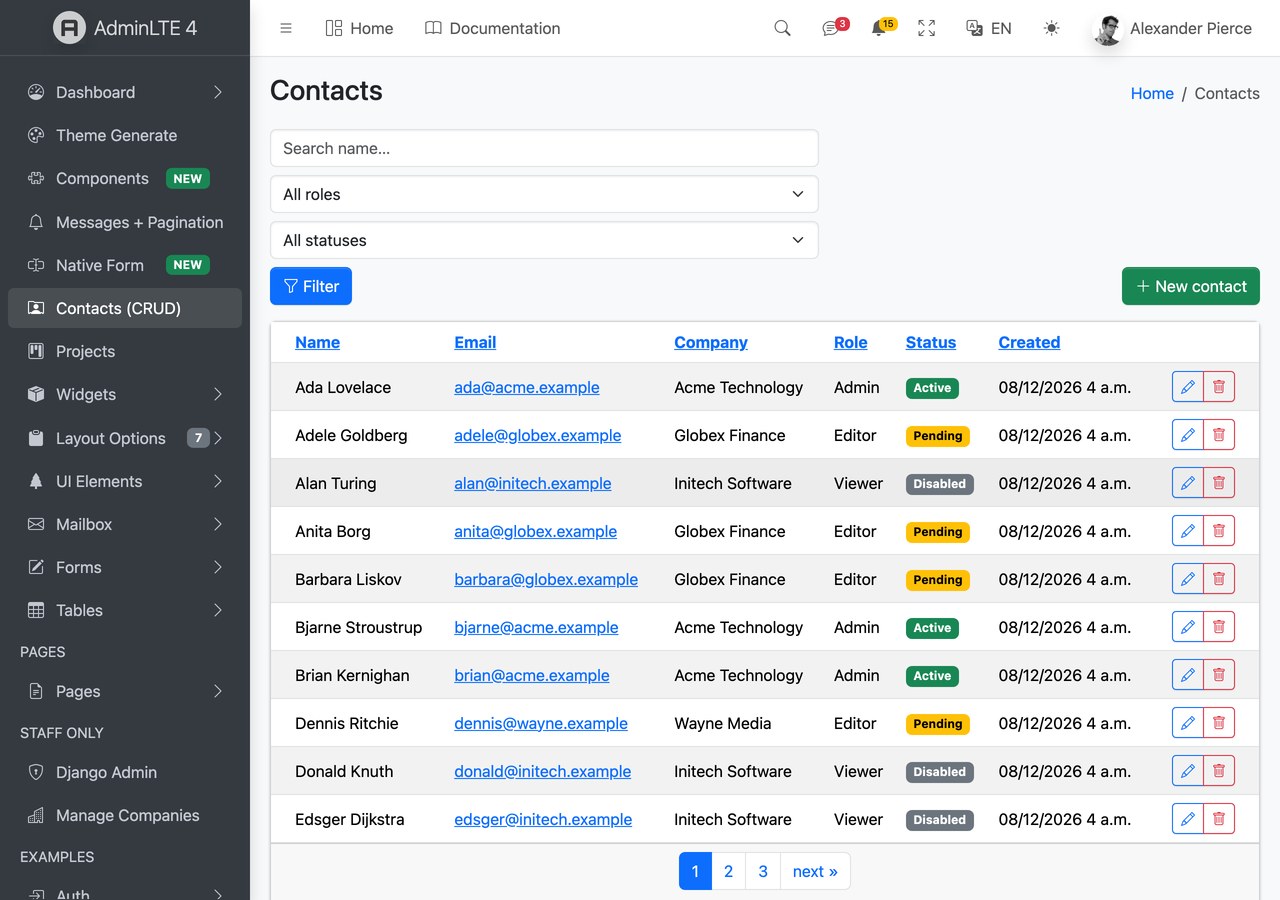
The demo’s Contacts page below is the whole stack at once — a django-tables2 table, a django-filter form, create/update/delete views and success messages:
The themed Django admin — what it actually does
The package themes django.contrib.admin, and this is the feature most likely to be misunderstood, so it is worth being precise. Enable it by putting django_adminlte4 before django.contrib.admin in INSTALLED_APPS so its template overrides win:
INSTALLED_APPS = [
    "django_components",
    "django_adminlte4",          # must precede django.contrib.admin
    "django.contrib.admin",
    # ...
]
What you get is an AdminLTE shell around the admin: a collapsible sidebar auto-generated from your registered apps and models (built by the same menu pipeline as the app sidebar, so it honours per-user view permissions), a topbar, and a colour-mode toggle. What renders inside that shell is Django’s native change-list and change-form, with Django’s own styling:
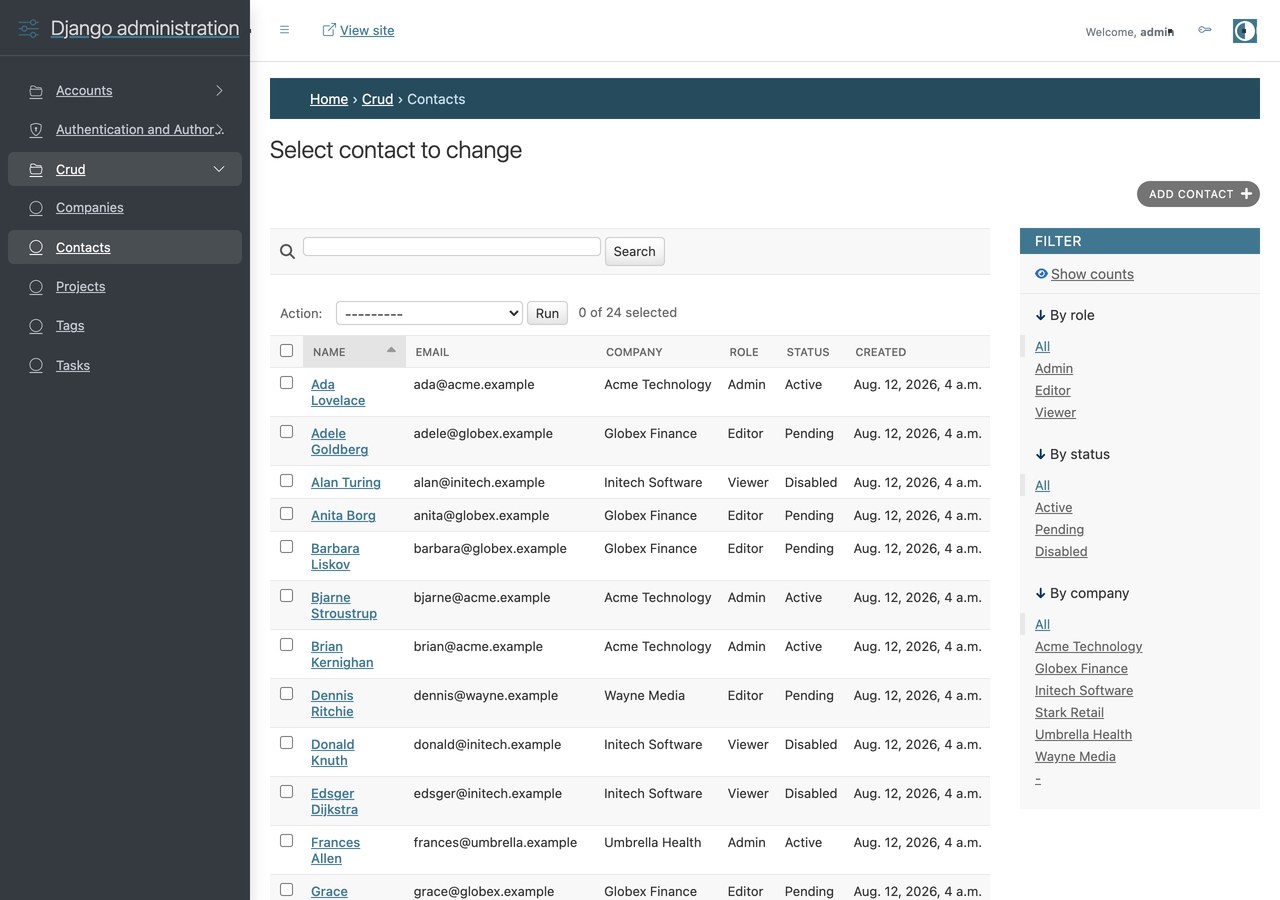
Compare that screenshot with the Contacts page above. Same model, same data — the app page is AdminLTE through and through, while the admin keeps Django’s blue header bar and native filter sidebar. If you were expecting the admin to come out looking like the dashboard, it does not, and no configuration flag changes that. What you gain is navigation and a consistent frame around both halves of the project.
That is the right trade for most teams. Django’s admin change-form does a great deal of work that a re-skin tends to break — inlines, raw ID fields, autocomplete widgets, permissions — and wrapping it is far safer than restyling it. You can customise the shell with admin_brand and admin_menu in the ADMINLTE dict.
Try it before you install
The demo at django.adminlte.io is a running Django project, not a static mockup. Visitors start logged out and the login page comes pre-filled with the demo credentials, so one click gets you into the sign-in-only pages — Contacts, Projects and the Django admin. Running it locally takes four commands:
cd demo
pip install -r requirements.txt
python manage.py migrate
python manage.py seed_demo         # sample relational data + demo superuser (admin/adminpass)
python manage.py runserver
The seed data is a small relational schema — Company → Contact, Project ↔ Tag, Project → Task — which makes it a more useful reference than the usual single flat table, because it exercises the parts of the admin that actually get hard.
Four management commands ship with the package: adminlte_install (copy the Vite stubs), adminlte_status (print version, merged config and Vite manifest state — start here when something will not render), adminlte_make_auth, and adminlte_scaffold <app> for a CRUD app built from Card and Form components.
Path 2: manual integration
You do not need the package to use AdminLTE with Django. AdminLTE 4 is plain Bootstrap 5 with vanilla JavaScript and no jQuery, so a manual integration is genuinely simple: put the dist CSS and JS in static/, copy the AdminLTE HTML shell into a base.html, replace the nav markup with your own template tags, and extend it from your pages.
Choose this when you are retrofitting AdminLTE into an existing Django project with its own template tree, when you need one styled screen rather than a whole back office, or when you cannot move to Django 6.0 and Python 3.12. The cost is that everything the package integrates — the permission-aware menu, form field binding, tables2 theming, themed auth and admin — is now yours to write and maintain.
The practical dividing line: if you are going to build more than about three screens, the setup in Path 1 is cheaper than the plumbing you would otherwise write.
Path 3: when to pick something else
Two honest caveats about the official package before you commit to it.
It is new. The PyPI package is at an early 0.x version and the repository was published in 2026. It is MIT-licensed and maintained alongside the rest of the AdminLTE ecosystem, but it does not have the years of production mileage that django-jazzmin or django-unfold have accumulated. Pin your version and read the changelog before upgrading, as you would with any young dependency.
It requires a current stack. Django 6.0+ and Python 3.12+ are hard requirements. A long-lived project on an older LTS cannot use it without upgrading first.
Beyond that, pick a different tool when:
- You only want a prettier Django admin. If you are not building custom app screens at all, an admin-only theme is a smaller dependency and will restyle the change-forms themselves rather than wrapping them.
- Your front end is a SPA. If Django is serving DRF endpoints to a React or Vue front end, server-rendered templates are the wrong layer — use the React or Vue builds instead.
- You need charts, calendars and kanban out of the box. These ship as plugin-backed components (Chart.js, Tabulator, Quill, jsVectorMap, SortableJS), each installed separately via npm — which is fine, but it means the Vite path, not the no-Node one.
For alternatives in either direction, see our Django admin dashboard templates roundup, and the sibling guides for Laravel and Next.js.
Frequently asked questions
Does AdminLTE work with Django?
Yes. There is an official package, adminlte-django on PyPI (imported as django_adminlte4), which provides AdminLTE 4 as Django templates and django-components. It needs Django 6.0+ and Python 3.12+. You can also integrate AdminLTE manually into any Django version, since AdminLTE 4 is plain Bootstrap 5 with no jQuery.
Is adminlte-django free?
Yes — MIT licensed, free for commercial use, with no paid tier for the package itself. It is maintained by Colorlib alongside the React, Vue, Angular, Laravel and ASP.NET builds of AdminLTE 4.
Do I need Node.js to use AdminLTE with Django?
No. The package ships a pre-compiled asset bundle, and setting ADMINLTE = {"assets_mode": "static"} serves it without importing django-vite at all — collectstatic becomes the entire build. The default “vite” mode gives you hot module replacement in development and is required for the optional plugin components like charts and datatables.
How do I define the AdminLTE sidebar menu in Django?
As a Python list under the menu key of the ADMINLTE dict in settings, rather than as markup. Each item takes text plus either route (a named URL, preferred) or url, with optional icon, label, submenu, and can for a permission — items whose permission check fails are hidden from that user automatically.
Does adminlte-django theme the Django admin?
It wraps it rather than restyling it. You get an AdminLTE shell around django.contrib.admin — a collapsible sidebar auto-generated from your registered apps and models that respects per-user permissions, plus a topbar and colour-mode toggle. The change-list and change-form inside that shell keep Django’s native styling. Enable it by listing django_adminlte4 before django.contrib.admin in INSTALLED_APPS.
Why does APP_DIRS have to be False?
Because django-components requires an explicit template loaders list, and Django does not allow APP_DIRS and loaders to be set at the same time. The loaders list in the settings block above includes the app-directories loader, so nothing is lost — it is the same behaviour, spelled out. This is the most common setup error.
Can I use AdminLTE with Django REST Framework and a SPA?
You can, but the server-rendered templates would not be doing anything for you. If Django is only serving API endpoints and your UI is React or Vue, use the corresponding AdminLTE build for that framework instead — this package’s value is its integration with Django’s forms, tables, messages and auth, all of which are server-side.

You Might Also Like


