
10 Best Django Admin Themes & Dashboard Templates 2026

Django ships one of the best admins in any framework, and one of the plainest. There are two ways to fix that, and they are not interchangeable: reskin the admin you already have with a theme, or replace it with a standalone dashboard you build yourself. A theme is a pip install and a settings change. A dashboard template is a project you own and wire up. One project on this list does both, and that is where we start.
Every project below was checked against Django 6.1 on 20 August 2026. That check removed more than half the field — several of the most-starred Django admin themes have not shipped a release since 2018, and one still sells licences for a package whose last stable version predates Django 3.0. Those are named, with reasons, in checked and left out.
Looking for the front end rather than the admin? Our Django website templates roundup covers that side, and websites built with Django shows what teams ship with it.
Quick Picks
- Best overall: Apex Dashboard, Django Edition — reskins the built-in admin and ships the dashboard
- Best free theme: Django Unfold — Tailwind, and the only one on Django 6.1
- Fastest to set up: Django Jazzmin — AdminLTE-based, one settings block
- Most battle-tested: Django Grappelli — a decade of tracking Django releases
- Best with a live demo: django-baton — Bootstrap 5, try it before installing
- No code at all: django-admin-interface — restyle from the admin itself
- Best standalone dashboard: AdminLTE 4 for Django — official, free, MIT
Reskin or replace? Decide this first
This one choice decides which half of the list you should be reading.
- Reskin the built-in admin. You keep
django.contrib.admin— every ModelAdmin, permission, inline and action you already wrote keeps working — and a theme changes how it looks. Installation is a pip install plus an entry inINSTALLED_APPS. The ceiling is that you are still bound by what the Django admin can express: it is a CRUD interface over models, not a dashboard with charts. - Replace it with a dashboard. A standalone template gives you charts, custom layouts and pages that have nothing to do with your models — at the cost of writing the views, forms and permission checks yourself. The Django admin usually stays alongside it for the data-entry work.
Most teams want the first and reach for the second by mistake. If your need is “the admin looks dated”, a theme solves it in an afternoon. Reach for a dashboard template only when you need screens the admin was never meant to produce — an analytics view, a customer-facing portal, an operations console.
That trade-off holds for almost everything below. One entry escapes it, and because it removes the choice rather than answering it, it goes first.
The one project that does both
1. Apex Dashboard, Django Edition
⚡ Django 6 · 23 Apps · 1024 Tests
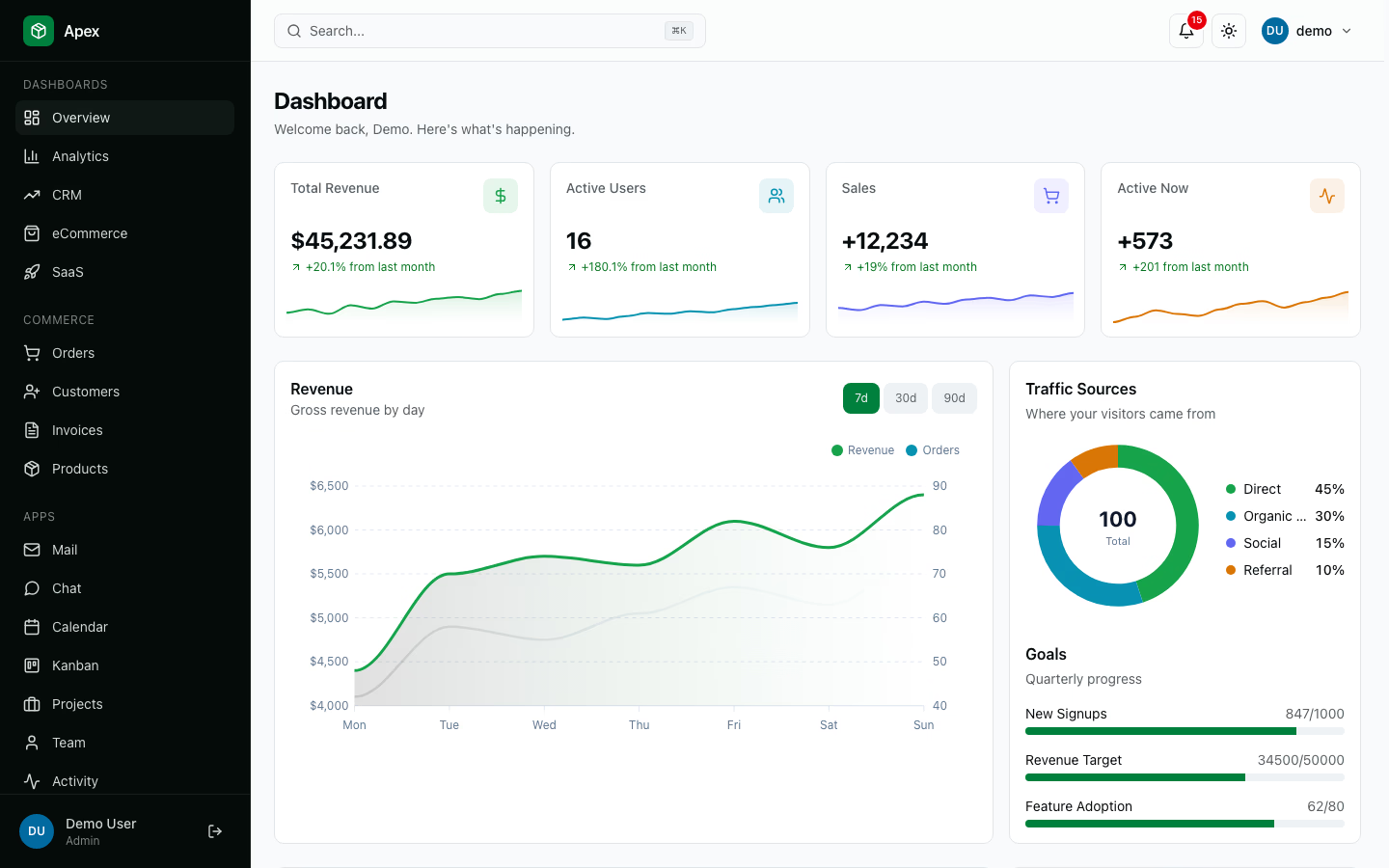
Why we like it: It answers both halves of the question above — reskinning django.contrib.admin and shipping a finished dashboard application, not components to assemble one, from a single project.
That is the part worth pausing on. Nearly everything else here makes you choose: a theme restyles django.contrib.admin but cannot produce a chart, and a dashboard template gives you charts while leaving the built-in admin looking exactly as it did. Apex does both from one project — sign in to its demo at /admin/ and Django’s own Site administration page renders inside the Apex shell, with the model grid, KPI cards, org switcher and dark-mode toggle all in place.
The nearest exception is our own AdminLTE 4 integration at number eight, which also reskins the admin and is free — but it hands you a shell and components, and you still build the dashboard screens yourself. Apex is the one that arrives with them finished.
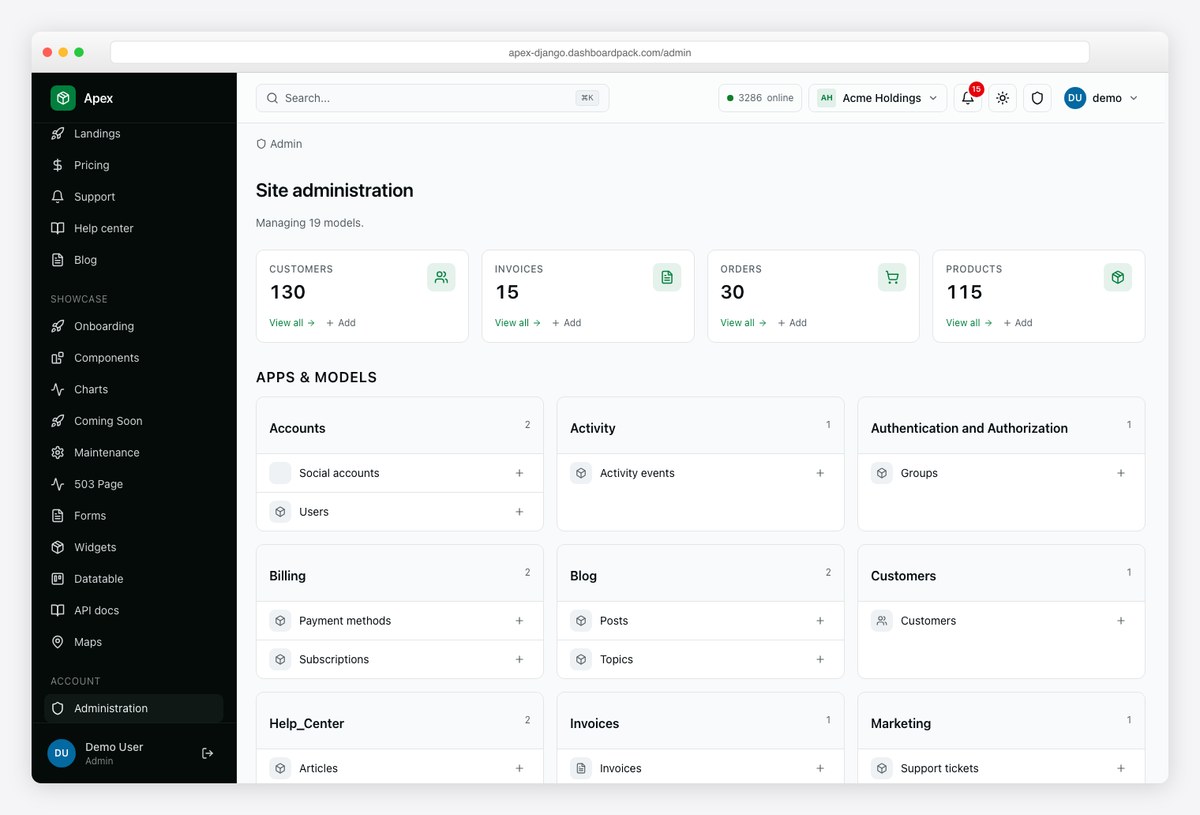
The practical effect is that your ModelAdmin classes keep working untouched — the same registrations, permissions, inlines and actions — while the data-entry screens stop looking like a different product from the rest of your app. That is the gap most teams hit at month three: they install a theme, then need an analytics view, then end up running a themed admin and an unrelated dashboard side by side.
Apex Dashboard is the only entry on this list shipping a real working backend rather than just a theme or scaffold. Built on Django 6 with HTMX 2 swaps, Alpine.js 3 islands, and Tailwind CSS v4, it gives you 23 fully wired apps — Auth with 2FA, Customers, Invoices, Orders, Products, Mail, Chat, Calendar, Kanban, Projects, Files, Notifications, Stripe-style Billing, multi-tenant Organizations with 5-tier RBAC, and more — every screen backed by real models, signals, permissions, and migrations. No mocks, no placeholder pages.
You also get 5 dashboard variants (Overview / Analytics / CRM / eCommerce / SaaS), 8 ApexCharts variants themed for light + dark, a full Django Ninja REST API with Swagger UI and bearer-token auth, signed outbound webhooks, an HTMX datatable system with server-side sort + 6 filter widgets + CSV/XLSX/PDF export, dark mode, RTL, English + Spanish i18n, PWA-installable, and 1024 passing pytest unit tests + 57 Playwright E2E tests. Deploy guides for Render, Fly.io, and Linux VPS are included; Docker Compose spins Postgres + the app with seed data in one command.
Disclosure: Apex is our own commercial product, and it leads a list whose entries 2 through 9 are free and open-source. It is first for a reason you can check rather than one you have to take on trust — open the demo at /admin/ and you are looking at Django’s own admin, restyled. No free entry here does that and arrives with the dashboard built.
Themes that restyle the built-in Django admin
All free, all installed the same way, all leaving your ModelAdmin code untouched. Ordered by how current each is against Django 6.
2. Django Unfold

Why we like it: The only theme here that declares support for Django 6.1, and the most actively developed by a distance — it ships releases most weeks.
Django Unfold is the new hotness in the Django admin space, and for good reason. It’s the only major Django admin theme built with Tailwind CSS, and it shows. The design is sharp — dark mode that actually looks good, responsive layouts that work on mobile, and an attention to detail that most admin themes lack. HTMX and Alpine.js handle interactivity without the overhead of a full SPA framework.
Beyond looks, Unfold adds genuinely useful features: WYSIWYG editor integration, custom action buttons, sidebar navigation, and extensible filters. It’s actively maintained with frequent releases. If you’re starting a new Django project in 2026, this should be your default admin theme. Period.
Speaking of Tailwind, our roundup of Tailwind admin dashboard templates covers the broader ecosystem beyond Django.
Two things to know before you commit. Unfold requires Django 5.2 or newer and Python 3.12+, so it is not a drop-in if you are still on 4.2 LTS. And while the theme itself is MIT, there is an optional paid add-on, Unfold Studio, sold as a one-time per-developer licence — the core does not expire or nag.
3. Django Jazzmin

Why we like it: It is AdminLTE applied to the Django admin, configured entirely from one settings dictionary — the least effort-to-result ratio in this list.
Jazzmin is probably the easiest Django admin theme to set up. Install via pip, add to INSTALLED_APPS, and your admin immediately gets a modern sidebar navigation, search bar, dark mode toggle, collapsible menus, and custom branding. Under the hood, it’s powered by AdminLTE 3 (Bootstrap 4), so the component library is massive and well-documented.
The “install and go” philosophy extends to customization — a single JAZZMIN_SETTINGS dictionary in your settings file controls everything from logo placement to menu ordering to color schemes. No template overrides required for most use cases. It supports Django 2.x through 5.x and the MIT license means you can use it anywhere.
Want to see what Tailwind-based alternatives look like? Check out our best Tailwind CSS templates list.
Its public demo runs on a free Render instance, so the first request can take up to a minute to wake. That is the host, not the theme.
4. Django Grappelli

Why we like it: The oldest theme still standing, and it has tracked every Django release for over a decade — which is a better predictor of being here in three years than any star count.
Grappelli is the OG Django admin theme. It’s been around since the early Django days and has outlasted dozens of competitors. The reason is simple: it works, it’s stable, and it doesn’t break when Django releases a new version. You get a polished UI overhaul with improved navigation, autocomplete lookups, sortable inlines, and a customizable dashboard — all through Django template overrides.
Unlike newer themes that bolt on JavaScript frameworks, Grappelli keeps things lean with a bespoke stylesheet and jQuery. It supports Django 3.2 through 5.x and the codebase is refreshingly well-maintained. If you value reliability over flashy features, Grappelli is a safe bet that won’t cause headaches during Django upgrades.
For more admin panel options across different frameworks, check out our best free admin panels collection.
One caveat for the cautious: Grappelli publishes no Django version classifiers, so its 6.x support is stated in the changelog rather than declared in machine-readable metadata. Given its track record we take that at face value, but it is an author claim rather than a verified one. There is also no hosted demo — only screenshots.
5. django-baton
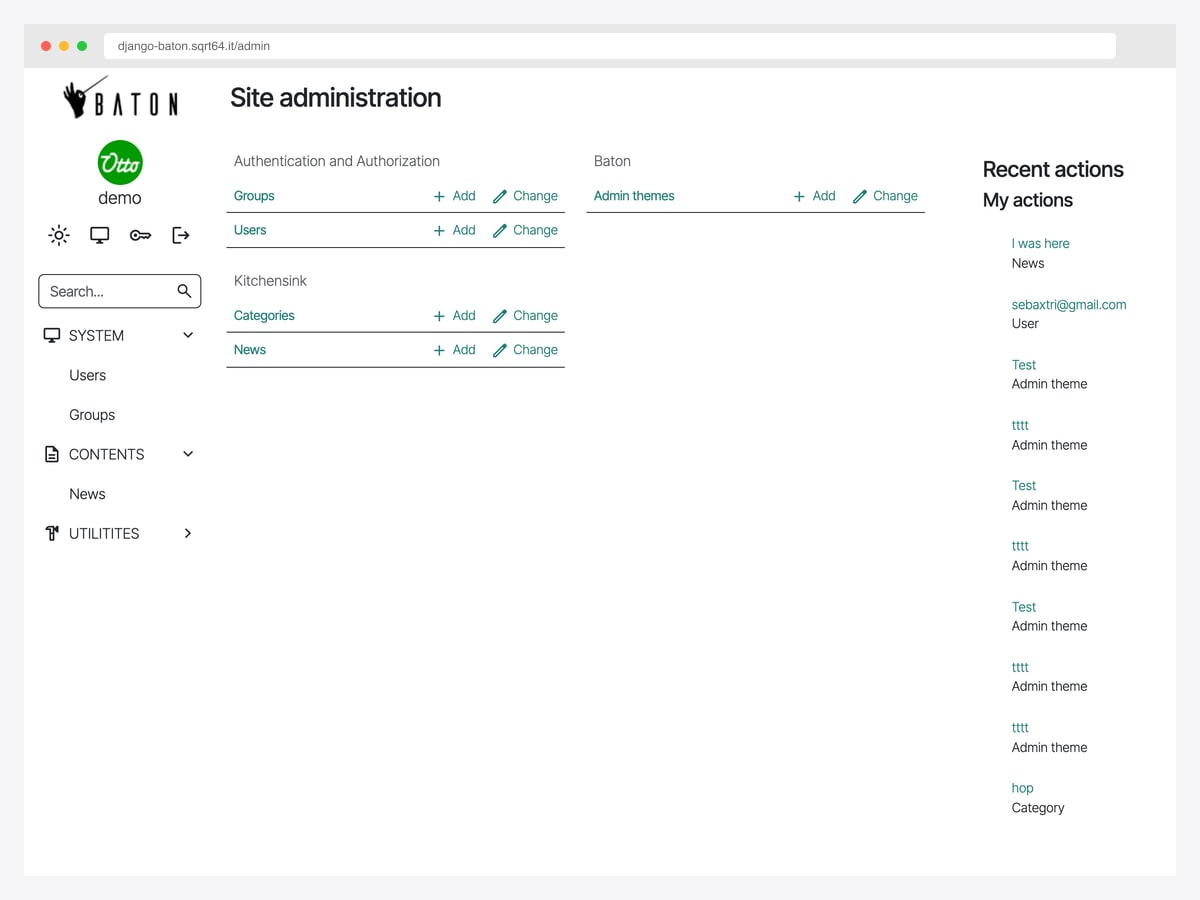
Why we like it: It is the only theme in this section with both current Django support and a working public demo — you can log in and click around before deciding, which Grappelli and django-admin-interface do not let you do.
Baton sits between Jazzmin and Unfold: a Bootstrap 5 shell with a collapsible sidebar, a configurable menu, changelist filters in a modal, and a search field wired to your own view. Configuration is a single dictionary, so moving from Jazzmin is close to a drop-in.
It also ships optional AI helpers — translation, summarisation and image generation hooks that call OpenAI if you supply a key. They are off by default, and the theme is entirely usable without them.
6. Django Admin Interface

Why we like it: It is the only option here you configure from inside the admin itself — colours, logo and layout are database-backed settings, not code, which makes it the pragmatic choice when a client wants their branding on it.
Django Admin Interface takes a unique approach: instead of hardcoding a theme, it lets you customize the admin’s appearance directly from the Django admin itself. Change colors, upload your logo, set a custom title, toggle between light and dark modes, and add environment indicators (so you never accidentally delete production data from what you thought was staging) — all without touching any code.
Popups are replaced with modals, the layout is responsive, and you can save multiple theme presets. It’s especially useful for agencies or freelancers who deliver Django projects to clients — each client gets a branded admin panel with minimal effort. MIT licensed, supports Django 3.2 through 5.x, and the codebase is actively maintained.
Looking for admin solutions beyond Python? Our best admin templates roundup covers all major frameworks.
7. django-smartbase-admin
Why we like it: Almost nobody covers it, and it shipped a release this week — a genuinely maintained alternative if the better-known themes do not suit.
It is a fuller rethink of the admin than a pure reskin: filtering, list configuration and a navigation model of its own. The trade-offs are that it is small, and there is no hosted demo — only screenshots in the repository, so you are installing it to evaluate it.
Django dashboard templates
Standalone projects rather than themes. You get charts, custom pages and a layout the Django admin cannot produce — and you write the views yourself.
8. AdminLTE 4 for Django (Official)
🆓 Free & Open-Source · Django · Bootstrap 5.3
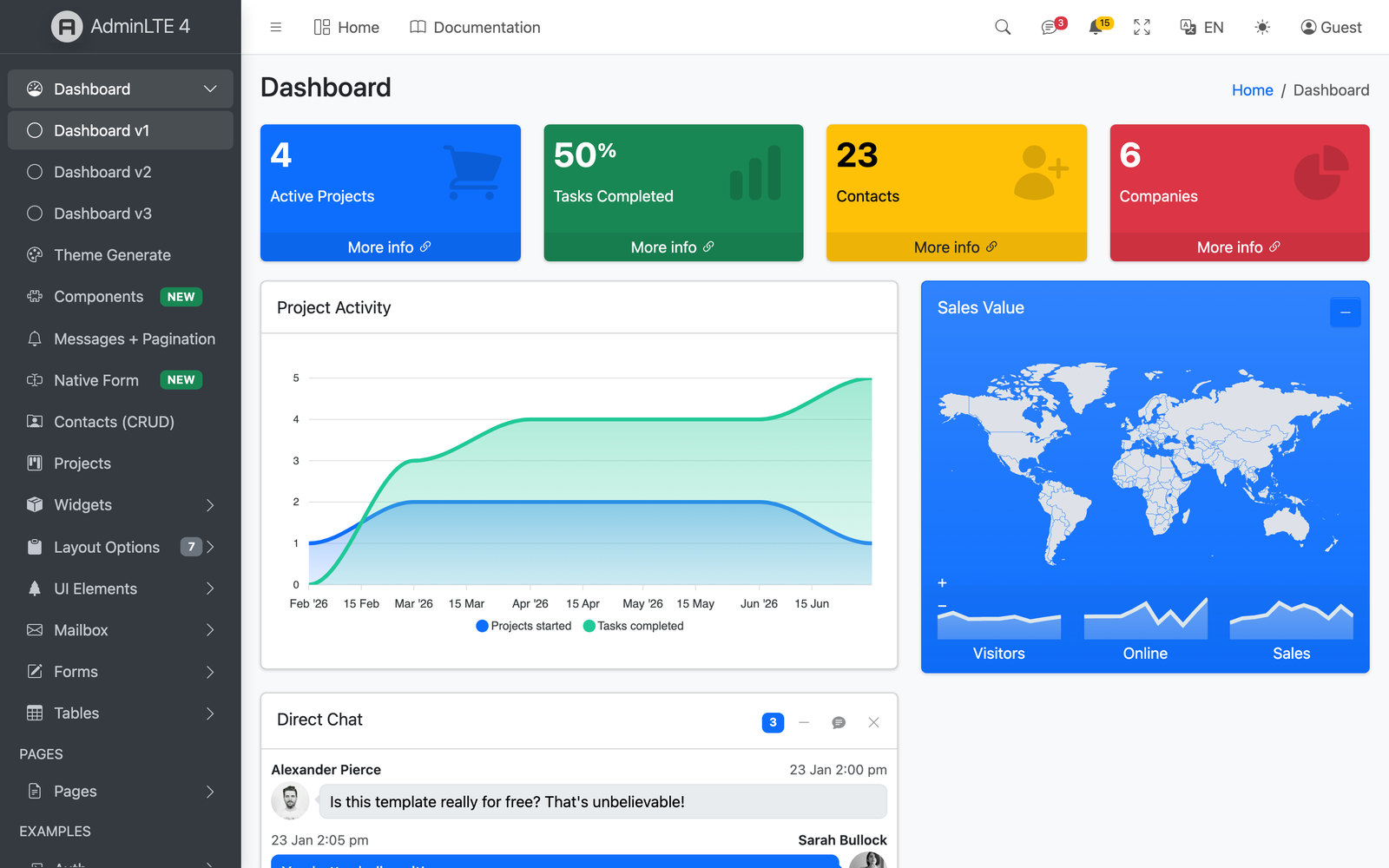
Why we like it: The officially maintained AdminLTE integration for Django, free under MIT, with a live demo you can open without an account.
The official AdminLTE 4 integration for Django themes django.contrib.admin and gives it a modern shell — a config-driven sidebar with per-request filters, 33+ Bootstrap 5.3 components, and a {{ form }} renderer. Free and open-source under the MIT license, it ships compiled assets so you can run it with zero Node setup via collectstatic. If the goal is to modernise Django’s built-in admin — like Jazzmin or Unfold below, but maintained by the AdminLTE team — this is the natural pick.
Two disclosures. This is our own project, since you are reading it on adminlte.io. And it is new — the repository was created in mid-2026 and is on an early version, so it has no long track record yet. Requiring Django 6.0 or newer is the narrowest support window in this list, and that is a deliberate choice rather than a gap: it targets the current release instead of carrying compatibility shims for versions Django itself has stopped supporting. It is maintained alongside AdminLTE’s other framework integrations, and we track each new Django release as it ships.
9. Django Datta Able

Why we like it: A complete Django project rather than a theme — authentication, a dashboard layout and a set of UI pages you can start deleting from.
Datta Able is different from the Django admin themes above — it’s a standalone dashboard template, not a reskin of Django’s built-in admin. You get charts, data tables, authentication pages, user management, and a complete Bootstrap 4 layout with custom Django views. This is for when you need a full admin application, not just a prettier version of /admin/.
AppSeed maintains this (and several similar starters), and the quality is consistent: Docker support, CI/CD configs, and clean project structure. Chart.js handles the data visualization. If you’re building a custom dashboard from scratch rather than extending Django’s admin, Datta Able gives you a solid foundation to build on.
Worth being straight about the metadata: the package declares no Django version classifiers and pins no Django requirement, so we cannot verify which releases it supports. It works, and it is actively touched, but you are checking compatibility yourself. Note also that its maintainers ship two similarly named things — a standalone starter project and a pip theme library that reskins the admin. This is the starter.
10. Zenith Dashboard, Django Edition
🌟 Django 6 · 27 Apps · 1034 Tests · Multi-Tenant SaaS
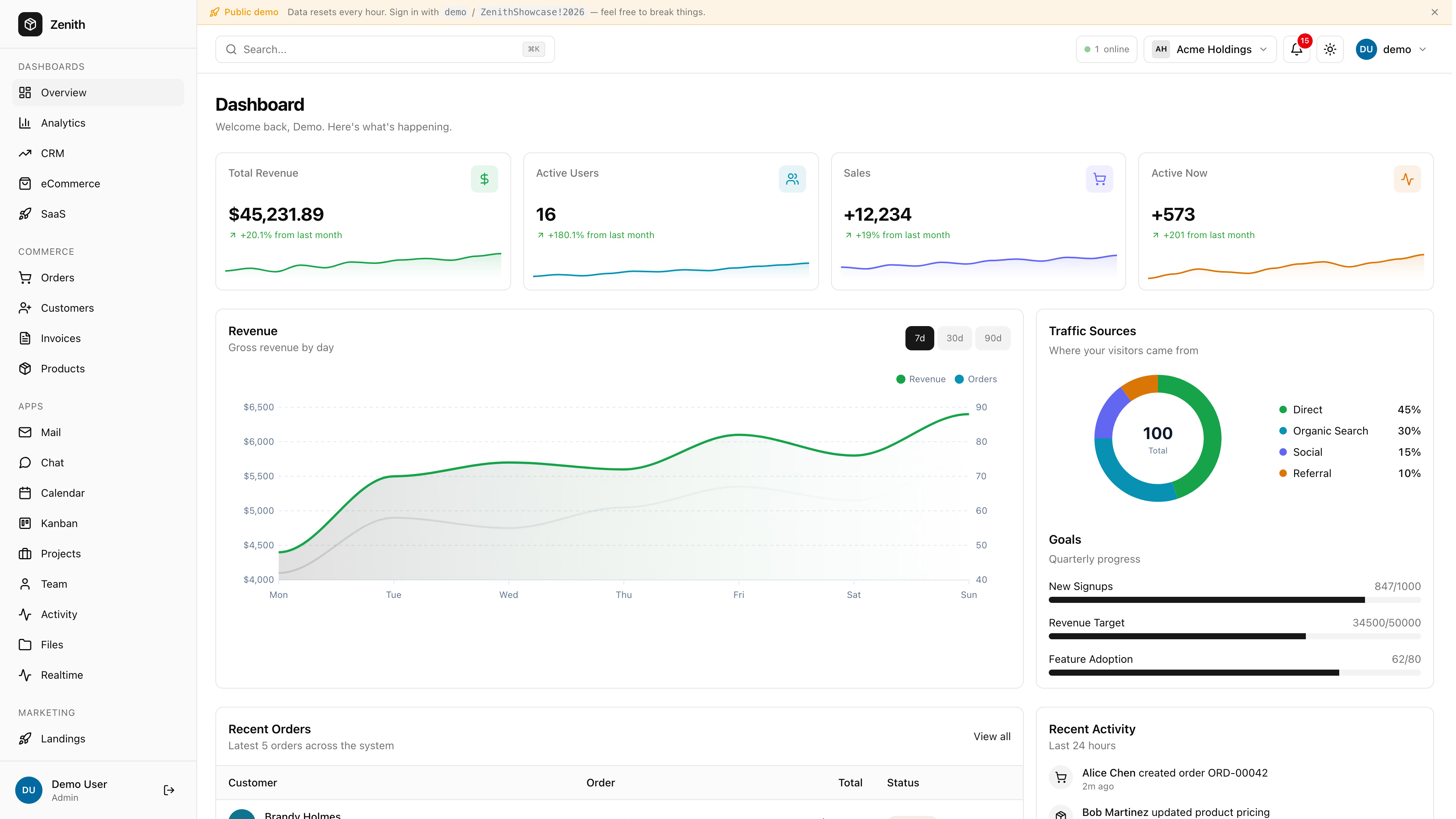
Why we like it: Functionally Apex’s twin in a warmer palette — pick on which interface you would rather look at daily.
Zenith is the SaaS-shaped sibling to Apex above — built on the same Django 6 + HTMX 2 + Alpine.js 3 + Tailwind CSS v4 stack, but designed from the first commit around multi-tenant organizations. Where Apex is the kitchen-sink admin, Zenith narrows the editorial scope to what a SaaS company actually ships on day one: a real org switcher, 5-tier RBAC enforced in middleware (not just templates), Stripe-style billing with plan + seats + invoice history, 2FA with TOTP + recovery codes, GDPR-compliant data export per user, and a live notifications feed wired through Django Channels 4 over WebSockets. The visual language differs too: Zenith uses an achromatic OKLCh palette — zero-chroma neutrals against a single accent — for a cleaner, less colorful enterprise feel than Apex’s product-marketing tone.
You get 5 dashboard variants (Overview / Analytics / CRM / eCommerce / SaaS) and 27 production apps (vs Apex’s 23), including the SaaS-specific ones Apex doesn’t ship: Orgs, Billing, Plans, Invoices linked to Stripe, Sessions management with revoke, and a Command Palette (Cmd+K) for power users. Testing coverage is also a tier higher — 1034 pytest unit tests plus full Playwright E2E coverage, all running on GitHub Actions. Same deploy story as Apex (Render, Fly.io, VPS, Docker Compose with seed data); same $69 personal license; same lifetime developer license at $349. If you’re picking between the two: choose Apex if you need every admin app under one roof, choose Zenith if you’re building a multi-tenant SaaS where billing, orgs, and audit trails matter more than feature breadth.
Disclosure: Zenith, like Apex at the top of this list, is our own commercial product. Everything between the two is free. Unlike Apex, Zenith leaves django.contrib.admin stock — it is a dashboard, not a reskin.
Not using Django? The equivalents in the neighbouring Python ecosystems are Flask-Admin for Flask, SQLAdmin for SQLAlchemy projects and FastAPI Admin for Tortoise ORM. They solve the same problem for a different stack and are outside the scope of this list.
Checked and left out
These appear in most Django admin roundups, including earlier versions of this one. Each was checked against Django 6.1 on 20 August 2026 and removed. The rule: nothing capped below Django 6.0, and nothing whose last real release predates the version you are running.
- Django Jet — the most-starred dead project in the category. Its repository looks recent, but the newest commit is a security-scanning config; the last real code change was 2018 and its setup file still advertises Python 2.6. Both demo domains resolve to a server with every port closed. Its README points at “New Jet”, which is an unrelated commercial SaaS rather than a successor.
- Django Suit — still sells licences, but its last stable release is from October 2019 and v2 has been in alpha since 2021, with its own README saying it is not ready for production. It is also licensed non-commercially, so the free tier is not an option for client work.
- Django Admin Tools — capped at Django 4.0, last commit August 2023. A pull request titled “Django 6 compatibility” has been open and unmerged since December 2025.
- Django Jet Reboot — the community revival of Jet, and a real project, but its tested ceiling is Django 5.1. It has not been verified against 5.2 LTS or 6.x.
- Django SimpleUI — popular, but we could not establish what it supports: it publishes no version classifiers, pins no Django requirement, and its README advertises compatibility with “Django 5.3” — a release that never existed. Its demo server is offline and its licence is stated as MIT in one file and Apache-2.0 in another.
- django-material-admin — Django 3.2, untouched since 2021.
- django-adminlte-ui, django-adminlte3 and django-adminlte2 — third-party AdminLTE ports that still surface in search. The first stopped in 2023, the second last published to PyPI in 2020 and its demo now 404s, and the third has been archived by its author.
- Flask-Admin, SQLAdmin, FastAPI Admin, Starlette Admin, Piccolo Admin, CRUDAdmin and FastAdmin — all good tools, none of them Django. They were listed here previously under a Django title; that was a mistake and they have been removed rather than relabelled.
The shortlist at a glance
| Project | Type | Price | Max Django | Live demo |
|---|---|---|---|---|
| Apex Dashboard, Django | Theme and dashboard (ours) | $69 | Current | Yes |
| Django Unfold | Theme | Free (MIT) | 6.1 | Yes |
| Django Jazzmin | Theme | Free (MIT) | 6.0 | Yes |
| Django Grappelli | Theme | Free (BSD) | 6.x (stated) | No |
| django-baton | Theme | Free (MIT) | 6.0 | Yes |
| django-admin-interface | Theme | Free (MIT) | 6.0 | No |
| django-smartbase-admin | Theme | Free (MIT) | 6.0 | No |
| AdminLTE 4 for Django | Dashboard | Free (MIT) | 6.0+ | Yes |
| Django Datta Able | Dashboard | Free | Not declared | Yes |
| Zenith Dashboard, Django | Dashboard (ours) | $69 | Current | Yes |
How to choose
- Do you need both? Only Apex reskins
django.contrib.adminand ships the dashboard as one project. If you know charts are coming but the admin has to look right now, that is the shortcut — and the only paid answer here. - Theme or dashboard? If the complaint is “it looks dated”, you want a theme and you are done in an afternoon. Dashboards are for screens the admin cannot express.
- Check your Django version first. Unfold needs 5.2+ and Python 3.12+; the official AdminLTE integration needs 6.0+. On 4.2 LTS your realistic choices are Jazzmin, Grappelli and baton.
- Prefer projects that declare their support. Version classifiers are machine-checkable; a README sentence is not. Two projects here state Django support nowhere at all.
- A live demo is worth more than stars. Half the best-known themes have no way to see them running short of installing them.
- Star counts age badly in this category. The two most-starred Django admin themes on GitHub are both unmaintained.
Django Admin FAQ
What is the best Django admin theme?
Django Unfold, for most projects starting today — it is the only theme declaring Django 6.1 support, it is built on Tailwind with a genuinely modern result, and it ships releases most weeks. It needs Django 5.2 or newer and Python 3.12+, so on older projects Jazzmin is the pragmatic choice and Grappelli the conservative one. If you want the built-in admin restyled and a full dashboard from a single project rather than a pip-install theme, Apex is the entry that covers both.
How do I change the look of the Django admin?
Install a theme package, add it to INSTALLED_APPS above django.contrib.admin, and configure it from settings. Nothing about your ModelAdmin classes changes. If you would rather not touch code at all, django-admin-interface stores colours, logo and layout in the database and is edited from within the admin itself.
Is the Django admin good enough for production?
For internal data management, yes — that is what it was built for, and a theme addresses the dated appearance. It is the wrong tool for anything customer-facing, or for a dashboard built around charts and custom workflows rather than models. That is when you reach for a standalone dashboard template.
What is the difference between a Django admin theme and a dashboard template?
A theme restyles django.contrib.admin, so every ModelAdmin, permission and inline you already wrote keeps working. A dashboard template is a separate project with its own pages and layouts that you wire to your own views. Themes take an afternoon; dashboards are a build. Apex is the one project here that does both, which is why it leads the list.
Which Django admin themes still work with Django 6?
Fewer than the search results suggest. Unfold declares 6.1; Jazzmin, django-baton, django-admin-interface and django-smartbase-admin declare 6.0; Grappelli states 6.x in its changelog without publishing classifiers. Several widely recommended themes are capped at Django 4.0 or older.
Are these Django admin themes free?
The themes are, all six under MIT or BSD. Unfold has an optional paid add-on but its core does not expire. Among dashboards, the official AdminLTE integration and Datta Able are free; our Apex and Zenith Django editions are commercial. One to watch: Django Suit is licensed non-commercially, so its free tier cannot be used for client work.
Related reading: our Alpine.js admin dashboard templates roundup.

You Might Also Like


