9 Best Bootstrap Forum Templates & Themes 2026

Build a thriving online community with these Bootstrap forum templates and themes — hand-picked solutions for discussion boards, Q&A platforms, knowledge bases, and social networks.
Online communities remain one of the most valuable assets a brand or organization can build in 2026. Whether you are creating a customer support forum, an internal knowledge base, a niche discussion board, or a full-blown social network, having a polished, responsive foundation is critical for user engagement and retention.
The templates and themes in this collection are built on Bootstrap, ensuring responsive layouts, consistent cross-browser behavior, and a familiar component system that most developers can work with immediately. Some are HTML templates that require front-end coding knowledge, while others are WordPress themes that let you launch a community site with minimal technical experience.
A quick note on the distinction: HTML templates give you full design control but require you to build the back-end logic (user accounts, posting, moderation). WordPress themes come with built-in functionality through plugins like bbPress and BuddyPress, so you can have a working forum in hours rather than weeks.
We have also included a few social network and knowledge base layouts, since the line between forums, communities, and social platforms continues to blur. Let us walk through the best options available.
If you are building other types of Bootstrap-powered sites alongside your forum, check out our collections of free Bootstrap 5 templates and Bootstrap blog templates for complementary designs.
A forum template is not a forum
This is the distinction that decides your whole project, and it is worth being blunt about before you buy anything on this page. A template gives you the front end — the thread list, the post layout, the profile page, the styling. It does not give you a forum. Threads, user accounts, replies, permissions, moderation queues, search, spam filtering, email notifications and edit history are all backend work, and no HTML template includes any of it.
That leaves three genuinely different routes to a working community site.
Route 1: dedicated forum software
If you want a forum and not a design project, install software that already is one. All four of the mainstream open-source options are free, self-hostable and actively developed:
- Discourse — the modern default. Ruby, GPL-2.0, and the most feature-complete of the group: trust levels, a strong moderation toolkit, real-time updates and excellent mobile behaviour. It is also the heaviest to host, so budget for a proper server rather than shared hosting.
- Flarum — PHP and MIT-licensed, deliberately lightweight and extension-driven. The easiest of the four to get running on ordinary PHP hosting, and the most pleasant to theme if you care about design.
- NodeBB — Node.js, GPL-3.0, built around real-time discussion with websockets throughout. The natural pick if your stack is already JavaScript.
- phpBB — the veteran, still maintained, and still the most forgiving to host. Its default look is dated, which is precisely where a theme earns its money.
Choosing this route does not make the templates below irrelevant, but it changes what you buy them for: you are buying a look to adapt, not a foundation to build on.
Route 2: WordPress plus a community plugin
If you already run WordPress, bbPress adds traditional threaded forums and BuddyPress adds profiles, activity feeds and groups. This is the shortest path to a working community for anyone who is not a developer, and it is exactly what the WordPress themes further down this page are built for — Docy WP, Docly, Join Up and Beehive all assume bbPress or BuddyPress underneath. The trade-off is that WordPress-based forums scale less comfortably than purpose-built software once threads run into the tens of thousands.
Route 3: an HTML template plus your own backend
Take the markup and build the application behind it. This is the right call when the forum is one feature inside a larger product rather than the product itself, when you need it to sit inside an existing authentication system, or when your data model genuinely differs from a standard board. It is also by far the most work — assume months rather than days, because the unglamorous parts (moderation tooling, spam defence, notification batching) are most of the effort and none of the fun.
Which route fits
Want a community running this month, with no development? Route 1 or 2. Already on WordPress? Route 2. Building a product that happens to contain discussion, with your own users table? Route 3. If you are unsure, start with Route 1 — a Discourse or Flarum instance costs an afternoon, and discovering what your community actually needs is much cheaper before you have written any code than after.
Best Bootstrap Forum Templates For Any Community
1. Docy
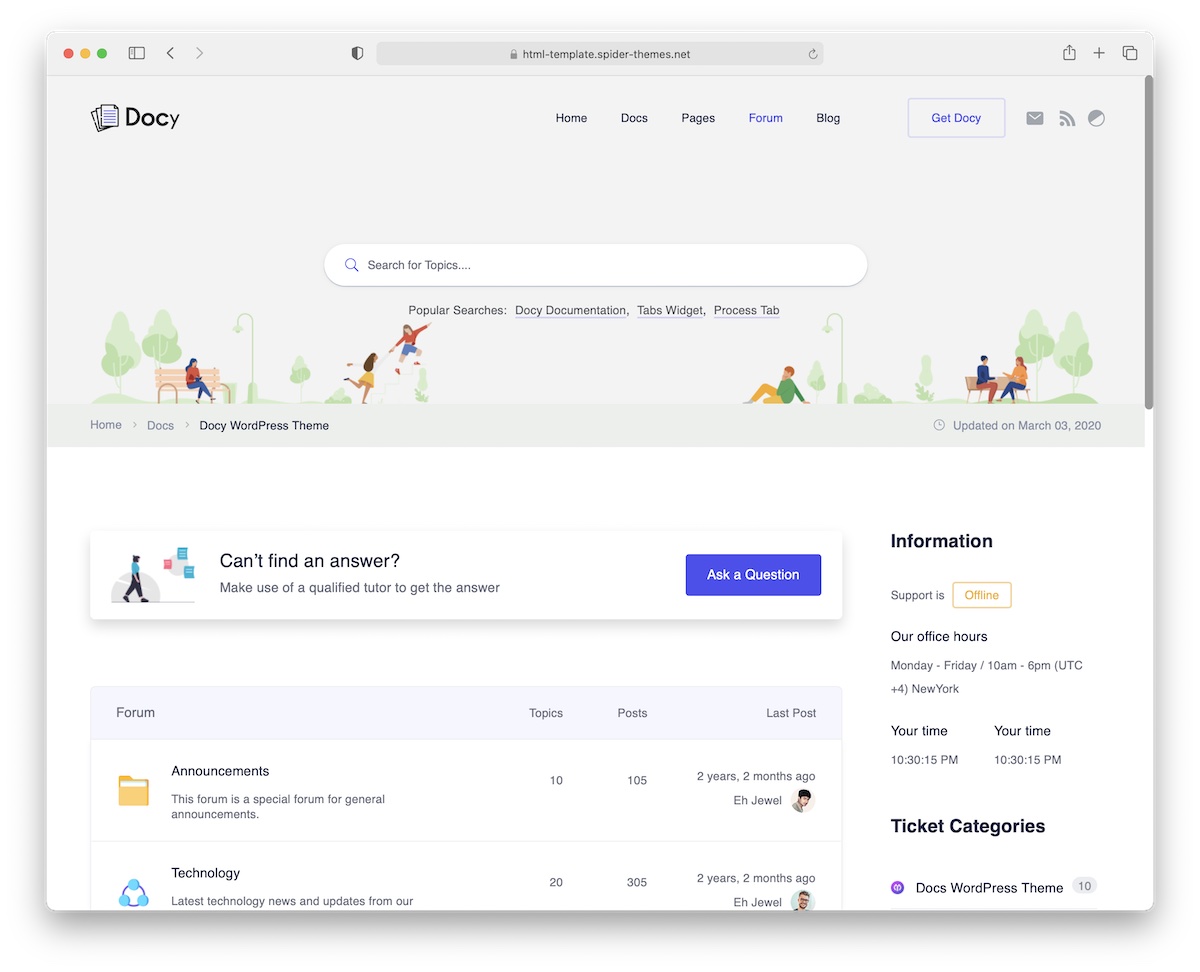
Docy is a specialized HTML5 template designed for helpdesk forums, knowledge bases, and online documentation portals. If you need a professional platform where users can find answers, browse documentation, and submit support tickets, Docy delivers everything you need in a clean, well-structured package.
The template ships with a comprehensive set of functional components — search with instant results, categorized article listings, sidebar navigation, breadcrumbs, and comment sections. You can use these out of the box or customize them to match your brand’s color scheme and typography.
Docy is fully responsive across all device sizes, and the codebase is written with clarity in mind, making it approachable for developers at any experience level. Multi-language support and RTL compatibility are built in, along with a dark mode toggle that users increasingly expect in 2026.
For software companies, SaaS products, and any business that needs to maintain a public-facing documentation and support hub, Docy is an excellent starting point.
2. Disilab
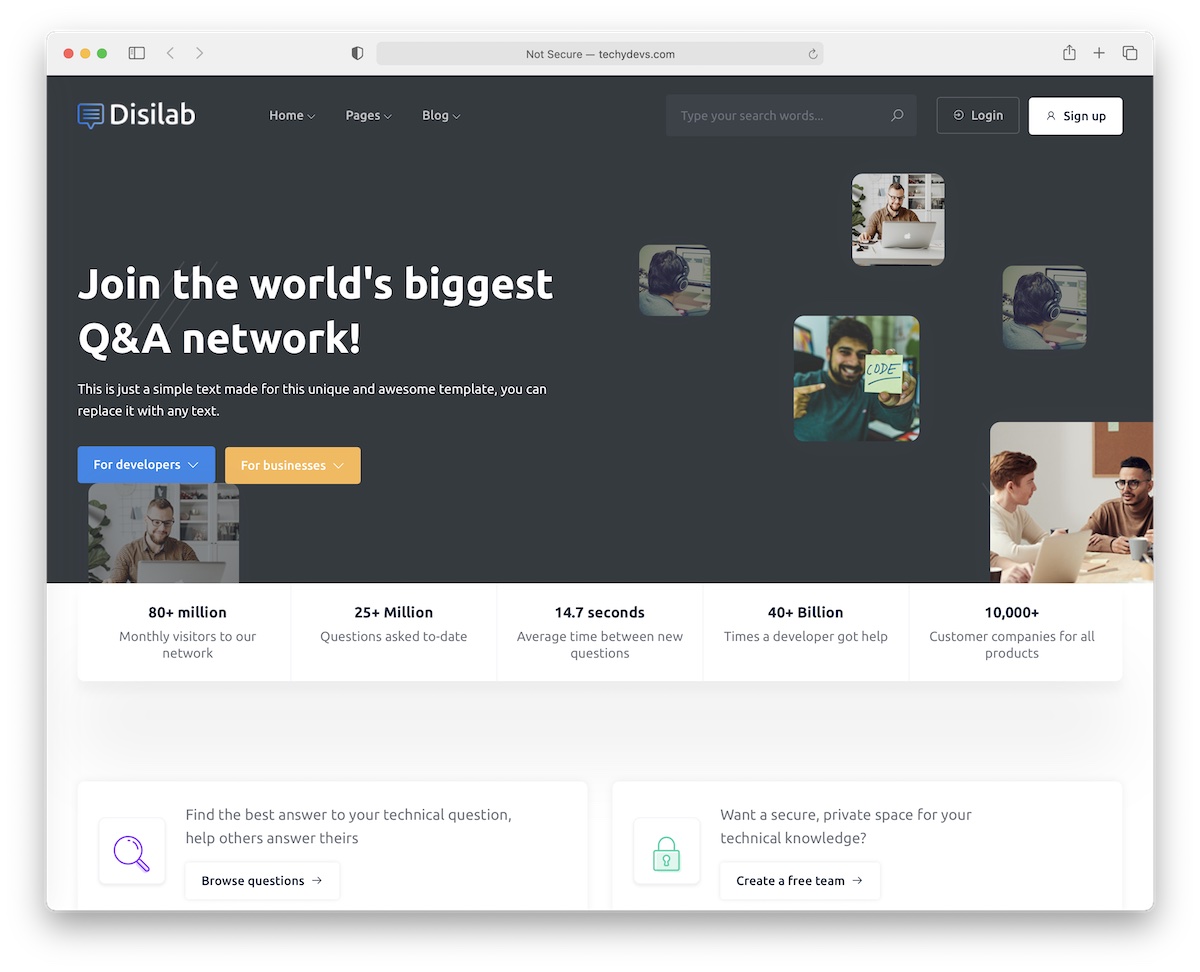
Disilab is a Bootstrap template designed for building Quora-style question-and-answer platforms. If you have ever wanted to create a community-driven Q&A site — whether for a specific industry, educational institution, or general knowledge sharing — Disilab provides a solid, feature-rich foundation.
The package includes three home page variations and over forty pre-built pages covering every aspect of a Q&A platform: question listings, detailed answer threads, user profiles, categories, tags, notifications, and admin panels. The modular page structure gives you unlimited possibilities for customization.
An RTL version is included for right-to-left language support, making Disilab suitable for Arabic, Hebrew, and other RTL markets. The responsive design ensures a smooth experience on desktops, tablets, and smartphones alike.
Going from concept to a launched Q&A community no longer requires months of development. With Disilab, you get professional design and proven UX patterns that you can build upon with your own back-end logic.
3. Socimo
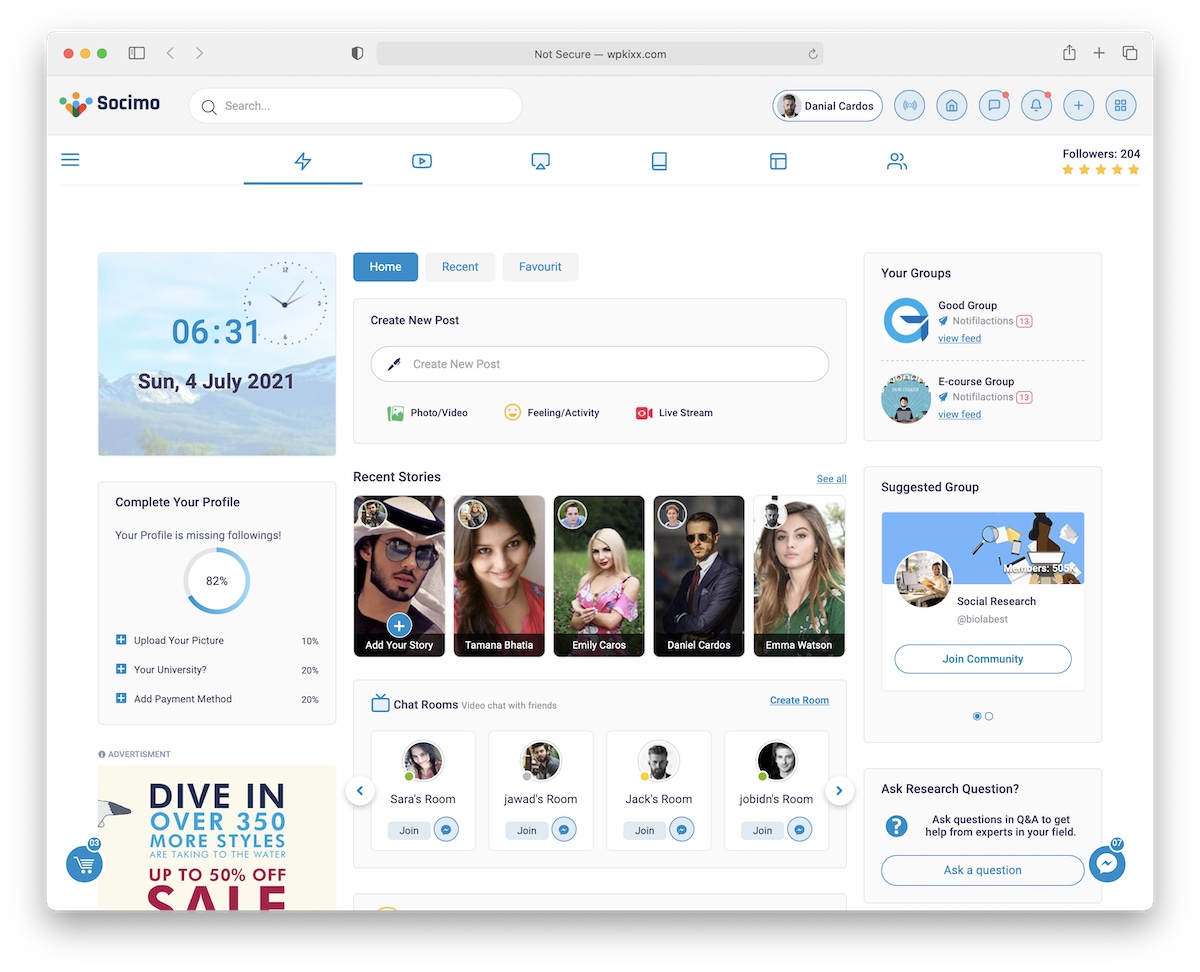
Socimo is a comprehensive Bootstrap template for building social networks and online communities. It goes well beyond a basic forum — this is a full social platform kit with newsfeeds, user profiles, messaging, groups, and more.
The template packs an impressive amount of functionality into a clean, well-organized design. Marketplace features let users buy and sell within the community, live chat enables real-time conversations, and a dark mode option caters to user preferences. Groups and events provide structure for sub-communities within your platform.
Socimo also includes a complete admin dashboard — an essential tool for moderating content, managing users, reviewing reports, and monitoring platform activity. This is a detail that many community templates overlook, but it is critical for actually running a social platform.
Whether you are building a professional networking site, a hobbyist community, or an internal company social platform, Socimo provides a mature, feature-complete starting point.
4. Socialite
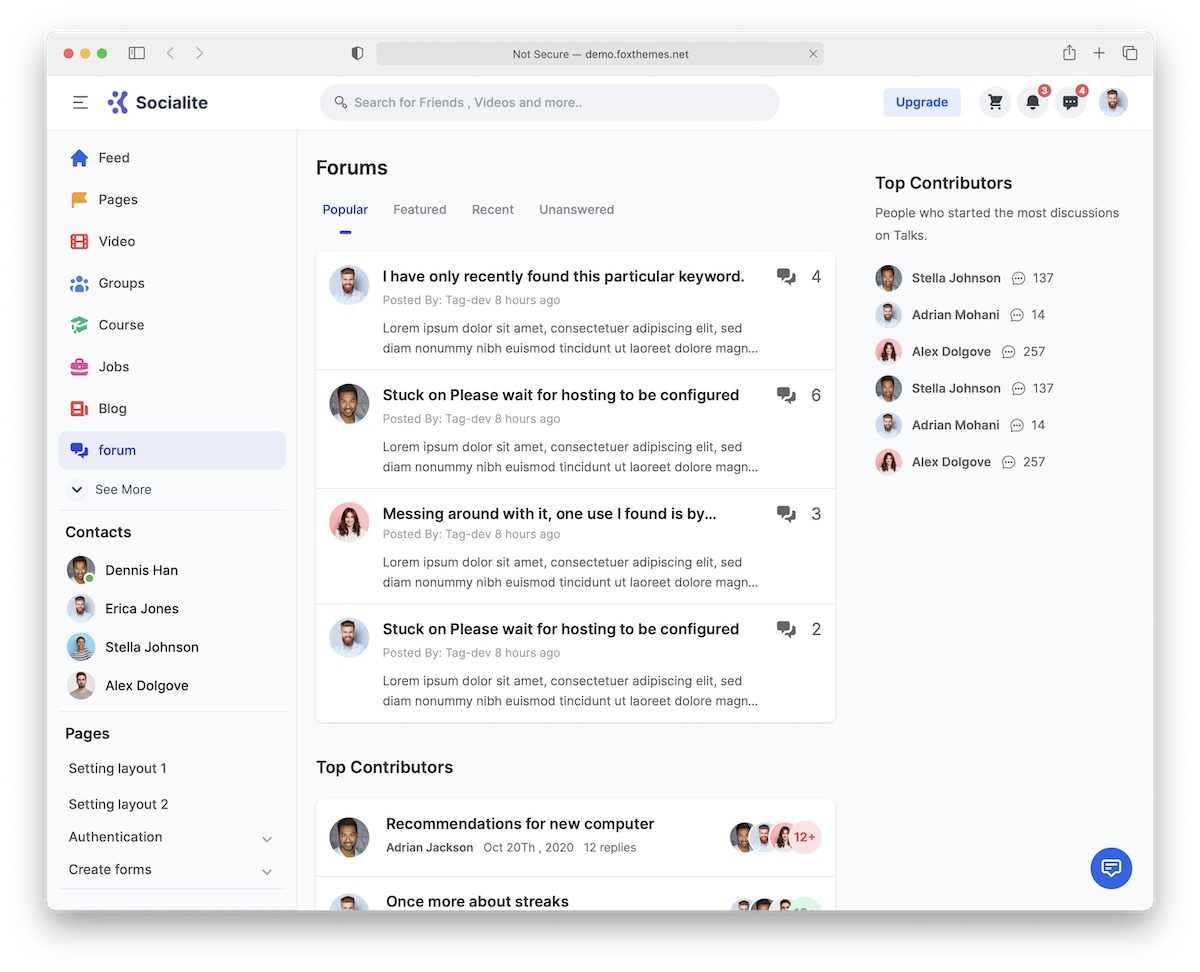
Socialite takes a clean, minimal approach to social community design — and that restraint is its greatest strength. In a space where templates often try to cram in every feature imaginable, Socialite focuses on clarity, usability, and a design that stays out of the user’s way.
The template includes essential community pages: login and registration flows, user profiles, friend lists, newsfeeds, and messaging interfaces. Six months of free support are included with the purchase, along with lifetime updates to keep the template compatible with new browser versions and web standards.
Socialite’s modular component architecture is particularly well-executed. Individual UI components — cards, navigation bars, comment threads, notification panels — can be mixed and reused freely across different pages and layouts. This makes it straightforward to extend the template with custom pages as your community grows.
Preview the live demo to experience the design firsthand. If you value clean aesthetics and a user experience that prioritizes content over chrome, Socialite is a strong choice.
5. Docy (WordPress Theme)

Docy is also available as a WordPress theme for those who want the same polished documentation and forum experience without writing front-end code. If the HTML template above appeals to you but you prefer a CMS-powered solution, this is the way to go.
The WordPress version leverages the block editor and custom post types to let you create and organize documentation articles, FAQ sections, and support forums through a familiar interface. No coding is required — you manage everything from the WordPress admin panel.
Performance optimization, mobile responsiveness, and SEO best practices are built into the theme. It works seamlessly with popular WordPress plugins, so you can extend it with contact forms, analytics, membership restrictions, or any other functionality your support portal needs.
For teams that want a professional knowledge base and forum site up and running in a single afternoon, the Docy WordPress theme is hard to beat.
6. Docly
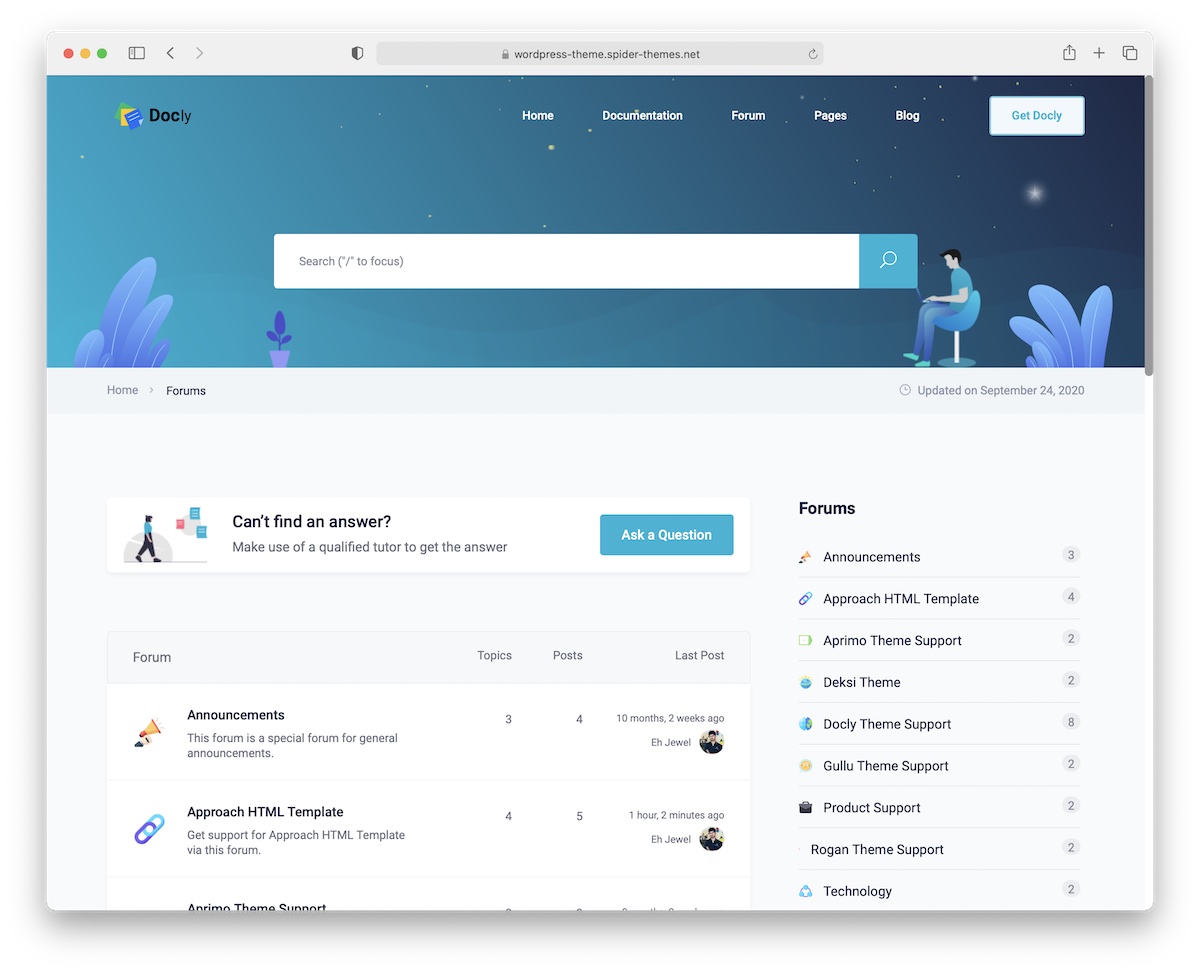
Docly is a Bootstrap-powered WordPress theme built specifically for documentation, knowledge bases, and helpdesk forums. It integrates with bbPress to provide a fully functional community forum where users can ask questions, share solutions, and help each other.
The theme is built with modern web technologies and follows current design trends — clean typography, generous whitespace, and intuitive navigation. Your documentation site will not only perform well technically but also look polished and professional to visitors.
Docly’s search functionality is particularly strong, with instant results and smart filtering that helps users find answers quickly. This is crucial for support-oriented sites where reducing time-to-resolution directly impacts customer satisfaction.
Customization is handled through the WordPress Customizer, so you can adjust colors, layouts, and branding elements in real time without touching code. Docly is an excellent choice for SaaS companies, open-source projects, and any product that needs a centralized documentation and community hub.
7. Join Up
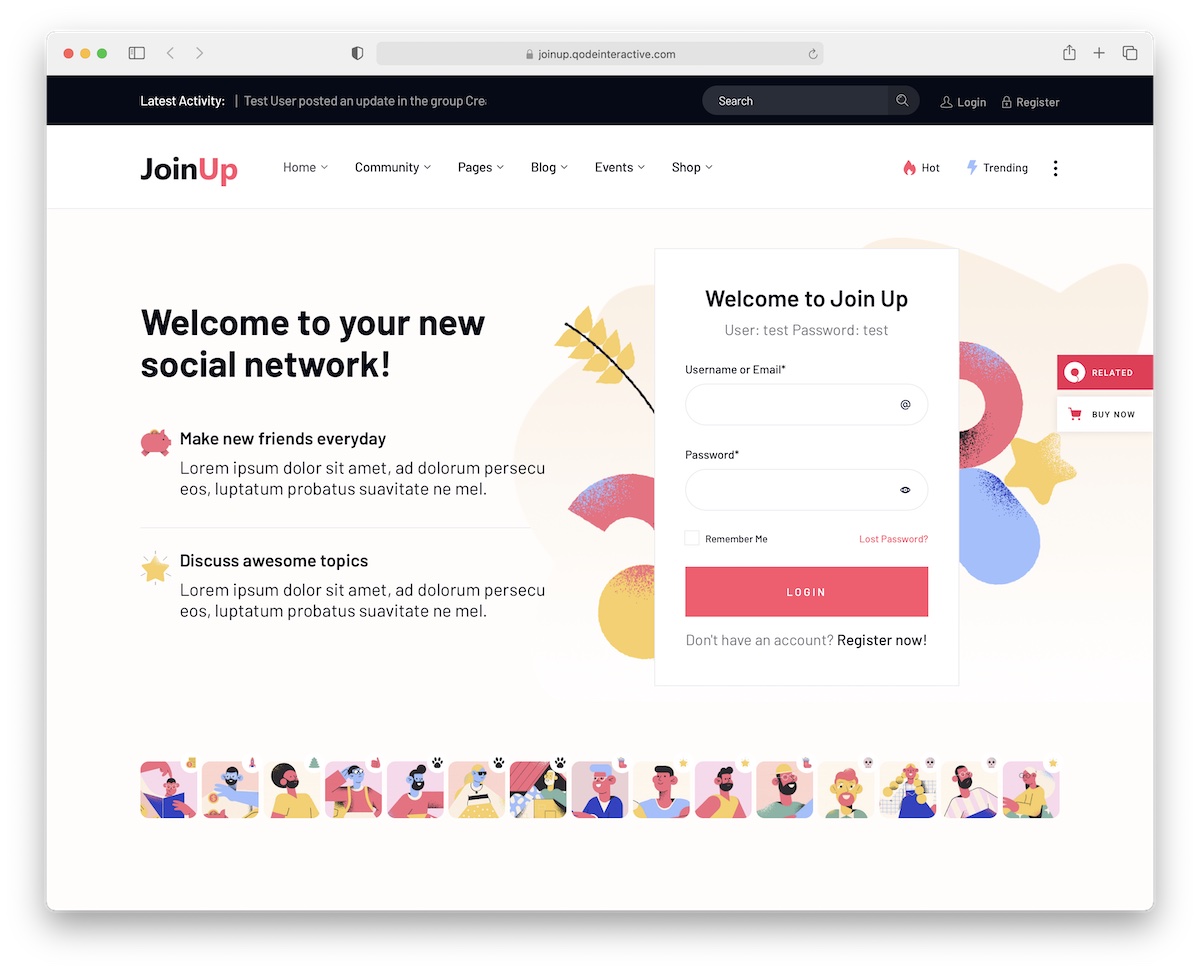
Join Up is an all-in-one WordPress theme for building online communities, combining social networking, forums, and blogging into a single platform. Built on BuddyPress and bbPress, it provides user profiles, activity feeds, private messaging, groups, and threaded discussions out of the box.
The theme ships with the Elementor page builder, which means you can customize layouts using drag-and-drop without writing any code. This makes Join Up particularly accessible for non-developers and small teams that need to launch a community site quickly.
An eCommerce module is also included, allowing you to sell products, memberships, or premium content within your community — a valuable revenue stream for niche communities and membership sites. Slider Revolution is bundled for creating engaging hero sections and promotional banners.
Social media integration, shortcodes for common components, and one-click demo import round out the feature set. Join Up is a versatile foundation for anyone building a community-driven WordPress site.
8. Beehive
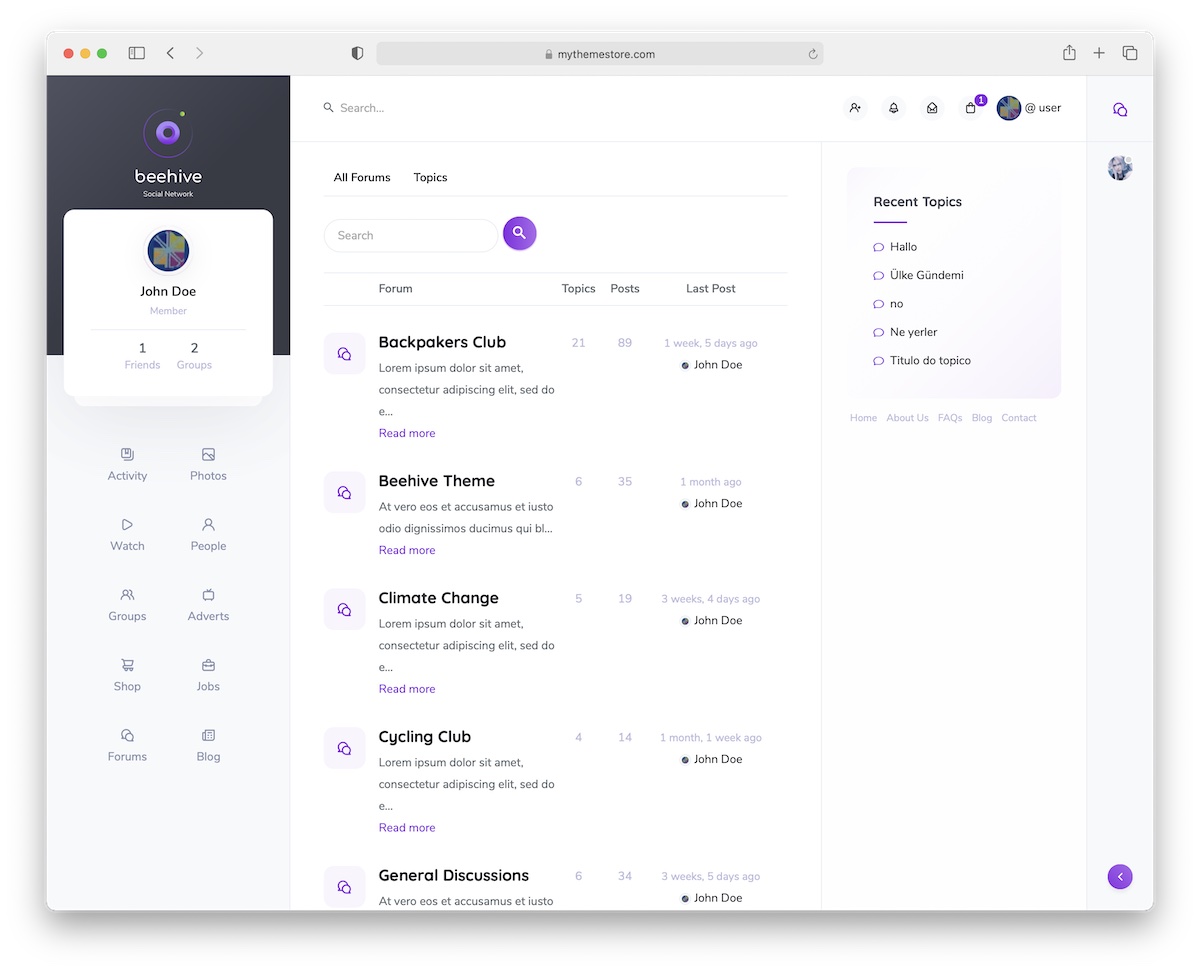
Beehive is a premium WordPress theme designed for building full-featured social networks. With hundreds of downloads and consistently high ratings (4.8+ stars), it is one of the most trusted community-building themes available.
The feature list is extensive: activity newsfeeds, social likes and reactions, real-time notifications, live chat, forum boards, blog functionality, and even a job search module. This breadth of features means you can build a comprehensive community platform without stitching together multiple plugins and hoping they play nicely together.
Beehive works with BuddyPress and integrates deeply with its component system, so user profiles, groups, connections, and messaging all work seamlessly. The design is modern and social-media-inspired, which means your users will feel immediately at home.
Before committing, explore the live demo to see how all the pieces fit together. Beehive is an excellent choice for organizations, educational institutions, and brands that want to build an engaged, self-contained community.
9. kbDoc
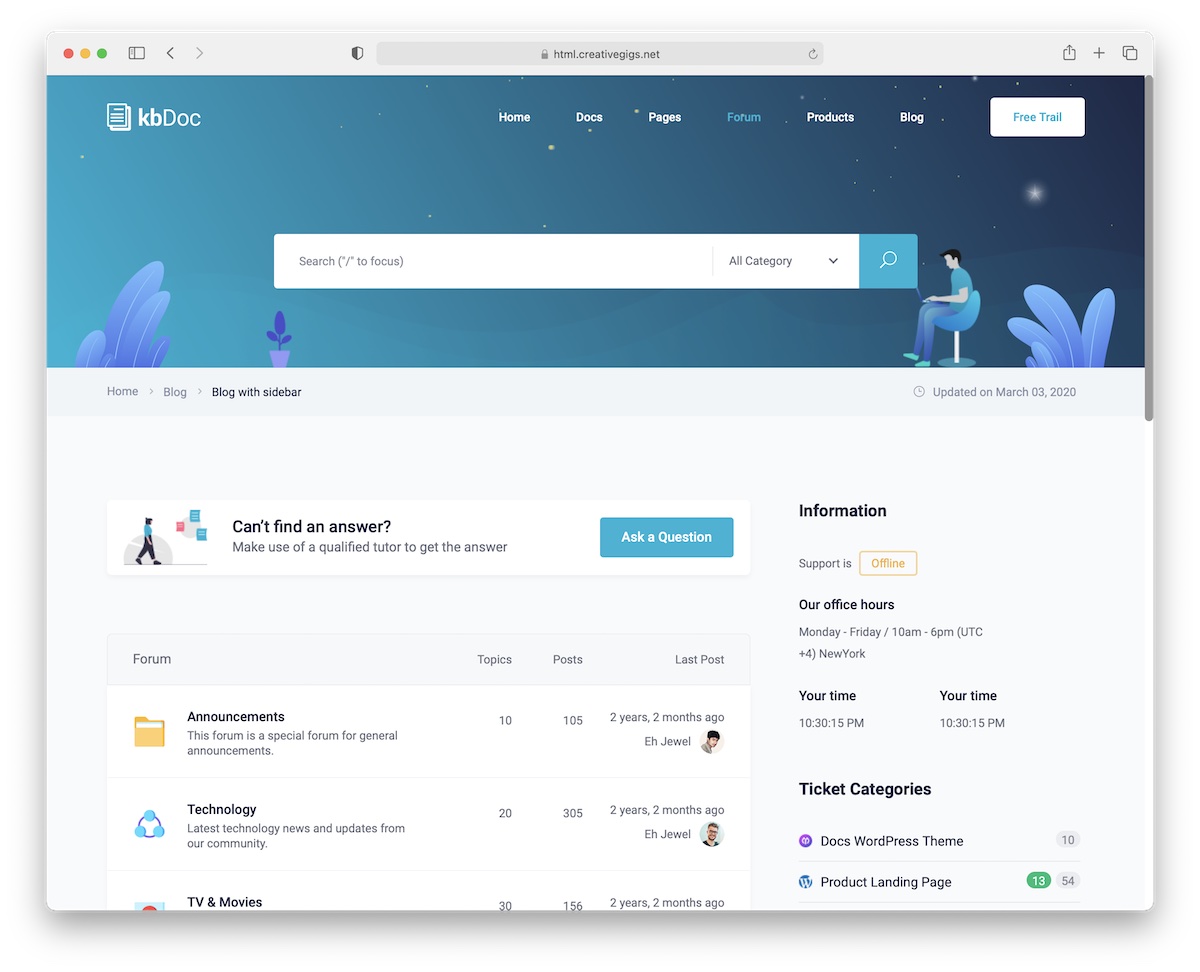
kbDoc is a Bootstrap template purpose-built for helpdesk forums, documentation portals, and knowledge bases. It provides everything you need in a single package — no third-party plugins or extensions required, though you can integrate them if your project demands it.
Standout features include a dark/light mode toggle, RTL language support, PSD source files for design customization, accordion-based FAQ sections, and a mega menu for organizing large documentation structures. The template is thorough in covering both user-facing pages and administrative views.
The Bootstrap foundation means kbDoc is fully responsive and benefits from Bootstrap’s mature grid system, utility classes, and component library. Developers familiar with Bootstrap will feel right at home extending and customizing the template.
For teams that need a dedicated support and documentation hub — whether for a software product, service platform, or internal wiki — kbDoc provides a professional, self-contained solution that you can deploy and customize with confidence.
Which Forum Template Should You Choose?
The right choice depends on your technical comfort level and project requirements:
For HTML/CSS developers who want full control over the front-end and plan to build custom back-end logic, go with an HTML template like Docy, Disilab, Socimo, Socialite, or kbDoc. These give you clean markup and Bootstrap components to build upon.
For non-developers or small teams who need a working forum quickly, the WordPress themes (Docy WP, Docly, Join Up, Beehive) are the better path. Plugins like bbPress and BuddyPress handle the community functionality, and page builders like Elementor let you customize the design visually.
For knowledge bases and documentation, Docy, Docly, and kbDoc are specifically designed for this purpose and will save you the most time.
For social networks and full community platforms, Socimo, Beehive, and Join Up offer the broadest feature sets, including newsfeeds, messaging, groups, and moderation tools.
You might also be interested in our curated list of Bootstrap WordPress themes if you are looking for more Bootstrap-powered WordPress solutions beyond forums.
Forum template FAQ
Can I build a forum website with a Bootstrap template?
Only the front end. A template supplies the thread list, post layout and profile styling, but not threads, user accounts, replies, permissions, moderation, search, spam filtering or email notifications — all of which are backend work. To get a working forum you either pair the template with software that provides those (Discourse, Flarum, NodeBB, phpBB), use WordPress with bbPress or BuddyPress, or build the application yourself.
What is the best free forum software?
Discourse is the most capable and the modern default, with trust levels and strong moderation tools, though it needs a real server rather than shared hosting. Flarum is the lightest and easiest to host on ordinary PHP. NodeBB suits teams already running JavaScript. phpBB is the veteran and the most forgiving to host, with a dated default look that a theme can fix. All four are free and open source.
Do I need WordPress to run a forum?
No, and purpose-built forum software usually scales better. WordPress with bbPress or BuddyPress is the fastest route if you already run a WordPress site or do not want to manage separate software, which is why several themes on this page are built for it. Once a board reaches tens of thousands of threads, dedicated software tends to handle it more comfortably.
What is the difference between bbPress and BuddyPress?
bbPress adds traditional threaded discussion forums to WordPress. BuddyPress adds social-network features — member profiles, friend connections, activity feeds and groups. They solve different problems and are frequently installed together, with bbPress providing the discussion boards and BuddyPress the community layer around them.
How much does a forum template cost?
The HTML and WordPress themes featured here generally run from about $16 to $89 for a regular licence, with extended licences considerably higher. The forum software itself — Discourse, Flarum, NodeBB and phpBB — is free and open source, so for most projects the real cost is hosting and your own time rather than the template.
What should a forum design get right?
Scannability above all: a visitor should be able to read a thread list and tell what is active, what is answered and what is worth opening. That means clear visual separation between threads, a visible reply count and last-activity time, and unambiguous author attribution. Mobile matters more than most forum designs assume, since a large share of community reading happens on phones.

You Might Also Like