
15 Free Google Data Studio Templates (And What They Really Cost)

Google gives away the reporting tool and charges nothing for its own data. Analytics, Ads, Search Console, Sheets, YouTube and BigQuery all have free connectors that never expire. Everything else — Facebook, Instagram, LinkedIn, TikTok, Mailchimp, Klaviyo, Shopify — has no free path at all, because Google publishes no connector for any of them.
That single fact decides which templates are genuinely free, and it is the fact most “free Data Studio templates” lists leave out. Of the 15 templates below, 7 run free forever on Google’s own connectors. The other 8 are free to copy and then need a paid subscription before they show a number. Every one was opened and rendered in a browser while writing this, and the ones that came back empty are flagged as such.
A naming note. Google has renamed Looker Studio back to Data Studio, the name it used before 2022. Reports, data sources and sharing all carried over untouched, and old lookerstudio.google.com links redirect to datastudio.google.com by themselves. Most template lists still say Looker Studio; it is the same product.
Which data sources have a free path
Before looking at any template, check what it connects to. Google maintains roughly twenty connectors for its own products and leaves the rest of the market to paid partners, of which there are several hundred. A template is free to run if and only if everything it reads sits in the first column.
| Data source | Free connector? | What that means in practice |
|---|---|---|
| Google Analytics 4 | Yes | Free forever, no row or refresh limits |
| Google Search Console | Yes | Free forever, capped at Google’s own sixteen months of history |
| Google Ads | Yes | Free forever, one account per data source |
| Google Sheets | Yes | Free forever — the escape hatch for data with no connector |
| YouTube Analytics | Yes | Free forever, your own channels only |
| BigQuery | Yes | Connector is free; you pay BigQuery for queries beyond its free tier |
| Facebook and Instagram | No | Paid partner connector, priced per account or per source |
| LinkedIn, TikTok, Pinterest | No | Paid partner connector |
| Mailchimp, Klaviyo, any email platform | No | Paid partner connector |
| Shopify, WooCommerce | No | Paid partner connector |
| HubSpot, Salesforce, most CRMs | No | Paid partner connector |
There is one workaround worth knowing. Because the Google Sheets connector is free and unlimited, anything you can get into a Sheet becomes free to report on. That is why the genuinely free templates further down lean on Sheets so heavily — it is the seam in the pricing model, and the community has been building through it for years.
15 Data Studio templates worth copying
| Template | Reads | Free to run? | Best for |
|---|---|---|---|
| 1. [Sample] YouTube Channel Report | YouTube Analytics | Yes — Google connector | Channel reporting |
| 2. Google Ads Pacing Dashboard — Conversions and Budget | Google Ads + Sheets | Yes — Google connector | Budget pacing |
| 3. Google Ads Pacing Dashboard — Revenue and Budget | Google Ads + Sheets | Yes — Google connector | Revenue pacing |
| 4. Data Studio Chart Tutorial | Google Sheets | Yes — Google connector | Learning the tool |
| 5. Custom Event Annotations Demo | Search Console + Sheets | Yes — Google connector | Explaining spikes |
| 6. Custom Expert Commentary Demo | GA4 + Sheets | Yes — Google connector | In-report commentary |
| 7. [Sample] Google Ads Campaign Performance | Google Ads | Yes — Google connector | Layout only, empty demo |
| 8. Google Ads Overview Report | Google Ads via Windsor | Copy free, pipe paid | Designed PPC report |
| 9. PPC Report | Multi-platform via Windsor | Copy free, pipe paid | Cross-channel paid |
| 10. Shopify Sales Funnel Dashboard | Shopify via Windsor | Copy free, pipe paid | Shopify funnel |
| 11. Shopify marketing funnel dashboard | Shopify via Coupler | Copy free, pipe paid | Shopify attribution |
| 12. Klaviyo Email and SMS Campaign Report | Klaviyo via TMR | Copy free, pipe paid | Klaviyo revenue |
| 13. Mailchimp Analytics Dashboard | Mailchimp via Windsor | Copy free, pipe paid | Mailchimp reporting |
| 14. Agency Report Dashboard | Multi-channel via Windsor | Copy free, pipe paid | Monthly client report |
| 15. Google Analytics 4 Overview Report | GA4 via Windsor | Copy free, pipe paid | Read the caveat first |
Templates that run free on Google connectors
These cost nothing to operate, permanently. Open the link, use File and then Make a copy, and point the copy at your own property. The only thing you are spending is the time to swap the data source.
1. [Sample] YouTube Channel Report by Google
![Google official [Sample] YouTube Channel Report template in Data Studio with views, watch time and top videos](https://adminlte.io/wp-content/uploads/2026/08/data-studio-templates-ytsample.jpg)
The best-populated of Google’s own sample reports and the one worth copying first, because it arrives full of real channel data rather than placeholders. Views, watch time, subscriber movement and a top-videos table are all laid out sensibly enough to keep as-is.
- Best for: Channel reporting, and seeing what a finished report looks like
- Reads: YouTube Analytics
- Free to run: Yes — Google connector
- Watch out for: Swapping the sample data source for your own channel is a manual step, and the report keeps the sample name until you rename it.
2. Google Ads Pacing Dashboard — Conversions and Budget by Paid Search Magic
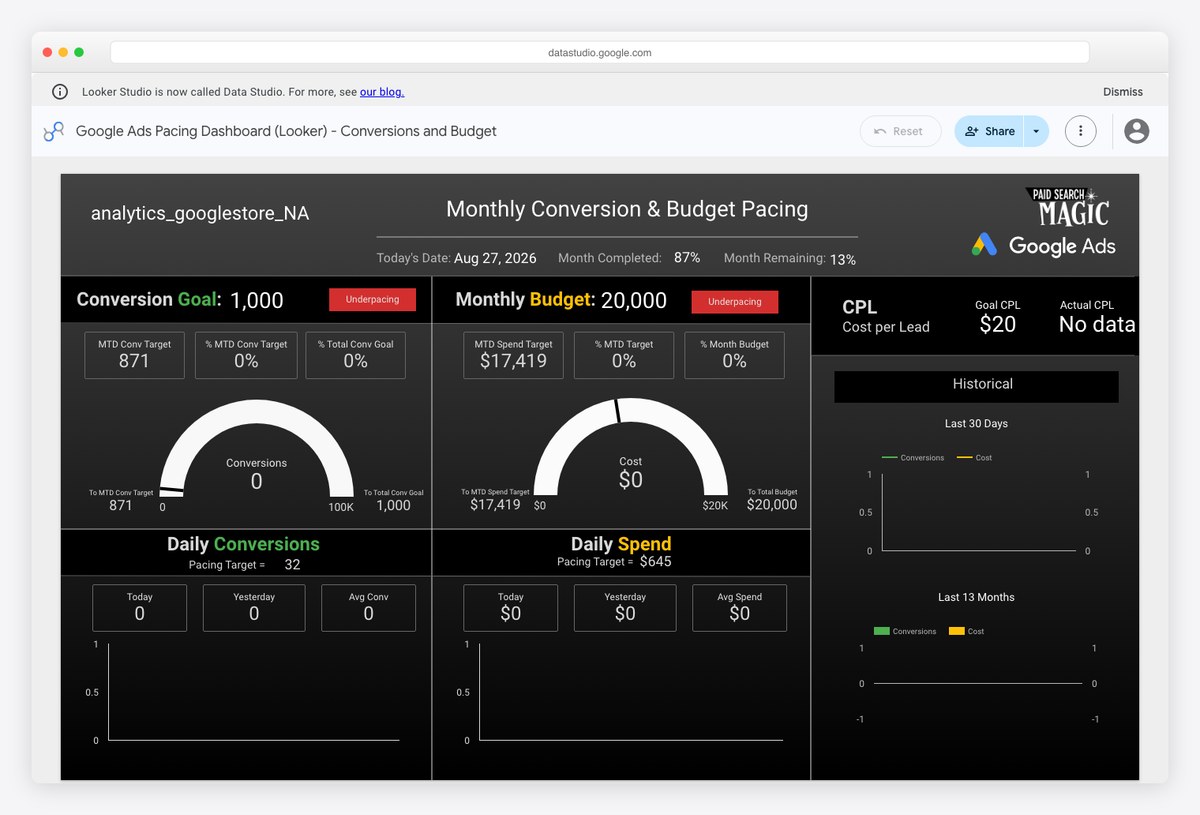
Answers the question every paid search manager is asked mid-month: are we on track to spend what we said we would, and get what we promised for it. Targets live in a Google Sheet you copy, and actuals come from Google Ads, so both halves run on free connectors.
- Best for: Mid-month budget pacing conversations with a client
- Reads: Google Ads + Google Sheets
- Free to run: Yes — Google connector
- Watch out for: You have to keep the targets Sheet current by hand. The dashboard is only as honest as the numbers you typed into it.
3. Google Ads Pacing Dashboard — Revenue and Budget by Paid Search Magic
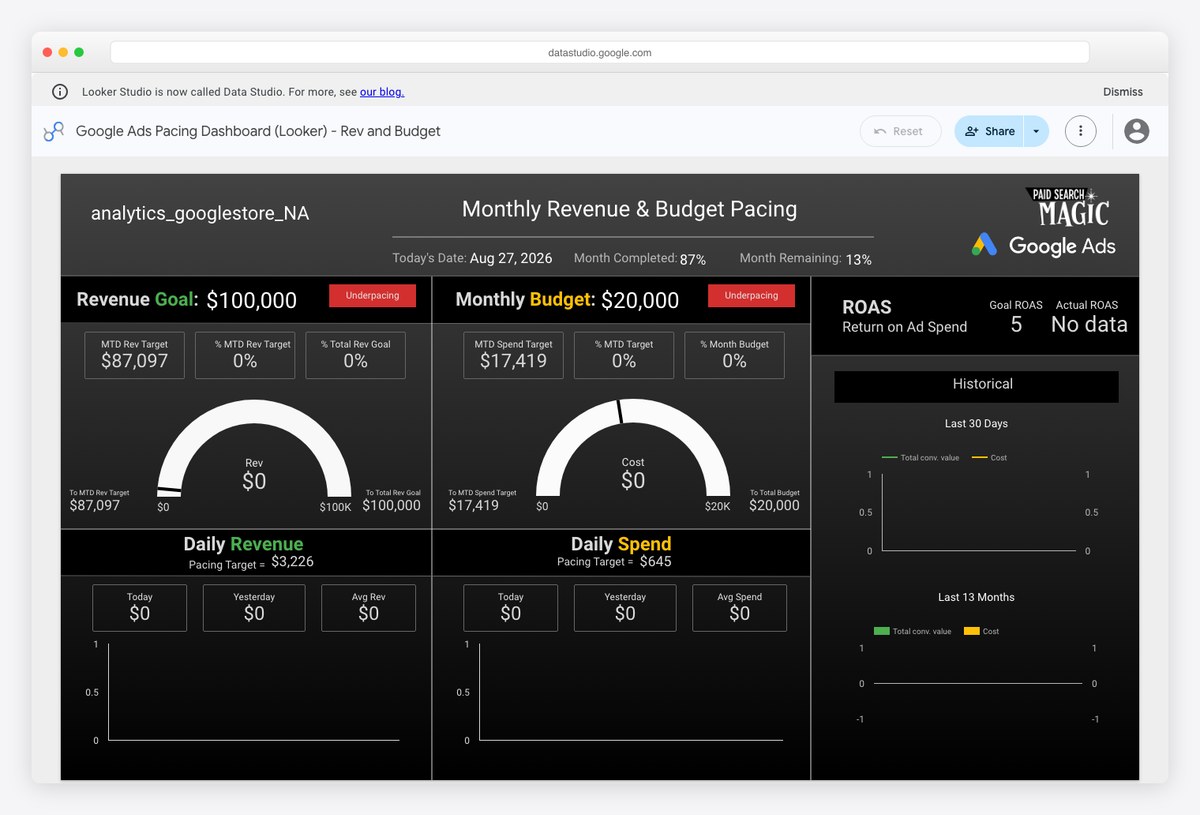
The same pacing build with revenue in place of conversions, which is the version to use for ecommerce accounts where the target is a return figure rather than a lead count. Pick one of the two rather than running both.
- Best for: Ecommerce paid search where the target is revenue
- Reads: Google Ads + Google Sheets
- Free to run: Yes — Google connector
- Watch out for: Revenue reported by Google Ads is attributed by Google Ads, so it will not tie out to your shop back end.
4. Data Studio Chart Tutorial by Ben Collins
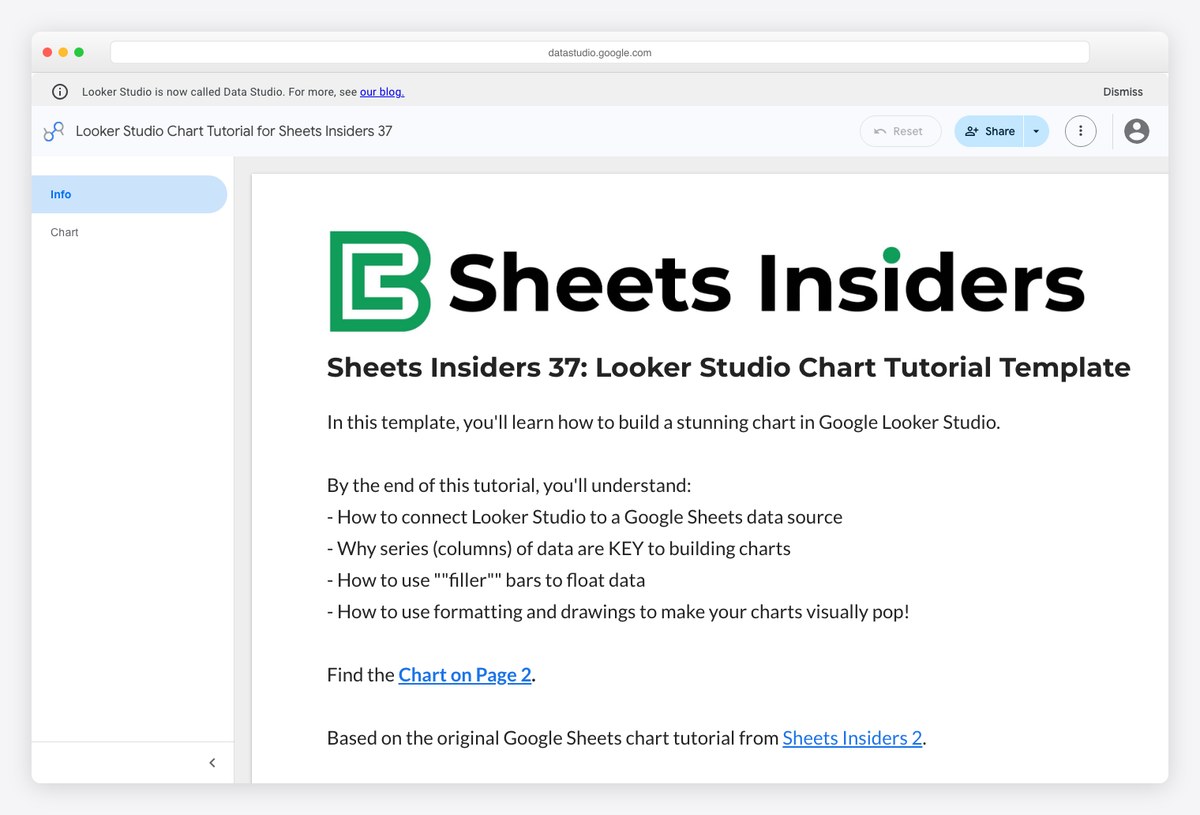
A teaching report rather than a business one: every chart type demonstrated on a single Google Sheet you can copy. When you want to understand why a chart is behaving oddly, this is more useful than any amount of documentation.
- Best for: Learning the tool, and as a chart reference while building
- Reads: Google Sheets
- Free to run: Yes — Google connector
- Watch out for: The opening page is explanatory text — the charts themselves are on the following page.
5. Custom Event Annotations Demo by Lazarina Stoy
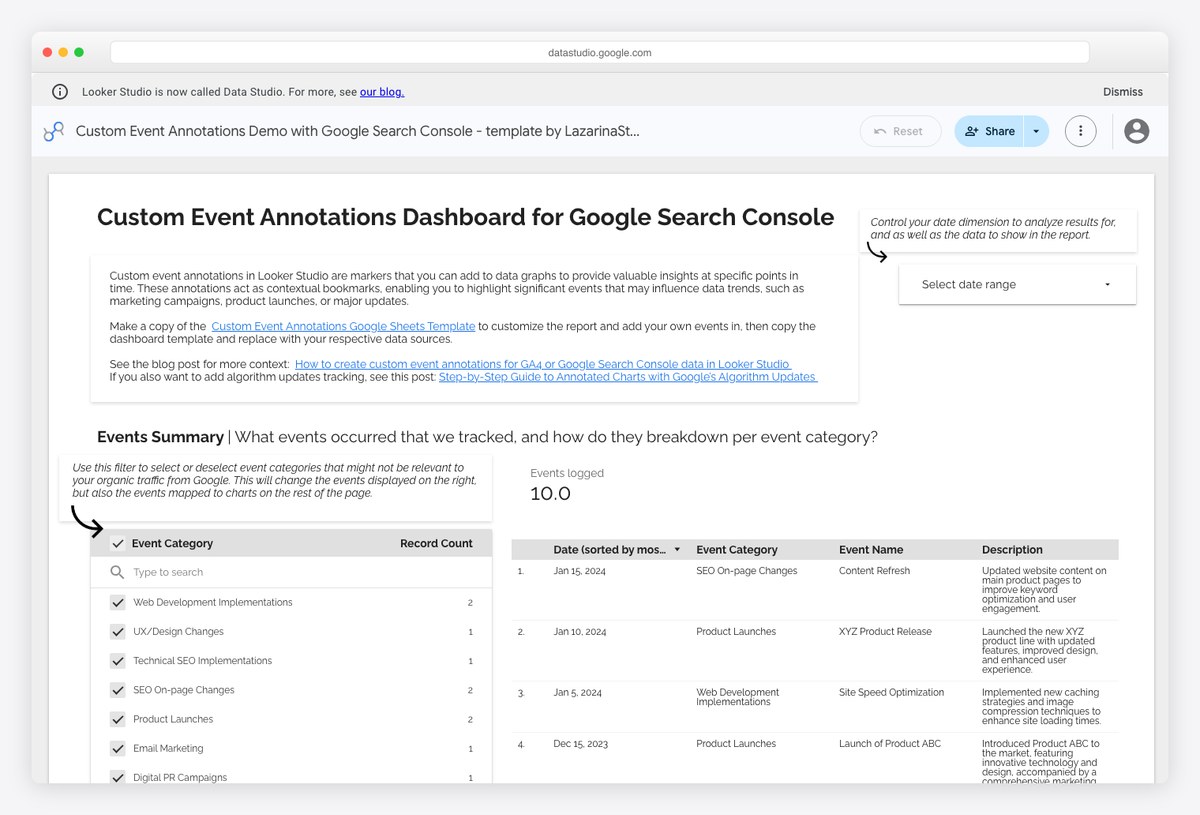
Solves something the tool has never handled natively: marking what you did on the chart of what happened. Events live in a Sheet you maintain, and the report draws them against the trend, so a traffic step change has a labelled cause next to it.
- Best for: Reports where someone always asks what caused that spike
- Reads: Search Console + Google Sheets
- Free to run: Yes — Google connector
- Watch out for: Someone has to write the annotations. The pattern is free; the discipline is the cost.
6. Custom Expert Commentary Demo by Lazarina Stoy
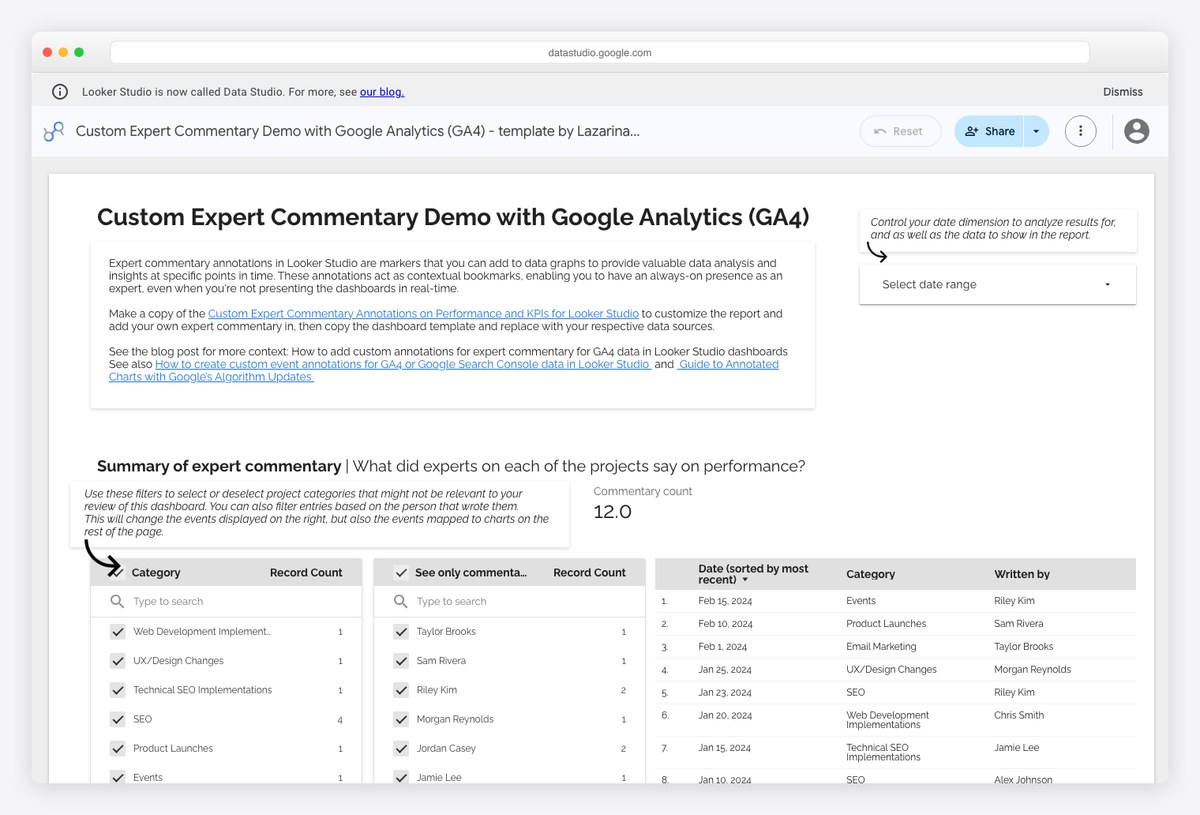
The same idea applied to written analysis: your commentary lives in a Sheet and renders inside the GA4 report, so the client reads the interpretation in the same place as the numbers instead of in a separate email.
- Best for: Replacing the monthly summary email with something that lives in the report
- Reads: Google Analytics 4 + Google Sheets
- Free to run: Yes — Google connector
- Watch out for: It rewards teams who actually write the analysis each month and does nothing for those who do not.
7. [Sample] Google Ads Campaign Performance by Google
![Google official [Sample] Google Ads Campaign Performance template rendering with zero values and placeholder campaign names](https://adminlte.io/wp-content/uploads/2026/08/data-studio-templates-adsempty.jpg)
Included as a warning rather than a recommendation. It is free, native and published by Google, and it renders almost entirely empty — zero values throughout, against campaigns named “Test – Delete me”. The layout is reusable; the demo is not.
- Best for: Nothing, until you attach your own account
- Reads: Google Ads
- Free to run: Yes — Google connector
- Watch out for: Several roundups list this as a free Google Ads template without mentioning that it shows no data. Attach your own account and the structure works fine.
Templates that are free to copy and cost money to run
Every template in this section reads a platform Google does not connect to, so a paid connector sits between the report and the data. They are still worth knowing: the layouts are better than most free work, and for cross-channel reporting there is no free alternative to compare them against. Judge them as designs with a running cost attached.
8. Google Ads Overview Report by Windsor.ai
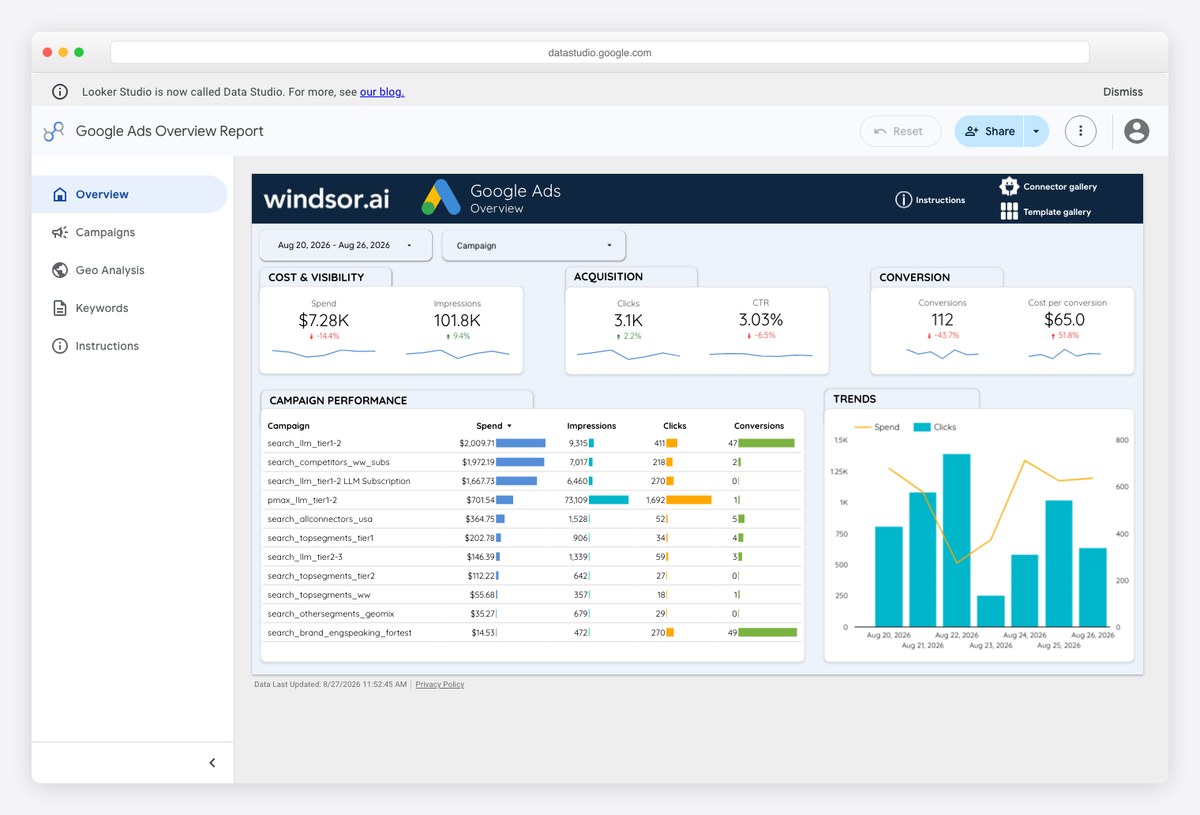
A far better-looking Google Ads report than Google’s own sample, with spend, clicks and conversion trends already arranged for a client audience. The catch is that it reads Google Ads through Windsor’s connector rather than Google’s free one.
- Best for: Agencies who want a designed paid search report immediately
- Reads: Google Ads via Windsor.ai
- Free to run: Copy free, pipe paid
- Watch out for: Google Ads has a free native connector, so paying a third party to read it is a choice about design and blending, not necessity.
9. PPC Report by Windsor.ai
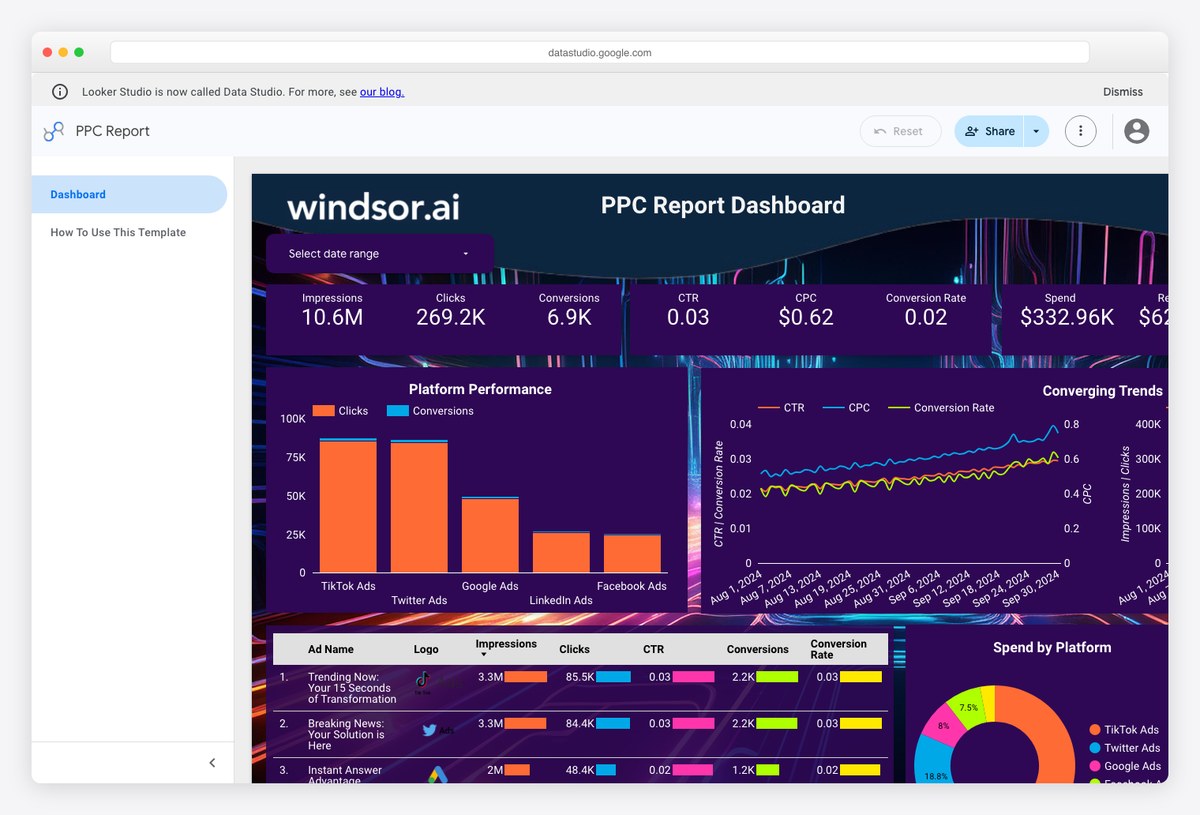
The most data-dense template in this list, blending paid search and paid social into one spend-and-return view. This is the case where a paid connector genuinely earns its money, because no free path joins Google and Meta data in one chart.
- Best for: Cross-channel paid reporting that Google connectors cannot do
- Reads: Multiple ad platforms via Windsor.ai
- Free to run: Copy free, pipe paid
- Watch out for: Blending several sources is exactly what free connector tiers exclude, so this template is the one most likely to push you onto a paid plan.
10. Shopify Sales Funnel Dashboard by Windsor.ai
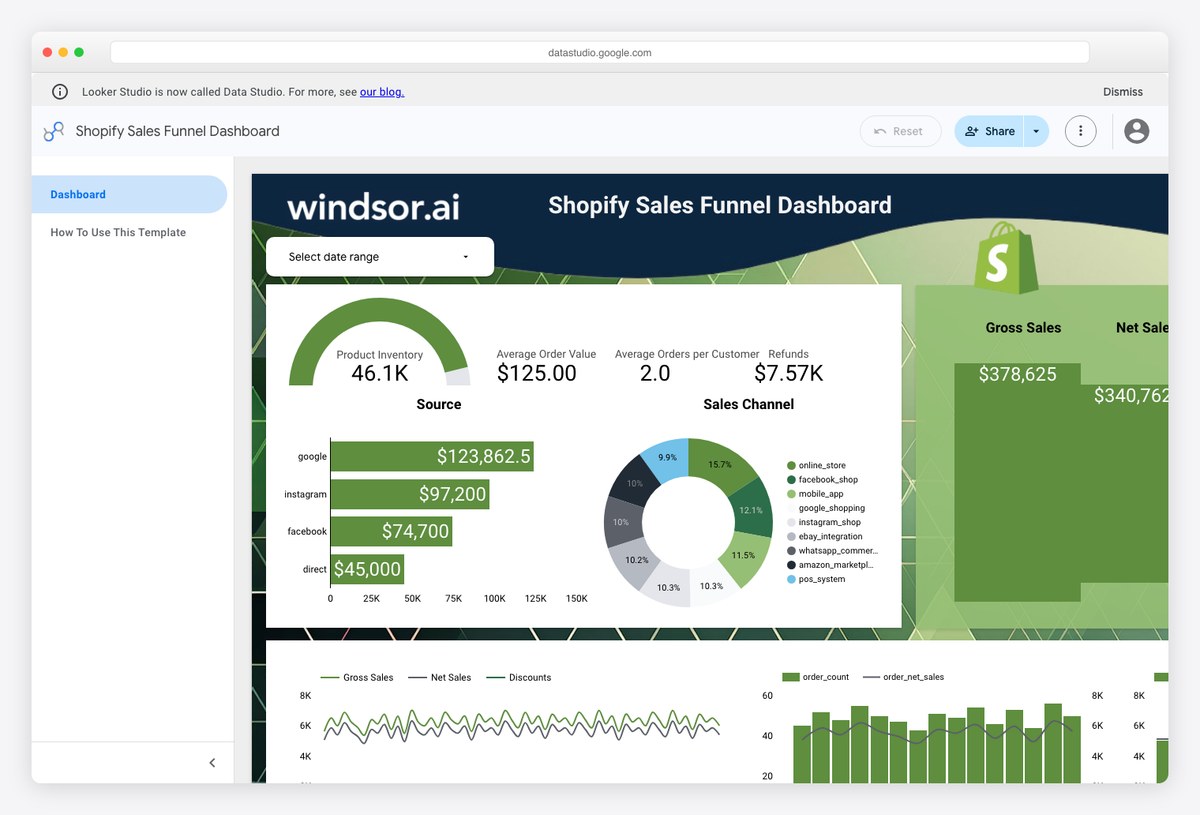
Store sessions through to completed orders in one funnel view, which is the shape most shop owners actually want and the one Shopify’s own analytics makes awkward to produce. Well populated in the demo, so you can judge it before committing.
- Best for: Shopify owners who want funnel reporting outside Shopify
- Reads: Shopify via Windsor.ai
- Free to run: Copy free, pipe paid
- Watch out for: Shopify has no free Data Studio connector either, so the template is free and the pipe is not.
11. Shopify marketing funnel dashboard by Coupler.io
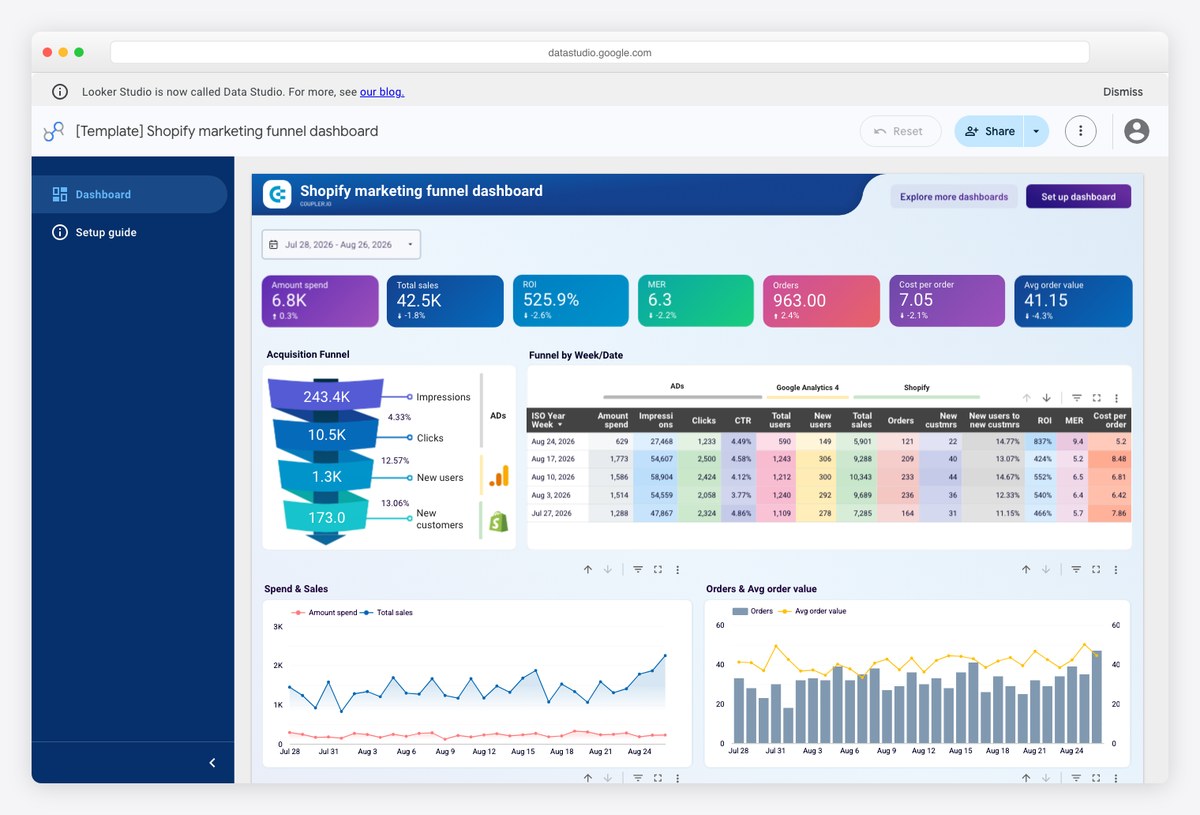
Coupler’s take on the same job, weighted towards marketing attribution rather than store mechanics — it wants to tell you which channel produced the order. Choose between this and the Windsor build on which question you are answering.
- Best for: Attributing Shopify orders back to marketing channels
- Reads: Shopify via Coupler.io
- Free to run: Copy free, pipe paid
- Watch out for: Coupler has a free tier, but at a hundred rows per run with manual refresh it will not carry a real store.
12. Klaviyo Email and SMS Campaign Report by Two Minute Reports
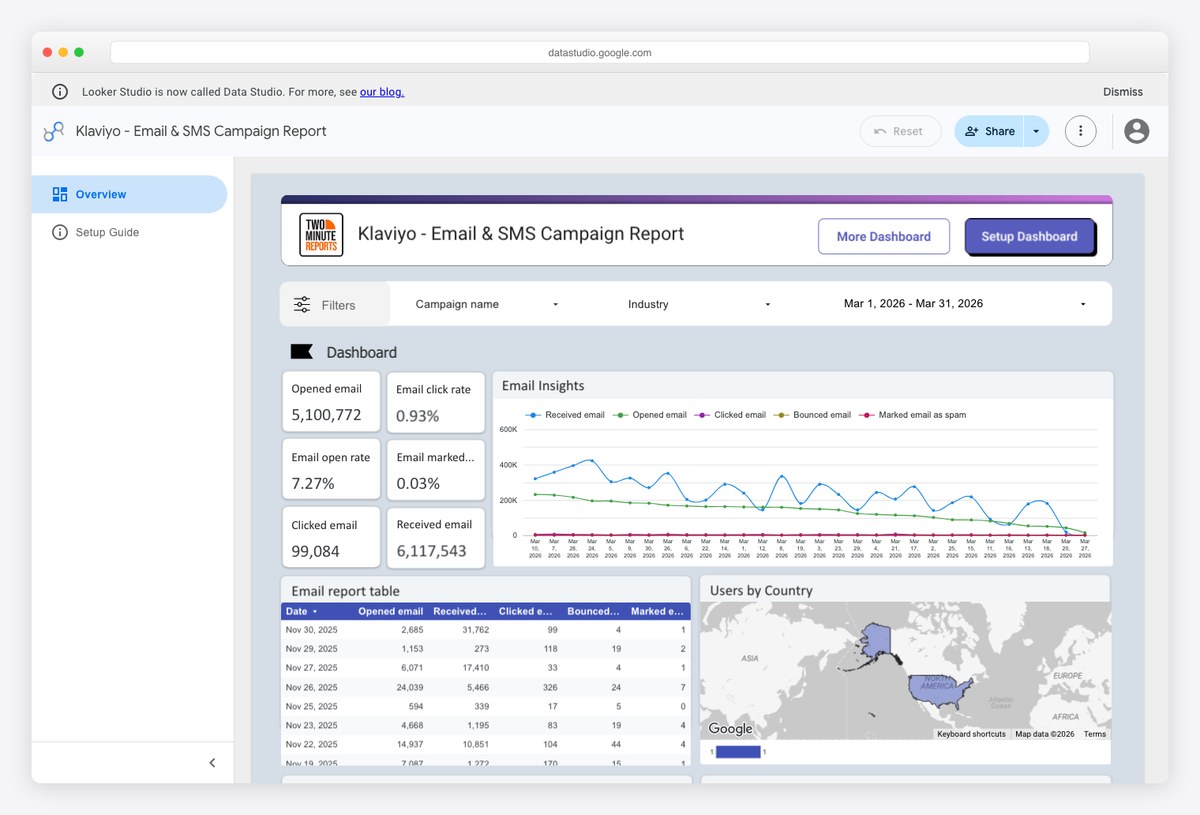
Email and SMS performance in one report, with revenue attributed per campaign rather than just opens and clicks. It is the most commercially useful email template found, and it arrives well populated.
- Best for: Ecommerce teams reporting on Klaviyo revenue, not just engagement
- Reads: Klaviyo via Two Minute Reports
- Free to run: Copy free, pipe paid
- Watch out for: Two Minute Reports has no free tier at all, only a trial, so this template has a running cost from day one.
13. Mailchimp Analytics Dashboard by Windsor.ai
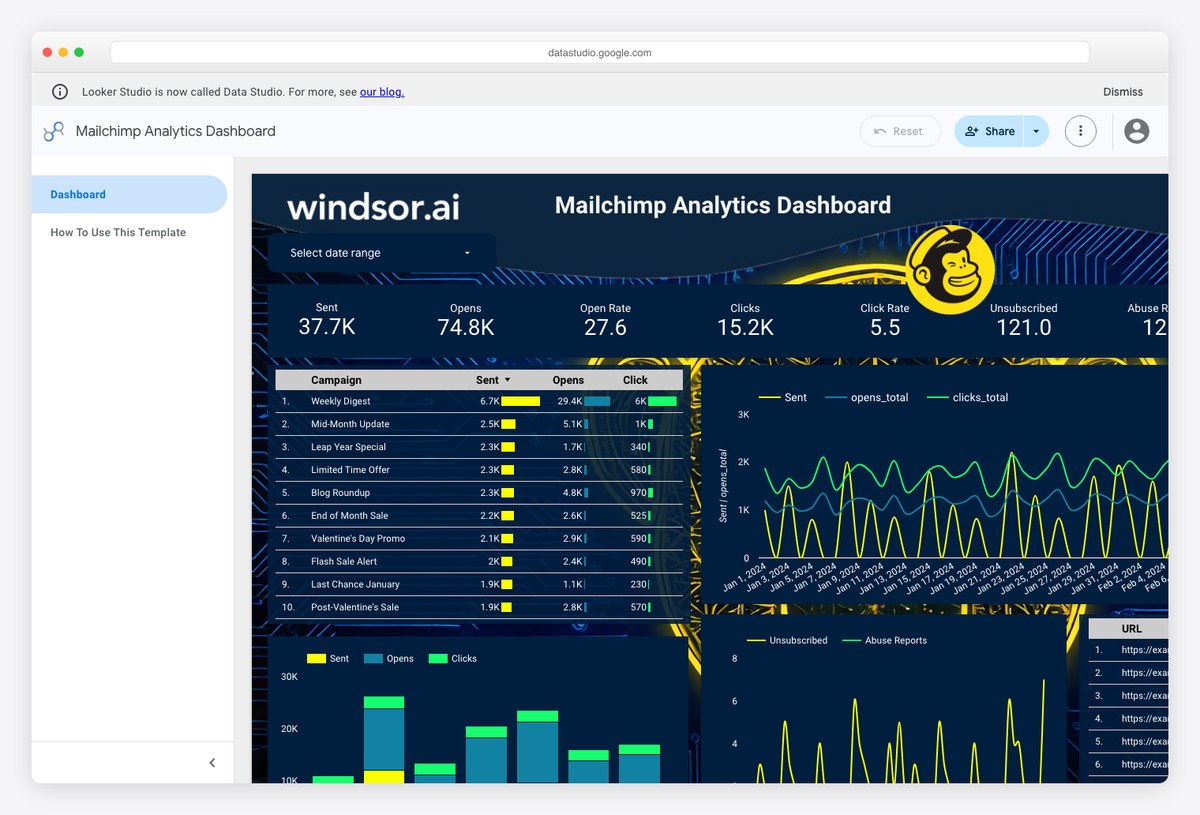
Campaign engagement and list growth over time, which is more than Mailchimp’s own reporting shows in one place. Densely populated in the demo and easy to read at a glance.
- Best for: Reporting Mailchimp performance alongside other channels
- Reads: Mailchimp via Windsor.ai
- Free to run: Copy free, pipe paid
- Watch out for: No email platform has a free Data Studio connector, so every Mailchimp and Klaviyo template on any list carries a subscription behind it.
14. Agency Report Dashboard by Windsor.ai
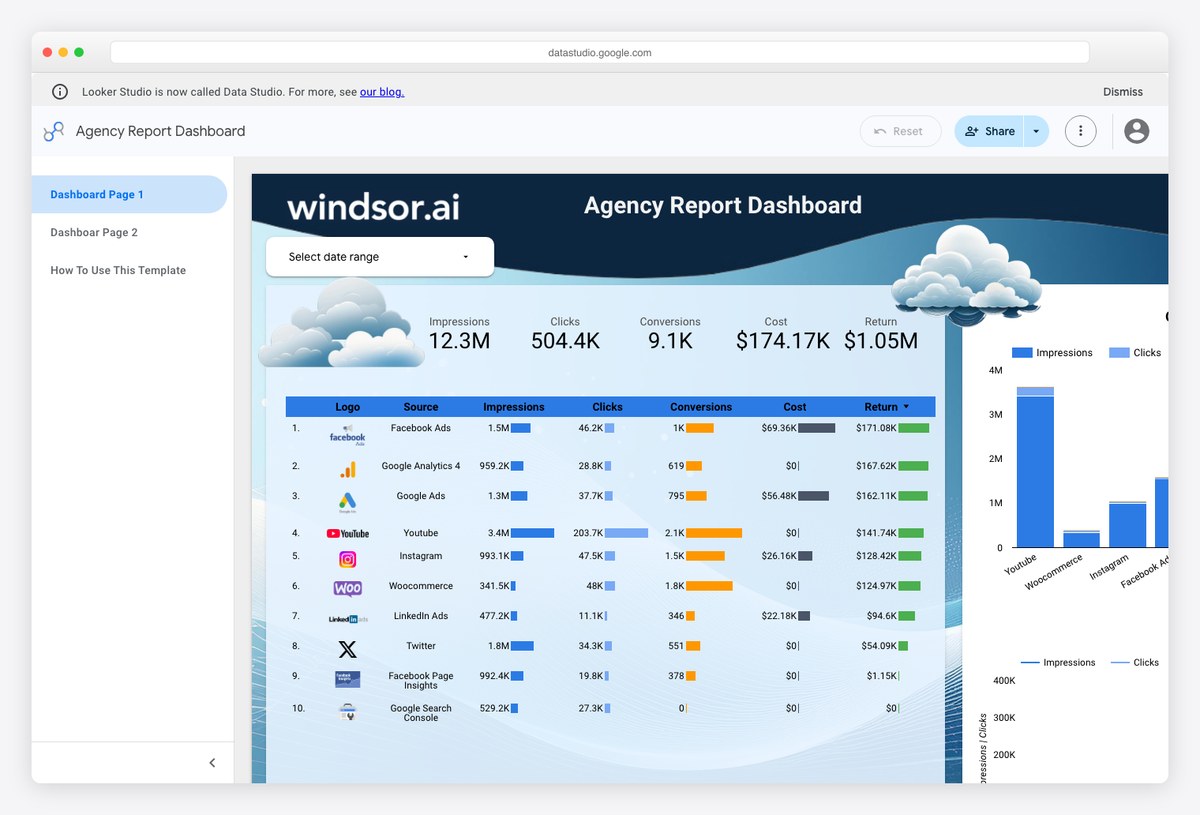
A client-facing multi-channel summary — the single report an agency sends monthly, with each channel given a band rather than a page. Of the blended templates here it is the one closest to being sendable without edits.
- Best for: The monthly client report, if you already pay for a connector
- Reads: Multiple channels via Windsor.ai
- Free to run: Copy free, pipe paid
- Watch out for: Blended reporting is the most expensive thing to run, because every source you add is priced.
15. Google Analytics 4 Overview Report by Windsor.ai
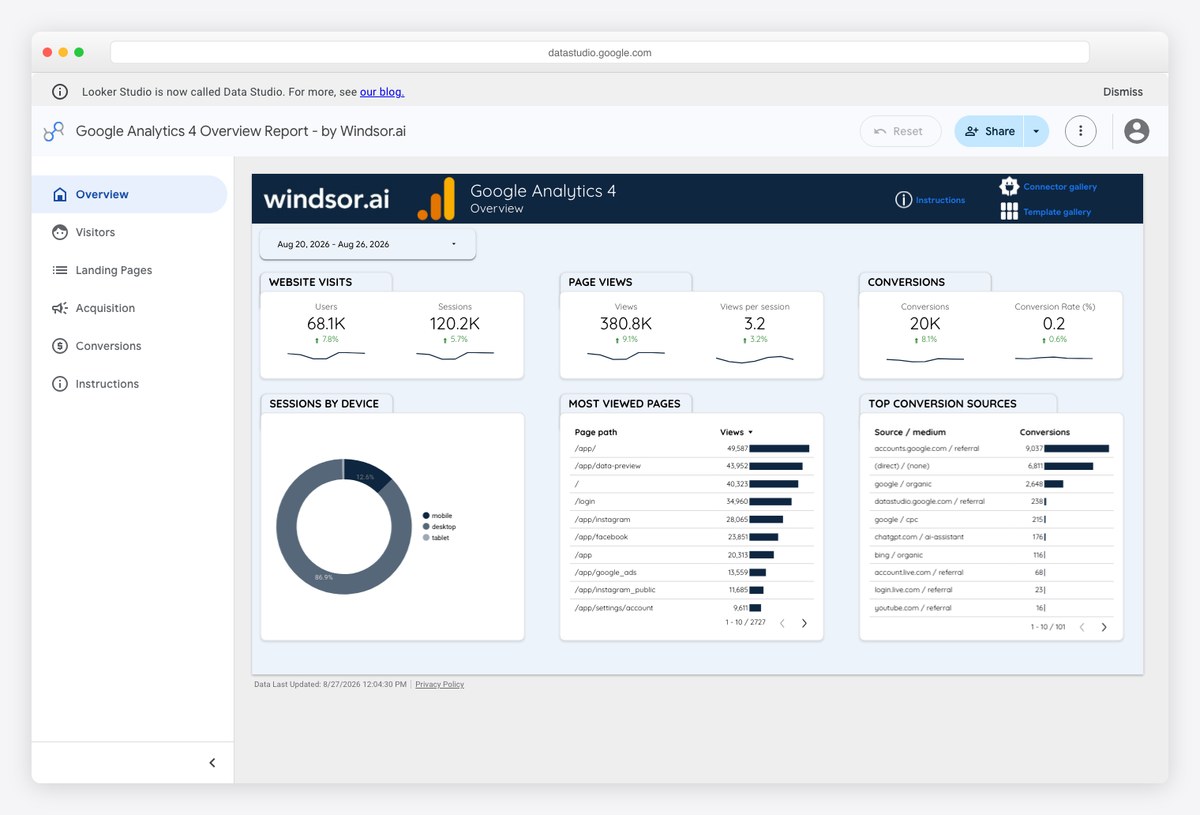
The best-looking GA4 report in this list, and the clearest illustration of the trap. GA4 has an excellent free connector from Google, but this template does not use it — it routes GA4 through Windsor’s paid partner connector instead.
- Best for: Nobody, until you have checked whether the free connector would do
- Reads: GA4 via Windsor.ai
- Free to run: Copy free, pipe paid
- Watch out for: A Google data source in the title does not mean a Google connector underneath. Open the data source panel before assuming a template is free.
The templates you cannot judge before you commit
Three of the templates checked for this page are not in the list above, because opening them tells you nothing about whether they are any good. They are worth showing anyway, because each fails in a different way and between them they cover most of what goes wrong.
Google’s own ecommerce sample is broken
![Google official [Sample] Google Merchandise Store Ecommerce Report template showing revenue and product performance](https://adminlte.io/wp-content/uploads/2026/08/data-studio-templates-gmssample.jpg)
The Merchandise Store report is Google’s reference ecommerce template, publicly shared and widely linked. Every panel on it currently returns “Data Studio has encountered a system error” — not a permissions message, not empty data, an actual fault. The report is still live, still public, and still recommended in roundups written by people who evidently did not open it.
Vendor demos that show configuration errors instead of data
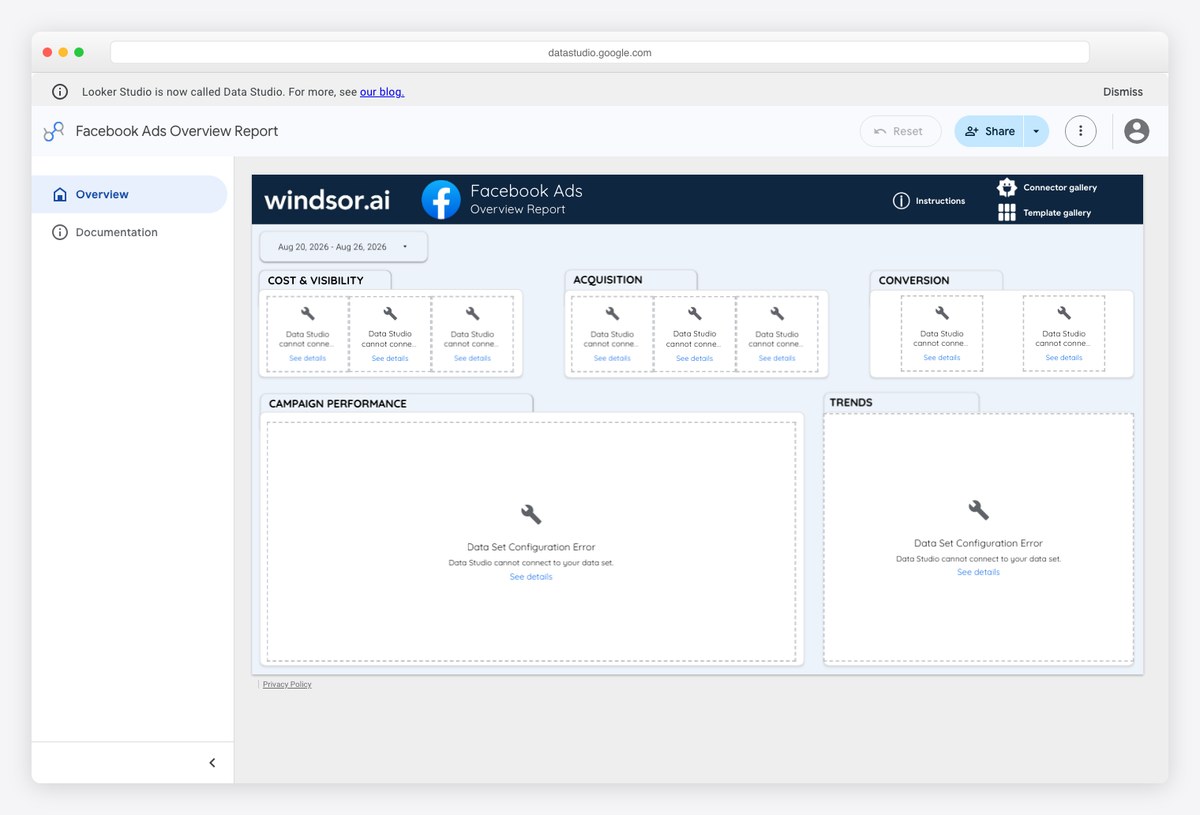
This is the pattern for social media templates specifically, and it is close to universal. Five Meta and LinkedIn templates were checked across four vendors. Not one showed sample data. They either return a data set configuration error in every tile, as above, or open on an instructions page rather than the dashboard.
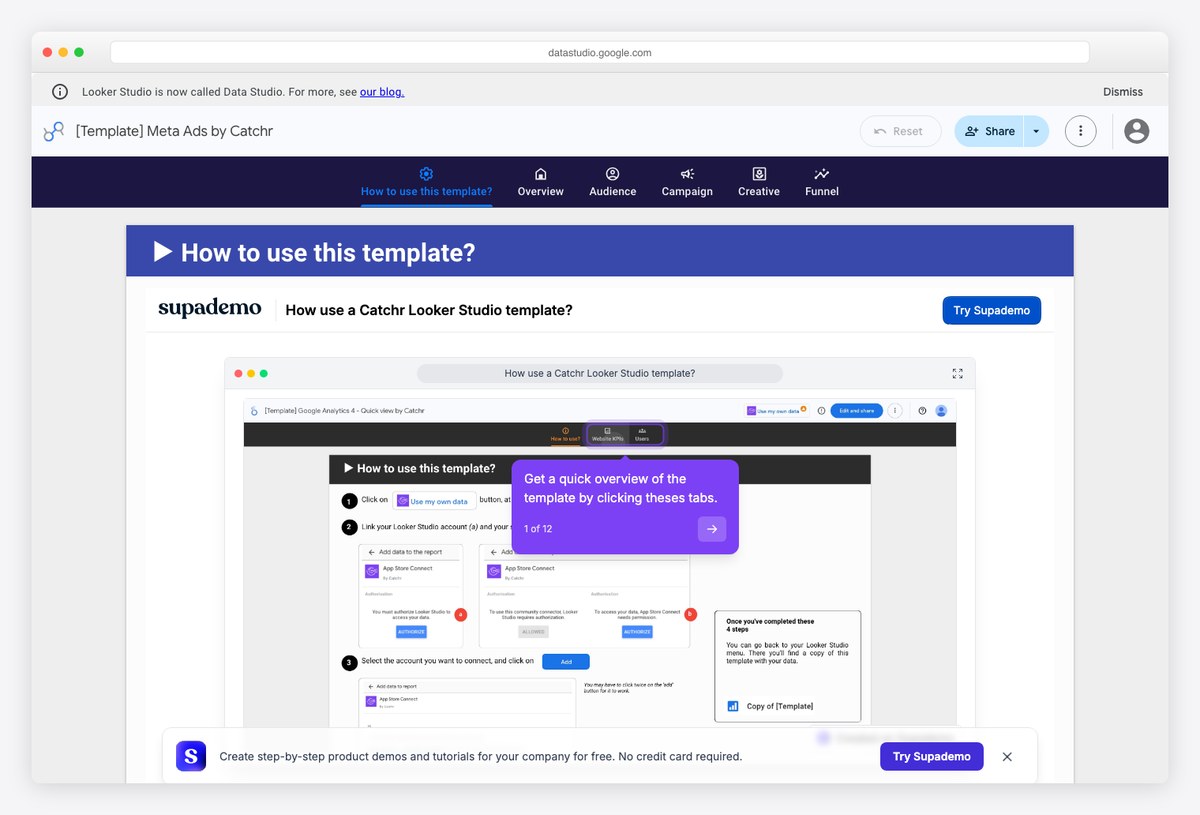
The consequence is worth stating plainly, because no vendor will: for Facebook, Instagram, LinkedIn and TikTok reporting you cannot evaluate a template before you subscribe. You are buying the layout on trust, having seen only the marketing screenshot on the vendor’s own page. That is a reasonable thing to do if the price is small, and a poor basis for an annual commitment.
How to tell the three apart
A permissions message means the report was shared but its data source was not, and the template will work once you copy it. A system error means the report itself is faulty and copying it will not help. A configuration error in a vendor template means the demo was never connected to anything, so there is nothing to see until you connect your own account. Only the first is a template you can trust sight unseen.
What the paid half actually costs
If a template needs a connector, the connector is the real purchase, and the pricing models differ enough to change which template you should choose. These are the vendors behind the templates above.
| Connector | Free tier | What the free tier actually allows |
|---|---|---|
| Windsor.ai | Yes | One user, one data source, one account, no backfill — a single-channel report, never a blended one. Also the cheapest entry plan of these five |
| Coupler.io | Yes | One hundred rows per run, manual refresh only — enough to evaluate, not to run |
| Catchr | No | Fourteen-day trial, then a mid-priced plan — cheap, but not the cheapest here |
| Two Minute Reports | No | Fourteen-day trial, then the most expensive entry plan of these five |
| Supermetrics | No | Fourteen-day trial; cheap to start and the most expensive of these at scale |
Three tests to run on any list of free templates
Template roundups rot faster than almost any other kind of list, and they rot invisibly. Run these three checks on any list you find, this one included.
Does the link actually open a report?
A dead Data Studio link does not behave like a normal dead link. Ask for a report that does not exist, or one that is not shared publicly, and Google answers with a success code and a generic marketing page rather than an error. A fabricated report ID made up on the spot returns exactly the same response as a real report that has been unshared.
The practical consequence is that automated link checkers pass dead template links, so roundups keep listing them for years after they stop working. The only reliable test is to open the link and see whether the report carries its own name at the top rather than a generic Data Studio marketing headline.
This is not a rare failure. Google’s own help documentation, on the page that teaches you how to create a report from a template, links a sample report that fails the test — and the same dead link appears in the equivalent page of the Google Cloud documentation. Two of the free-template roundups ranking for this topic link reports in exactly the same state.
Does it show data, or only a layout?
Covered in detail above, and the short version is that empty panels have three different causes with three different consequences: an unshared data source, which copying fixes; a faulty report, which it does not; and a vendor demo that was never connected to anything, which needs your subscription. Whichever it is, a template you cannot see is a template you cannot judge.
If it is a Google Sheets template, does the link strand you?
Sheets templates are usually published as a copy or template-preview link, and both of those bounce anyone who is not signed in to a Google account onto a sign-in screen. The document is not private — the same file opens perfectly well if the address ends in /edit?usp=sharing instead. Most publishers use the bouncing form, so if a Sheets template appears to require an account, try swapping the ending before giving up on it.
Data Studio template FAQ
Are free Data Studio templates really free?
The template is always free to copy. Whether it is free to run depends entirely on what it reads. If it only uses Google Analytics, Google Ads, Search Console, Google Sheets, YouTube or BigQuery, it runs free forever on Google’s own connectors. If it touches Facebook, LinkedIn, TikTok, Mailchimp, Klaviyo, Shopify or a CRM, it needs a paid partner connector, because Google publishes no free connector for any of those.
Is Data Studio the same as Looker Studio?
Yes. The product launched as Data Studio, was renamed Looker Studio in 2022, and has now been renamed back to Data Studio to separate it from Google’s enterprise Looker platform. Nothing broke in the change: reports, data sources and permissions carried over, and lookerstudio.google.com addresses redirect to datastudio.google.com on their own.
How do I connect Facebook or Instagram data for free?
You cannot, not directly. The only free route is indirect: export the data into a Google Sheet, which has a free connector, and report on the Sheet. That works and costs nothing, but somebody has to maintain the export. Paying for a connector is mostly buying away that chore.
Why is a template showing no data when I open it?
Two different causes. Either the report is shared but its underlying data source is not, so you see empty panels with a permissions message, or the report is genuinely public and its demo data is empty — which is the case with some of Google’s own sample reports. In both cases the template works normally once you copy it and attach your own data.
Can I use a Data Studio template without a Google account?
You can view a publicly shared report without signing in. You cannot copy one, because the copy has to live in your own account. Google Sheets templates are similar, except that the copy and template-preview links most publishers use will bounce you to a sign-in screen even for viewing.
What is the best free Data Studio template?
For most people, one of the community templates built on Google Sheets alongside a Google source, because those combine free operation with a design somebody actually thought about. Google’s own samples are useful for learning the structure but several of them ship with empty or placeholder data.
How many data sources can one report use?
As many as you like, but each one is a separate data source with its own connector and its own cost. This is where budgets go: a single-source report is often free, and the same report with four channels blended into it is the thing connector vendors price against.
Do these templates work with Looker, the enterprise product?
No. Looker and Data Studio are different products that briefly shared a name. These templates are Data Studio files and have nothing to do with Looker’s semantic modelling layer.
Choosing between them
If everything you report on already lives in a Google product, you never have to pay anything — copy one of the first 7 templates and you are finished. If you need Meta, LinkedIn, email or ecommerce data in the same report, there is no free option to weigh up, so the decision is only which connector to buy, and that turns on how many sources and accounts you need rather than on the template you liked.
The middle case is the common one: mostly Google data with one awkward source alongside it. Before subscribing to anything, check whether that awkward source can be exported to a Google Sheet on a schedule. It is less elegant than a connector and it costs nothing, and for a single stubborn data source it is very often the right answer.
Looking for Search Console reporting specifically? We keep a separate checked list of SEO dashboard templates, and for dashboards that live inside your own application rather than in Google’s, the analytics dashboard templates list covers self-hosted and code options.

You Might Also Like


